
Jewelry casting lives or dies on detail. A ring shank printed at 17 microns per pixel comes out of the investment flask crisp; one printed on a coarse machine comes out soft and pitted. That gap is why resin printers and castable resins dominate this space, and why we’ve built this list around them.
You’ll find machines here for bench jewelers running daily production, hobbyists casting their first silver pendant, and makers who want multicolor filament printing for display pieces instead. There’s also a compact starter unit for anyone testing the waters before committing to a full workshop setup. Each pick below covers what it does well, where it falls short, and who should actually spend their money on it.
The Shortlist At A Glance

Siraya Tech Cast Castable Resin Royal Blue 1kg

Siraya Tech Cast Castable Resin Purple 500g

ELEGOO Saturn 3 MSLA 12K 3D Printer

Anycubic Kobra S1 Combo Multicolor Printer

ANYCUBIC Photon Mono 4 10K Resin Printer

ANYCUBIC Photon Mono 4 Resin Printer

SuperCast 8K Wax-Filled Casting Resin 500g

Anycubic Kobra X Multicolor 3D Printer

Portable Compact FDM 3D Printer 100mm Cube
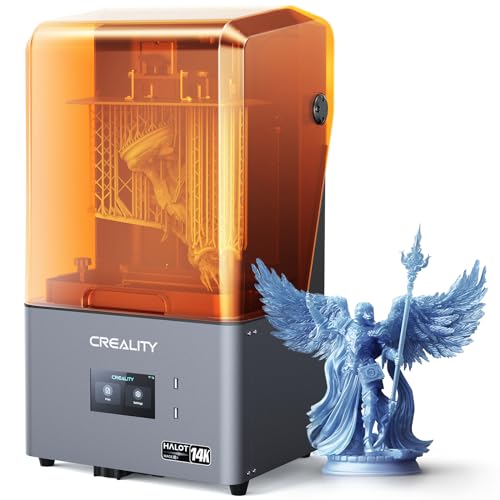
Creality Halot Mage S 14K Resin Printer
More Details On Our Top Picks
Casting resins usually force a trade-off: formulas that burn out cleanly tend to be brittle, and tough ones leave ash behind in the flask. Siraya Tech’s Royal Blue sits deliberately between those extremes, blending traits from the brand’s earlier purple and true blue formulations into one balanced material.
In practice, that balance matters most during lost-wax investment casting, where your printed pattern is burned away and replaced with molten metal. A kilogram bottle also goes further than the typical 500g offering, which helps if you’re running production work week after week.
Strong Points
- Burnout profile tuned to leave minimal ash residue, so flasks come out cleaner and castings show fewer pits
- Handles both delicate filigree patterns and thicker, chunkier geometries without switching materials mid-project
- The 1kg bottle suits busy benches that print casting patterns several times a week
- One formulation covers custom jewelry and small precision metal parts alike
Things To Consider
- You’ll still want to dial in exposure settings for your specific printer, as balanced formulas sometimes need a test print or two first
- Liquid resin demands gloves, good ventilation, and careful storage away from sunlight
Who It Suits Best
Bench jewelers and small studios that cast regularly and want one dependable resin for mixed design work.
Where Another Pick Suits Better
Hobbyists printing their very first patterns may prefer the Siraya Tech Cast Purple 500g, which is easier on the budget while you learn.
The purple version of Siraya Tech’s casting line is the friendlier sibling of the Royal Blue above. It’s a standard 405nm photopolymer, meaning it cures under the violet light every mainstream MSLA printer emits, so there’s no special hardware involved.
What makes it approachable is how forgiving it is around the workshop. The formula doesn’t demand an unusually dry room or extra additives, and it grips the build plate reliably, which cuts down on failed first layers. Because wax is blended into the mix, the burnout stage runs easier than with pure photopolymers, something newcomers appreciate the first time they open a kiln.
What We Like
- Prints cleanly without strict humidity control or additive tweaks, which removes a common beginner stumbling block
- Good adhesion to the build plate means fewer detached prints and less wasted resin
- Wax content softens the burnout process, easing the transition from plastic pattern to metal
- Approachable enough for new users yet consistent enough for experienced hands
Worth Noting
- The 500g bottle runs out quickly on production schedules, so heavy users will refill often
- Uncured resin sticks to skin and tools, so keep nitrile gloves and isopropyl alcohol within reach at all times
At A Glance
Made For
Newcomers to castable resin who want forgiving behavior and a smaller upfront commitment.
A Better Fit Elsewhere
Studios burning through resin weekly will get better value from the 1kg Siraya Tech Cast Royal Blue bottle.
MSLA stands for masked stereolithography, the tech behind most affordable resin printers: an LCD screen masks UV light layer by layer. The Saturn 3 pushes that concept hard with a 10-inch 12K mono LCD resolving 11520×5120 pixels, translating to XY detail around 19×24 microns. For jewelry, that’s the difference between a prong setting that prints intact and one that merges into a blob.
The generous build area lets you nest dozens of rings on a single plate, and speeds reach up to 70mm per hour when you’re pushing throughput. A sheet of 9H hardness tempered glass shields the screen from scratches and resin drips, which matters because screen replacement is the costliest repair in this category.
Highlights
- 12K resolution captures micro-detail like stone seats and engraving previews with confidence
- Spacious 10-inch plate supports batch printing, cutting per-piece time dramatically
- Tempered glass over the LCD extends screen life against drips and scrapes
- Speeds up to 70mm/h keep large plates from turning into day-long jobs
Trade Offs
- Resin printing here means washing, curing, and disposing of liquid waste, a bigger workflow than filament
- The larger footprint needs dedicated bench space plus ventilation
Right Fit For
Jewelers producing rings or charms in small batches who want pro-grade resolution without industrial pricing.
Consider Something Else When
Desk-space-limited hobbyists may find the Anycubic Photon Mono 4’s smaller frame more practical.
Not every jewelry-adjacent project gets cast in metal. Display pieces, earring prototypes, and custom gift items often look better in colored filament, and that’s where this Kobra S1 Combo earns its spot. The bundled ACE Pro unit handles four colors out of the box, and adding a second ACE Pro stretches that to eight.
The ACE Pro does more than swap spools. Its active drying keeps filament moisture-free, which directly reduces stringing and failed prints, and the anti-entanglement spool design prevents the mid-print tangles that ruin overnight jobs. Dual PTC heating modules back up the drying system.
Upsides
- Four-color printing included, expandable to eight with a second ACE Pro unit
- Active filament drying improves success rates, especially in humid workshops
- Anti-entanglement spool management protects long unattended prints
- Dual PTC heating keeps the drying chamber consistent through multi-day jobs
Minor Gripes
- Filament layer lines won’t match the surface finish of cast metal, so this complements rather than replaces a resin workflow
- The combo setup occupies more desk area than a single-body printer
Quick Facts
Best Suited To
Makers selling colorful wearable art, keychains, and prototype jewelry who value automation over casting.
Look Elsewhere When
Anyone focused strictly on lost-wax casting should put that budget toward the ELEGOO Saturn 3 instead.
Pixel size is the number that actually decides jewelry detail, and the Photon Mono 4’s 7-inch 10K screen delivers 9024×5120 resolution at 17×17 microns per pixel. Anycubic claims roughly a 105% precision gain over its predecessor, and at this scale even small improvements show up in stone seats and claw tips.
Underneath the screen sits the LighTurbo matrix light source, which spreads UV illumination evenly across the panel. Even lighting means uniform curing from corner to corner, so a ring printed near the plate edge matches one printed dead center. For charm and earring work where consistency across a batch counts, that stability quietly saves reprints.
Bright Spots
- 17×17 micron pixels resolve fine engraving-level texture on small pieces
- Matrix light source promotes even curing across the whole build plate
- Compact 7-inch format fits crowded desks and shared studio corners
- Big step up in precision compared with the previous generation
Softer Spots
- The smaller plate limits how many pieces you can nest per run compared with the Saturn 3
- Resin residue builds up in the vat over time, so regular filtering and vat cleaning keep prints reliable
Who Should Grab It
Hobbyists and side-hustle sellers focused on charms, earrings, and single-ring jobs in tight spaces.
Swap It Out When
Batch producers needing plate capacity will be happier with the larger ELEGOO Saturn 3.
You’ll notice this looks familiar, and it is: a variant configuration of the Photon Mono 4 reviewed just above, sharing the same 7-inch 10K screen, 9024×5120 resolution, and 17×17 micron pixel pitch. The difference comes down to availability and bundle specifics, so check both listings before deciding.
Where this version shines is the stabilized LighTurbo matrix light system paired with rapid exposure times as short as 1.5 seconds per layer. Faster exposures stack up over a full plate of rings, trimming hours off batch days. Surface quality benefits too, since stable curing produces smoother walls and layer lines that nearly vanish after finishing.
Reasons To Buy
- Exposure times down to 1.5 seconds per layer speed up full-plate jobs noticeably
- Over double the detail of the Mono 2 generation, per Anycubic’s own comparison
- Uniform light output yields smoother surfaces straight off the plate
Small Caveats
- With two near-identical Photon Mono 4 listings available, confirm which bundle and accessories ship before ordering
- Like any resin machine, the FEP film in the vat wears with use and needs periodic replacement
Perfect Match For
Detail-focused makers who print small jewelry components and want faster layer cycles than entry machines allow.
Reach For A Different Pick When
Shoppers wanting maximum resolution should compare the Creality Halot Mage S 14K later in this list.
Most castable resins ask for a post-curing session under UV light before they’re strong enough to handle. SuperCast skips that step entirely, and the manufacturer is blunt about it: post-curing actually causes incomplete burning in the flask. That single workflow change removes a whole station from your bench.
The Korean-made formula blends wax into a strong, stiff base, giving printed filigree the backbone to survive handling without flexing or snapping. Burnout happens at lower temperatures than standard resins demand, and the company states it leaves no ash trace, which translates directly into cleaner metal surfaces coming out of the investment.
Standout Traits
- No post-curing needed, saving time and equipment on every single print
- Wax-filled strength holds ultrafine filigree shapes without brittleness
- Low-temperature burnout leaves no ash, protecting delicate metal detail
- Low viscosity suits 8K-class printers chasing razor-sharp edges
Points To Note
- Skipping the cure station feels wrong at first, so follow the manufacturer’s guidance rather than old habits
- Wax-containing resins soften in warm mail trucks and cars, so store bottles somewhere cool
Core Details
The Right Fit
Filigree specialists and casting purists who want the shortest possible path from print to pour.
Another Choice May Suit
Users who prefer a more conventional cure-then-cast routine will get along better with Siraya Tech Cast Royal Blue.
Think of the Kobra X as the Kobra S1 Combo’s ambitious older sibling. Four colors come standard, but the platform expands to nineteen when you add four ACE 2 Pro units, a palette depth aimed squarely at artists producing gradient-heavy wearable art and display jewelry.
The clever bit is adaptive extrusion force compensation. In plain terms, the printer senses how much pressure different materials need and adjusts automatically, so it moves from rigid PLA to flexible TPU (the 68D grade is recommended) without manual recalibration. One-click operation rounds out the experience for anyone who’d rather design than tinker.
Plus Points
- Scales from 4 to 19 colors with additional ACE 2 Pro units
- Handles everything from stiff PLA to soft TPU without manual adjustment
- One-click printing lowers the skill floor for multi-material projects
- Professional-grade results for artistic, multicolor wearable pieces
Areas To Watch
- Reaching the full 19-color range means buying four accessory units, a serious cumulative investment
- Filament output still can’t match cast metal’s weight and finish for actual precious-metal work
Whose Shelf It Belongs On
Established makers scaling up a colorful product line who’ve already outgrown four-color limits.
Not Your Match When
Cost-conscious starters should begin with the Kobra S1 Combo and expand only once sales justify it.
Every list needs an honest starting point, and this unbranded compact FDM machine fills that role. FDM, short for fused deposition modeling, melts plastic filament through a heated nozzle, and this one uses a standard 0.4mm tip with a 100x100x100mm build volume. That cube comfortably fits pendants, beads, and small display pieces, though not much more.
Setup is the headline here. A quick-start guide and step-by-step videos walk you through modular assembly, bed leveling, and loading the included 10m of PLA filament. The kit bundles a TF card, tools, and a 12V Type-C power adapter, so the box contains genuinely everything needed for a first print.
Best Bits
- Video-guided assembly and leveling remove the usual first-print anxiety
- Removable build plate makes popping finished pieces off simple
- Accepts both PLA and TPU filament for rigid or flexible results
- Everything ships in the box, including starter filament and tools
Honest Caveats
- The 100mm build volume rules out larger statement pieces and full bracelet blanks
- FDM layer lines are visible on close inspection, so expect sanding and finishing before anything wearable looks polished
Feature Snapshot
Built With In Mind
Complete beginners and younger makers experimenting with jewelry-shaped projects before investing in resin gear.
Where A Sibling Pick Shines
Serious casting ambitions belong with the ANYCUBIC Photon Mono 4, whose micron-level detail this machine can’t approach.
Creality’s flagship resin machine tops this list on raw specification. The 10.1-inch mono LCD resolves 13320×5120 pixels, working out to pixel sizes between 16.8 and 24.8 microns depending on axis. Creality positions that as 14K-class output, and for jewelry it renders stone seats, milgrain previews, and miniature figurine faces with startling clarity.
Speed is the other story. A closed-loop motor, dual linear rails, and the Dynax+ mode combine for print rates three to four times faster than conventional setups, according to the manufacturer. Closed-loop means the motor verifies its own position, so fast movement doesn’t sacrifice accuracy. High-volume studios will feel that difference every single day.
Positives
- 14K-class resolution brings out micro-detail in jewelry and miniatures
- Large 10.1-inch plate fits substantial batch runs
- Dynax+ mode with closed-loop motor drives 3-4x faster printing
- Dual linear rails keep motion precise at high speeds
Room For Improvement
- This tier of machine rewards experienced operators; beginners may not extract its full potential right away
- Large-format resin vats consume more material per fill, raising the cost of experimentation
Details At A Glance
Who Will Love This
Production studios and advanced hobbyists churning out detailed castings daily who need both speed and resolution.
Skip It When
Budget-first shoppers will find the ELEGOO Saturn 3 delivers most of the practical benefit for considerably less.
What Matters Most Before Choosing 3d Jewelry Printers
Resolution Is Your Detail Budget
Pixel size determines the smallest feature your printer can reproduce. Anything at or below 25 microns handles prongs, bezels, and engraved textures convincingly, while coarser machines blur those elements together. Match the spec to the finest work you actually sell, not the finest work imaginable.
Casting Workflow Compatibility
Your resin and printer must agree. Some castable formulas need post-curing, others forbid it, and burnout temperatures vary. Read the resin’s requirements before buying either component, because a mismatched pair wastes both money and flasks.
Build Volume Versus Bench Space
Bigger plates mean more pieces per run, which matters once orders stack up. The trade-off is footprint, ventilation needs, and resin cost per fill. Solo makers rarely need more than a 7-inch plate; growing studios do.
Total Cost Of Ownership
The sticker price is only the opening bid. Factor in resin, FEP films, wash solutions, replacement screens, and protective gear. Filament machines cost less to run but deliver a different category of output entirely.
Key Considerations Across These Picks
Traps First Timers Fall Into
The most common mistake is buying a high-resolution printer and pairing it with cheap, non-castable resin, then wondering why castings fail. The second is skipping ventilation: resin fumes accumulate fast in spare bedrooms. Start with a matched printer-and-resin combination and a proper wash-and-cure routine from day one.
Where The Extra Money Goes
Premium machines buy resolution, speed, and reliability simultaneously. Closed-loop motors, hardened glass screens, and matrix light systems each add cost, but together they cut failed prints and rework. Paying up makes sense once printing becomes income; until then, mid-tier hardware covers learning curves generously.
Frequently Asked Questions
Can a 3D printer make real metal jewelry?
Yes, indirectly. You print a pattern in castable resin, then use lost-wax investment casting to replace it with silver, gold, or other metals in a kiln.
Do I need a special resin for jewelry casting?
Absolutely. Standard resins leave ash when burned, ruining castings. Castable formulas contain wax and are engineered for clean burnout.
How detailed can resin printers get?
Quality machines resolve features around 17 to 25 microns, fine enough for prong settings, filigree, and surface textures visible under magnification.
Is resin printing safe indoors?
With precautions, yes. Work in a ventilated space, wear nitrile gloves, and keep uncured resin away from skin and sunlight.
FDM or resin for jewelry work?
Resin wins for casting patterns and fine detail. FDM suits colorful display pieces, prototypes, and beginners learning the basics affordably.
Closing Remarks
The right choice comes down to honest self-assessment. Casting-focused makers should pair a 12K or finer resin printer with a proven castable resin like Siraya Tech’s Royal Blue or SuperCast. Color-driven artists belong with the Kobra family, and cautious beginners can start small without regret. Whatever direction you take, match the tool to the work you actually do, and let the results guide your next upgrade.