
A ten-year-old with a 3D pen doesn’t want a toy, they want to build something real. The catch is that most pens are built for adults, with hot nozzles, fiddly controls, and filament that jams at the worst moment. This shortlist focuses on options that balance safety-minded design, simple controls, and enough creative range to keep a kid busy past the first weekend. You’ll find beginner bundles, classroom-scale kits, and even a couple of add-ons that turn an existing pen into a science project.
The Shortlist At A Glance

MYNT3D Pro 3D Pen + 10 Color PLA + DesignPad Mat Kit

3Doodler EDU Create+ Learning Pack with 12 Pens

3Doodler Flow 3D Printing Pen for Teens & Creators (Black)

SCRIB3D P1 3D Printing Pen + 20-Color PLA Refill Pack

Juku 3Doodler Create+ 3D Printing Pen (Steel Blue)

SCRIB3D Advanced 3D Printing Pen + 20-Color PLA Pack

Rocket Launcher STEM Kit for 3D Pens

IEY 3D Relief Art Bubble Expanding Pen Set
SCRIB3D P1 3D Printing Pen with Display
More Details On Our Top Picks
This bundle reads like someone thought about what actually happens after the first hour of doodling: you run out of plastic, your lines wobble, and the nozzle clogs. MYNT3D answers all three. The Pro pen offers stepless speed control, meaning the feed rate adjusts smoothly instead of jumping between presets, plus adjustable temperature so different materials melt cleanly.
The included DesignPad mat gives a kid a defined workspace, which matters more than it sounds when melted plastic meets a kitchen table. Ten vacuum-sealed PLA colors round out a package that suits a child who has already shown real interest in making things.
Strong Points
- Stepless speed slider lets kids slow down for corners and details without fighting preset steps
- Adjustable temperature opens the door to more material types as skills grow
- Replaceable sealed nozzle design keeps clogs from ending a project mid-build
- Ten PLA colors mean fewer “I’m out of blue” meltdowns in week one
Things To Consider
- PLA softens in hot cars and direct sun, so finished creations need indoor storage
- Nozzle changes require adult hands and a cool pen
Key Specs
Made For
A motivated ten-year-old who has outgrown basic craft kits and wants room to experiment with real technique.
Where A Sibling Pick Shines
Families wanting a lower-cost entry point will find the SCRIB3D P1 refill bundle easier on the wallet while still covering the basics.
Most pens on this list serve one child at a time. The EDU Create+ Learning Pack flips that math entirely, shipping twelve Create+ pens alongside 1,200 strands of plastic filament and structured activity plans designed for group instruction. In a co-op class or after-school club, that turns a single purchase into a semester of hands-on STEAM work covering science, technology, engineering, art, and math.
The bundled lesson plans remove the biggest barrier for parents and teachers who don’t have a 3D modeling background themselves. Kids get guided prototyping and problem-solving exercises rather than freeform scribbling, which tends to keep engagement alive longer. One honest note: this is serious overkill for a single household unless you host regular group sessions.
What We Like
- Twelve pens support a full small classroom or homeschool pod simultaneously
- 1,200 filament strands dramatically reduce per-child material costs
- Activity plans give non-expert instructors a ready-made curriculum
Worth Noting
- Far more capacity than one family typically needs
- Storing twelve pens and their accessories takes dedicated shelf or bin space
Right Fit For
Teachers, librarians, and homeschool co-op leaders running structured maker sessions for groups of kids around age ten.
Swap It Out When
A single-child household gets far better value from the MYNT3D Pro bundle, which covers one creator completely at a friendlier scale.
The Flow sits at the older end of this list by design, aimed at teens and adults rather than first-time users. Its headline trick is broad material compatibility: it runs standard 1.75mm filaments including PLA, ABS, and even wood blends, so a growing creator can move beyond basic plastic as their interests shift. An integrated LCD screen shows live temperature, which helps avoid the guesswork that plagues cheaper pens.
Setup stays refreshingly simple despite the pro-leaning feature set; there’s no software to install and no calibration ritual. The included stencil book and guide give structure to early sessions. Compared with the Juku Create+ below, the Flow trades some of that model’s fine-tuned dual-drive feel for wider material freedom, a trade many older kids will happily make.
Highlights
- Accepts PLA, ABS, and wood-blend 1.75mm filaments for varied project textures
- Live LCD temperature readout removes melting guesswork
- Stencil book and guide provide immediate direction for new owners
Small Caveats
- ABS requires better ventilation than PLA, worth planning for indoors
- Positioned for teens and adults, so younger children may find it less forgiving
Who Should Grab It
A twelve-and-up creator, or a mature ten-year-old working alongside a parent, who wants one pen that grows with them.
Another Choice May Suit
Pure beginners under eleven usually do better with the SCRIB3D P1 with Display, whose simpler controls shorten the learning curve.
Here’s the bundle that solves the number-one complaint about kids’ 3D pens: running dry. Alongside the P1 pen itself, you get 30 feet of starter filament plus a refill pack adding another 328 feet across twenty assorted colors. For context, that’s enough plastic to keep a prolific ten-year-old supplied through months of weekend projects before anyone orders more.
The P1 keeps operation friendly with a stepless speed slider and a plug-in, heat-up, start-drawing workflow described in a detailed manual. A ceramic nozzle and anti-clogging feed design address the jam issues commonly reported with budget pens. Against the pricier MYNT3D Pro, you give up adjustable temperature, but for pure PLA doodling most families won’t miss it.
Reasons To Buy
- Nearly 360 feet of total filament means very few repeat purchases early on
- Ceramic nozzle resists clogging, cutting down frustrating mid-project stops
- Intuitive controls suit children handling a 3D pen for the first time
- Twenty colors encourage mixing and layering rather than single-color flat builds
Points To Note
- Fixed temperature limits material choices compared with adjustable-temp rivals
- That much filament needs a sealed container to stay dust-free between sessions
Feature Snapshot
Who Will Love This
A first-time owner around age ten who values color variety and volume of material over advanced temperature tuning.
Reach For A Different Pick When
Kids already comfortable with a basic pen and curious about ABS or wood filaments should step up to the 3Doodler Flow instead.
Some kids draw structures; others draw jewelry, miniatures, and repairs around the house. The Juku-branded Create+ leans toward that second crowd. Its dual-drive extrusion system feeds plastic through two driven points, giving noticeably finer command over flow rate than single-drive budget pens, and optimized speed settings help a finished piece match what the maker pictured.
Material flexibility is a quiet strength here: it runs 3Doodler’s own PLA, ABS, and FLEXY plastics, and FLEXY alone unlocks bendable bracelets and wearable pieces that rigid PLA can’t manage. Owners commonly report the steel-blue body feels balanced during long drawing sessions, though the pen is tuned for 3Doodler-brand plastics, which can cost more than generic refills. That’s the main trade-off against the SCRIB3D picks earlier in this list.
Upsides
- Dual-drive feeding delivers precise, controllable flow for detailed work
- FLEXY plastic compatibility enables flexible, wearable creations
- Speed modes cover both slow detail passes and fast fill work
Softer Spots
- Works best with brand-name filament, which adds ongoing supply cost
- No display screen, so temperature checks rely on indicator lights
Whose Shelf It Belongs On
An artistic ten-year-old focused on jewelry, figurines, and fine detail rather than big structural builds.
Consider Something Else When
Budget-conscious families stocking up on cheap generic PLA will prefer the SCRIB3D Advanced bundle and its 348 feet of standard filament.
Think of this as the P1 bundle’s more grown-up sibling. The Advanced pen adds variable speed control and a large LCD screen showing operating status at a glance, wrapped in an ergonomic body shaped for longer, steadier drawing sessions. Where the base P1 asks kids to learn by feel, the Advanced shows its state plainly, which builds confidence fast.
The supply situation matches its sibling: 20 feet of starter filament plus 328 more feet spread across twenty vibrant colors, totaling 348 feet of 1.75mm PLA. A stencil book and project guide come in the box, giving structure to the first week. Compared with the Juku Create+, you lose flexible-filament support but gain a screen and a much larger included material stash.
Bright Spots
- Large LCD screen makes status visible without guesswork
- 348 feet of PLA across twenty colors supports long-term use
- Ergonomic grip reduces hand fatigue during extended sessions
- Stencil book and guide give day-one direction
Minor Gripes
- Only two starter colors ship with the pen itself before the refill pack kicks in
- Screen adds a learning step absent from simpler models
At A Glance
Who It Suits Best
A ten-to-twelve-year-old moving past their first pen who wants visible controls and plenty of color options.
Not Your Match When
Total newcomers often find the plain SCRIB3D P1 with Display less intimidating, since its stripped-back interface speeds up early wins.
One thing worth knowing upfront: this isn’t a pen. It’s a 90-plus-piece companion kit that turns any 3D pen into a rocket-building lab, aimed squarely at ages eight through twelve. Kids print their own rocket bodies, then launch, test, and refine them while absorbing real concepts like force, gravity, air resistance, trajectory, and projectile motion along the way.
The 23-page full-color guide carries the teaching load with step-by-step photos, science prompts, and troubleshooting tips, so parents don’t need engineering degrees or 3D modeling experience to run it. Paired with any pen from this list, it converts aimless doodling into goal-driven building, which is exactly what keeps some kids engaged. The obvious caveat: you’ll need a pen already, since none is included.
Plus Points
- Build-and-launch loop teaches physics through repetition and iteration
- 23-page illustrated guide requires zero prior lesson planning
- 90+ pieces support repeated redesigns, not a one-afternoon build
Honest Caveats
- A 3D pen and filament must be purchased separately
- Outdoor launch space is needed, which rules out apartment balconies
Quick Facts
Built With In Mind
Science-curious kids who already own a compatible pen and learn best through hands-on trial and error.
Look Elsewhere When
Households without an existing pen should start with the SCRIB3D P1 refill bundle first, then add this kit once the pen earns its keep.
Not every ten-year-old wants molten plastic near their fingers, and this set sidesteps the issue entirely. These six neon pens dispense special puffy ink that rises into raised, three-dimensional lines only after heat is applied afterward, using a hair dryer or a brief warm cycle. There’s no heated nozzle in a child’s hand at any point, which makes this the gentlest entry into 3D-style art on the whole list.
The workflow suits scrapbooking, greeting cards, posters, and gift decoration, and the ink adheres to paper and several other surfaces. Layering and mixing the six colors produces genuinely eye-catching relief effects. The honest trade-off is scope: this is a craft tool, not a construction tool, so kids dreaming of printed towers and toys should look elsewhere. Results also depend on even heating, which younger children may need help applying.
Standout Traits
- No hot nozzle, removing the main safety concern of traditional pens
- Six neon colors mix and layer for dimensional artwork
- Works on paper and multiple other surfaces for varied projects
Areas To Watch
- Heat activation needs adult supervision for consistent puffing results
- Ink-based format can’t build standalone 3D objects like filament pens can
The Right Fit
Younger or cautious creators who love decorating, journaling, and card-making more than structural building.
Where Another Pick Suits Better
Kids intent on printing actual three-dimensional objects will get far more mileage from the MYNT3D Pro kit’s true filament extrusion.
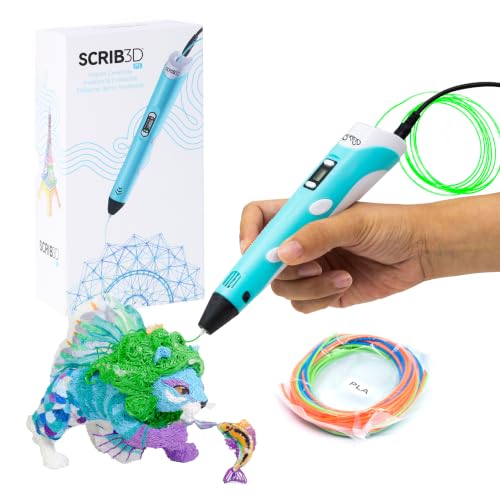
This is the version of the P1 built for shared family use rather than solo deep dives. The pen includes a stepless speed function, three starter PLA colors, a stencil book, a project guide, and its own power adapter, so nothing extra is required before the first doodle. Parents commonly reach for this exact configuration because the manual walks everyone, adults included, through the basics clearly.
Compared with the refill-heavy P1 bundle at number four, this pick trades bulk filament volume for a leaner, gift-ready package. It works well as a birthday present where the goal is trying the hobby before committing to a large supply. Spatial thinking and creativity get a genuine workout here, and the price point keeps the entry commitment low.
Positives
- Everything needed ships together, including the power adapter
- Stepless speed control adapts to both kids and adults sharing the pen
- Stencil book and guide prevent aimless first sessions
Trade Offs
- Only three filament colors included, so heavy users will reorder soon
- PLA creations soften if left in hot cars or sunny windowsills
Core Details
Best Suited To
Families gifting a first 3D pen and wanting a low-commitment way to test whether the hobby sticks.
Skip It When
A child already hooked on the hobby will burn through three colors quickly, making the 20-color SCRIB3D P1 refill bundle the smarter buy.
What Matters Most Before Choosing 3d Pens For 10 Year Olds
Control Style Shapes Early Success
Speed control is the difference between clean lines and spaghetti. Stepless sliders, found on the MYNT3D Pro and both SCRIB3D P1 models, let a child slow down gradually through corners instead of lurching between fixed speeds. Kids with patient temperaments handle either style, but impatient beginners benefit visibly from smooth adjustment.
Filament Supply Is The Hidden Cost
The pen itself is a one-time expense; plastic is recurring. Bundles carrying 300-plus feet, like the two SCRIB3D refill packs, delay that second purchase by months. Also check material type: PLA is the easiest and lowest-odor option for indoor use, while ABS demands better ventilation and suits older, supervised users.
Match The Tool To The Temperament
Builders who dream of towers and toys need true filament pens. Decorators who fill journals and make cards may be happier with the IEY bubble pen set, which skips hot nozzles altogether. STEM-minded kids gain the most from pairing any pen with the rocket launcher kit, turning idle doodling into testable experiments.
Think About Shared Use
Siblings fighting over one pen is a real pattern in households with two makers. Either budget for two modest pens or consider the 3Doodler EDU pack, whose twelve-pen layout absorbs group demand in classrooms and co-ops without friction.
Key Considerations Across These Picks
Traps First Timers Fall Into
The most common mistake is buying a bare pen with no filament reserve, then watching enthusiasm die the week the plastic runs out. Another frequent slip is choosing an adult-oriented multi-material pen for a cautious eight-year-old; the hot nozzle and ventilation needs overwhelm young beginners. Start simple, upgrade later.
The Upgrade Payoff
Higher-tier pens earn their cost through adjustability and durability. Temperature control, LCD feedback, ceramic nozzles, and dual-drive feeding all extend how long a pen stays useful as skills grow. Paying more pays off once a child has finished a dozen projects and asks for harder challenges; until then, a value bundle does the job well.
Frequently Asked Questions
Are 3D pens safe for a ten-year-old?
Most are, with basic supervision, since modern pens insulate the barrel and only the nozzle tip gets hot. Teaching a simple rule, fingers away from the tip and the pen parked on its stand when idle, covers nearly every risk.
What is PLA filament?
PLA is a plant-derived plastic that melts at relatively low temperatures and produces minimal odor. It’s the standard choice for kids’ pens because it’s forgiving to work with indoors.
How long does a spool of filament last?
A casual young user typically works through 30 feet over several weeks of weekend sessions. Bundles with 300-plus feet, like the SCRIB3D refill packs, generally last months before reordering.
Can these pens fix broken plastic items?
Yes, within reason. Small cracks in toys, cable clips, and costume parts are classic repair jobs, and the Juku Create+ handles this especially well thanks to its precise flow control.
Do 3D pens need a computer?
No. Every pen on this list draws directly by hand, with no software, apps, or modeling experience required. Stencil books and guides simply give beginners patterns to trace.
Bottom Line
For most families, the decision comes down to temperament and budget. A curious first-timer does beautifully with the SCRIB3D P1 with Display, while a committed young maker justifies the MYNT3D Pro bundle’s finer controls. Group leaders should look hard at the 3Doodler EDU pack, and science lovers will squeeze extra value from the rocket kit paired with any pen above. Whichever route fits your household, starting with generous filament supply is the single smartest move you can make.