
Flexible filament changes what a desktop printer can make: phone cases that survive drops, gaskets that actually seal, watch bands you’d wear all day. The catch is that soft material punishes weak extruders and sloppy setup, so the machine and the spool both matter. This roundup covers machines built to handle TPU alongside spools worth loading into them, so you can match gear to your projects instead of fighting failed prints.
The Shortlist At A Glance

ELEGOO Centauri Carbon CoreXY 3D Printer

Creality SPARKX i7 Multi-Color 3D Printer

Creality TPU Filament 95A 2 kg

TECBEARS TPU Filament 95A 8-Pack

Siraya Tech Flex TPU 85A Black 1kg

Amazon Basics TPU Filament Red 1 kg

Bambu Lab P1S FDM 3D Printer
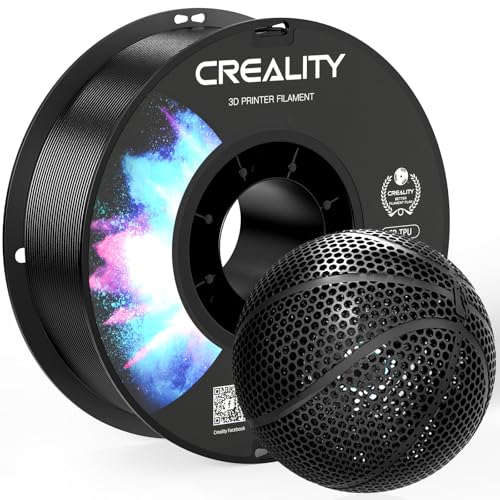
Creality Black TPU Filament 95A 1KG

Portable Compact FDM 3D Printer
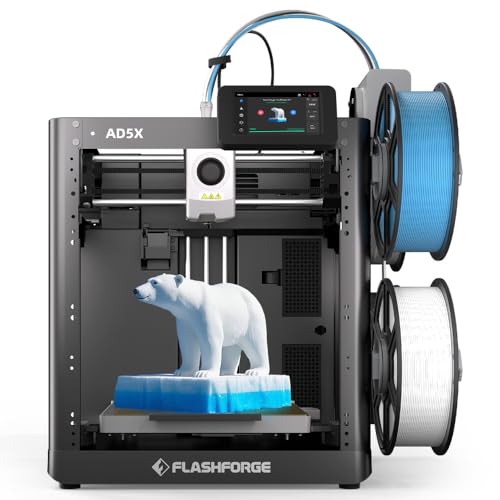
FLASHFORGE AD5X Multi-Color 3D Printer
More Details On Our Top Picks
The Centauri Carbon arrives assembled and pre-calibrated, which removes the most intimidating part of owning a fast machine. Its CoreXY motion system moves the print head on both axes at once, letting it hit 500mm/s without the wobble you’d get from a bed-slinger at that pace.
For flexible filament, the direct-drive path matters more than raw speed, and the auto calibration plus 320°C-rated nozzle give you headroom to tune TPU profiles properly. The built-in camera lets you check on long jobs from another room, something owners of open-frame budget machines often wish they had.
Strong Points
- Ships ready to print, no assembly session required
- 500mm/s top speed shortens multi-hour flexible prints considerably
- Auto bed leveling means fewer first-layer failures on rubbery materials
- 256mm cube volume fits helmets, brackets, and batch runs of cases
- Integrated camera adds remote peace of mind
Things To Consider
- TPU still prefers slower profiles than PLA, so expect to dial speeds down yourself
- The enclosed frame needs clearance and decent ventilation wherever you park it
Key Specs
Who It Suits Best
Hobbyists who want one fast, low-maintenance machine for both rigid and flexible materials.
Where Another Pick Suits Better
Total beginners on tight budgets will find the Portable Compact FDM 3D Printer an easier, smaller first step.
Where the ELEGOO leans on speed, the SPARKX i7 leans on intelligence. Creality’s CubeMe AI can turn a portrait photo into a printable 3D model, which makes personalized gifts almost trivially easy for people who never learned CAD.
The onboard camera watches for spaghetti failures and tangled filament, sending alerts before a spool of expensive TPU becomes a bird’s nest. Auto-leveling and quiet operation round out a package aimed at people printing in shared living spaces. One note: multi-color output requires the separate CFS Lite unit, so factor that into your planning.
What We Like
- AI photo-to-model workflow skips modeling software entirely
- Failure detection saves filament on unattended overnight runs
- Low noise output suits apartments and bedrooms
- Roughly 10-inch cube build area covers most hobby projects
Worth Noting
- Multi-color printing depends on buying the CFS Lite accessory separately
- AI features add a learning curve if you just want plain slicing
Made For
Creative gift-makers and casual designers who value smart automation over manual tuning.
A Better Fit Elsewhere
Printers chasing maximum speed on functional parts should look at the ELEGOO Centauri Carbon instead.
This two-kilogram bundle of 95A TPU is the practical choice once you stop experimenting and start producing. Shore 95A sits at the firmer end of the flexible scale, stiff enough to hold shape yet springy enough for cases, clips, and protective bumpers.
Creality specifies good interlayer bonding here, which translates to parts that don’t split along layer lines when flexed repeatedly. The glossy surface finish is a nice bonus for visible pieces like keychain fobs or controller grips. Two kilos goes a long way; a phone case uses maybe 30 grams, so this is months of hobby printing.
Highlights
- Dual 1kg spools reduce how often you reorder
- 95A hardness balances softness with structural resilience
- Strong layer adhesion keeps flexible parts intact under bending
- Resists wear and aging for parts handled daily
Small Caveats
- TPU absorbs moisture, so store spools in a sealed container with desiccant between sessions
- Single colorway limits matching to your project palette
Quick Facts
Right Fit For
Anyone printing functional flexible parts weekly who wants bulk supply without premium pricing.
Swap It Out When
You need softer, skin-contact flexibility; the Siraya Tech Flex TPU 85A handles that better.
Eight 250g spools in eight colors solve a real problem: flexible filament goes stale before you finish a big spool. Small rolls mean less exposed filament sitting in storage, and the color range covers everything from subtle grey brackets to bright orange safety markers.
TECBEARS positions this as a fast-printing TPU, quoting good layer adhesion even around 120mm/s, roughly triple typical flexible-filament speeds. In practice you may find results vary by extruder type, but direct-drive owners commonly report clean prints at brisk settings. At 95A hardness it matches the firmness of the Creality bundle above while trading quantity for variety.
Upsides
- Eight colors cover gifts, prototypes, and color-coded parts
- 250g spools stay fresher in humid climates
- Formulated for higher-speed flexible printing
- Low stringing reported at tuned settings
Points To Note
- Small spools run out mid-project more often than 1kg rolls
- High-speed claims assume a capable direct-drive setup
Feature Snapshot
Who Will Love This
Makers printing colorful small flexible items like fobs, straps, and mini cases in rotation.
Reach For A Different Pick When
Long production runs favor the Creality TPU Filament 95A 2 kg twin-spool bundle.
Drop from 95A to 85A and the material character shifts noticeably: this spool produces genuinely squishy, rubber-like parts rather than firm-flexible ones. Grips, cushioning pads, seals, and wearable bands are where it earns its keep.
Siraya Tech lists ISO 10993 biological-response testing for this filament, data points that matter to anyone making items held against skin for long periods. That said, softer TPU is harder to print; expect slower speeds and a well-tuned direct-drive extruder, since Bowden setups tend to struggle pushing this much flex through a tube. The honest read is that this is a specialist spool, not an everyday one.
Bright Spots
- 85A softness delivers true rubber-like squish
- ISO 10993 test data supports skin-contact applications
- High toughness suits parts bent thousands of times
Softer Spots
- Demands slow print speeds and patient tuning
- Bowden-style extruders often jam or grind on this softness level
- Black only, so visible multicolor builds need other spools
At A Glance
Who Should Grab It
Experienced makers with direct-drive printers producing grips, gaskets, and wearable items.
Not Your Match When
Beginners should start with the firmer Amazon Basics TPU Filament Red 1 kg before attempting 85A.
For a first TPU experiment, this red 1kg spool keeps the stakes low. The 1.75mm diameter carries a stated tolerance of plus or minus 0.05mm, loose by premium standards but workable on most desktop machines, and the formulation targets easy handling with solid layer-to-layer bonding.
The material resists oil, grease, and scratches, which suits shop-floor jigs, tool grips, and phone cases that live in pockets. Compared with the TECBEARS pack, you give up color choice and tighter tolerances, but you gain a simple, predictable spool that behaves like the product page says it will. For learning TPU slicer profiles, that predictability counts for a lot.
Plus Points
- Straightforward spool for first flexible-filament attempts
- Good interlayer bonding reduces delamination on bends
- Oil and grease resistance suits workshop parts
- Full kilogram gives plenty of trial-and-error room
Minor Gripes
- Wider diameter tolerance than premium spools may need flow calibration
- Red only; no alternate colorways in this listing
Whose Shelf It Belongs On
Newcomers testing their printer’s flexible capabilities without committing to specialty stock.
Consider Something Else When
Precision-focused users should step up to the Creality Black TPU Filament 95A 1KG with its tighter accuracy rating.
The P1S is the machine you grow into rather than out of. Speeds up to 500mm/s with aggressive acceleration mean a part that takes three hours on an entry printer finishes in well under one, and the fully enclosed body stabilizes temperature-sensitive materials during long runs.
Add Bambu’s AMS unit separately and you unlock multi-color and multi-material printing with up to sixteen color combinations, useful for flexible-over-rigid parts like a hard case with soft TPU bumper zones. Setup is close to plug-and-play, and the ecosystem’s polish shows in daily use. The trade-off is cost, plus the AMS being an extra purchase rather than bundled.
Reasons To Buy
- 500mm/s speed with strong acceleration slashes print times
- Enclosed chamber improves consistency across materials
- AMS compatibility enables up to 16 color combinations
- Near turnkey setup gets you printing same-day
Trade Offs
- Multi-color capability requires buying the AMS separately
- Premium positioning costs more than open-frame rivals
Best Suited To
Committed makers running frequent mixed-material jobs who want speed and enclosure together.
Another Choice May Suit
Budget-conscious starters get similar core function from the FLASHFORGE AD5X at a friendlier tier.
This is the precision-minded sibling of the two-kilo Creality bundle earlier in the list. Same 95A shore hardness and stretchy character, but with dimensional accuracy quoted at plus or minus 0.03mm, tight enough that extrusion flow stays consistent across a whole spool.
That consistency shows up in surface quality on visible parts and in reliable feeding through geared direct-drive extruders. Creality notes the filament stretches to roughly three times its original length, plenty for snap-fit clips and protective edges. One widely repeated tip from the maker itself: pair it with a direct-drive extruder, since Bowden tubes fight soft filament. Skip it on Bowden-only machines.
Standout Traits
- +/- 0.03mm tolerance supports steady, repeatable extrusion
- Stretches about 3x original length for demanding flex parts
- High elasticity suits cases, seals, and shock absorbers
- Works across most desktop FDM machines with direct drive
Areas To Watch
- Manufacturer recommends direct-drive extruders specifically
- Moisture pickup means airtight storage between prints
Spec Overview
The Right Fit
Intermediate users printing precise black flexible components on direct-drive hardware.
Look Elsewhere When
Colorful projects call for the TECBEARS TPU Filament 95A 8-Pack instead.
At a 100mm cube build volume, this little machine won’t print helmets, but it will print keychains, cable clips, and small TPU bumpers, and it does so from a footprint smaller than a microwave. The removable build plate simplifies getting stubborn flexible parts off the bed without prying tools.
Setup follows video-guided modular assembly, and the box includes starter PLA, a TF card, basic tools, and a Type-C power adapter, so there’s no shopping trip before your first print. The 0.4mm nozzle is the standard size, meaning normal slicer profiles apply. Honest caveat: TPU on compact budget extruders takes patience, and slow speeds are non-negotiable here.
Positives
- Tiny footprint fits desks, dorms, and classrooms
- Removable plate makes part removal painless
- Accepts both PLA and TPU spools
- Video-guided setup lowers the beginner barrier
Honest Caveats
- 100mm volume rules out larger flexible parts entirely
- Modular assembly still demands some hands-on time
- TPU runs best very slowly on this class of extruder
Built With In Mind
Students, kids, and curious first-timers exploring 3D printing in small spaces.
Where A Sibling Pick Shines
Growing hobbyists needing real capacity should move to the ELEGOO Centauri Carbon’s 256mm volume.
The AD5X bundles what competitors sell separately: its IFS (Independent Filament System) drives up to four colors in one job right out of the box, no add-on module required. That makes it the straightforward route to multicolor models mixing rigid PLA accents with flexible TPU sections.
Speed tops out at 600mm/s, the highest figure in this roundup, and automatic leveling handles first-layer calibration without paper-shim rituals. The 220mm cube volume trails the ELEGOO Centauri Carbon but matches the SPARKX i7, and the 300°C nozzle ceiling leaves room for engineering-grade spools later. For households wanting one capable machine without accessory shopping, it lands nicely.
Best Bits
- Four-color IFS included rather than sold apart
- 600mm/s peak speed among the fastest here
- Fully automatic leveling removes manual calibration
- 300°C nozzle opens future material options
Room For Improvement
- 220mm build volume limits oversized single-piece prints
- Multi-material swaps add purge waste between color changes
Details At A Glance
Perfect Match For
Households and hobbyists wanting multicolor capability bundled in one purchase.
Skip It When
Large-format flexible prints matter more than color; the ELEGOO Centauri Carbon offers 256mm per axis.
What Matters Most Before Choosing 3d Printers For Tpu
Extruder Type Decides Everything
TPU behaves like cooked spaghetti inside a printer: push it through a long Bowden tube and it buckles instead of feeding. Direct-drive extruders mount right above the hotend and grip the filament briefly, which is why nearly every flexible-printing success story starts there. Machines like the ELEGOO Centauri Carbon and Bambu Lab P1S handle this well out of the box.
Hardness Numbers Are Your Shopping Map
Shore hardness describes how soft a rubber feels. 95A spools print easily and suit cases and clips; 85A stock feels genuinely rubbery but demands slow speeds and patience. Match the number to the part, not the marketing.
Enclosure And Speed Trade Against Simplicity
Fast CoreXY machines finish jobs quickly and handle temperature-sensitive materials better, but they cost more and take desk space. Open-frame budget units print fine at reduced speeds. Decide whether your projects justify the premium.
Storage Extends Spool Life
TPU pulls moisture from the air, causing bubbles and stringy prints. A sealed box with desiccant packs costs little and protects every spool you own.
Key Considerations Across These Picks
Traps First Timers Fall Into
The classic mistake is pairing soft 85A filament with a Bowden-extruder printer, then blaming the spool when feeding fails. Another common slip is printing TPU at PLA speeds; slowing to 30-40mm/s fixes most quality complaints. Skipping moisture storage ruins good filament within weeks in humid homes.
What Separates Premium From Basic
Higher-tier machines buy direct-drive extruders, auto calibration, enclosures, and cameras, all of which raise success rates on flexible material. Paying up makes sense once you print weekly; occasional users lose nothing starting with a compact budget unit and cheap 95A spool.
Frequently Asked Questions
Can any 3D printer print TPU?
Most FDM machines accept it physically, but direct-drive extruders succeed far more often. Bowden setups struggle with soft filament and frequently jam.
What does 95A versus 85A actually mean?
Both are Shore hardness ratings measuring rubber softness. 95A feels firm and springy, while 85A is noticeably squishier and harder to print.
How slow should TPU print?
Start around 30-40mm/s and adjust upward once quality holds. Flexible filament rewards patience far more than speed.
Do I need special slicer settings for TPU?
Yes, mainly reduced speed, slightly increased extrusion temperature, and retraction minimized or disabled. Most slicer profiles include a TPU preset worth starting from.
How should I store TPU filament?
Keep spools in a sealed container with desiccant packs. Moisture absorption causes bubbling, stringing, and weak layers within weeks.
Closing Thoughts
Flexible printing opens up half the useful objects in a home, from grippy tool handles to shock-absorbing mounts, and the gear above covers every budget and skill level. Start with a direct-drive machine and a forgiving 95A spool, learn its quirks slowly, then branch into softer stock or multicolor work as confidence grows. Whichever combination you settle on, the first successful squishy print tends to hook you for good.