
Acrylic signs, keychains, ornaments, custom tumblers. The problem is that acrylic punishes weak lasers, melting into a fuzzy edge instead of a crisp cut. This roundup sorts ten machines by real cutting power, bed size, and safety features, so you can match one to your workspace and your project list without guessing.
The Shortlist At A Glance
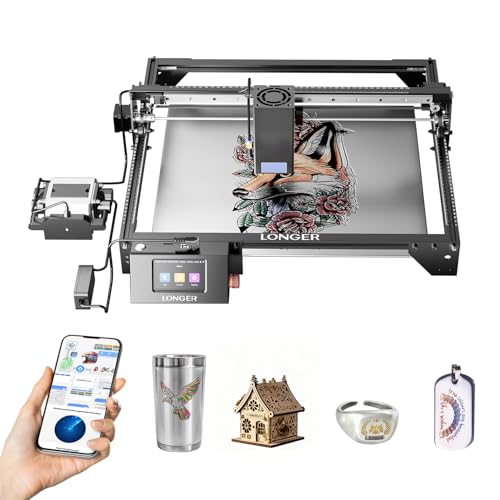
Longer RAY5 Laser Engraver Cutter 15.16″x15.16″
ACMER S1 Laser Engraver Machine 6000mW

Twotrees TTS-55 Pro Laser Engraver 5500mW

xTool S1 40W Laser Cutter and Engraver Rotary Bundle

Creality 10W Laser Engraver Machine 17″ x 16″

CREALITY FALCON A1 10W Enclosed Laser Cutter with Air Assist

LONGER Ray5 40W Laser Cutter 385×385mm

ACMER S1 Laser Engraver Machine 2500mW

Creality Falcon A1 10W Laser Engraver Class 1 Safety

ATOMSTACK A20 PRO V2 20W Laser Engraver
More Details On Our Top Picks
The upgraded RAY5 sits at the top of this list because its 40W optical module handles the material most diode machines struggle with: thick black acrylic. Longer pairs that output with laser enhancement technology, and the spec sheet points to roughly an inch of black acrylic in a single pass, which means fewer repeat runs and less charred edge cleanup.
In a working craft room, that translates to finishing a batch of signage in one evening instead of babysitting multiple passes. The square 15.16-inch bed suits standard sheet offcuts well, though you may find larger sign blanks require repositioning.
Strong Points
- 40W optical output cuts deep in one pass, saving setup time on production runs
- Handles wood, dark acrylic, and even thin stainless steel per the manufacturer’s specs
- Fast engraving speeds keep long job queues moving
- Square work area matches common acrylic sheet sizes with minimal waste
Things To Consider
- An open-frame design means you’ll want ventilation and eye protection sorted before the first run
- Owners commonly report that high-power modules benefit from regular lens cleaning to keep edges crisp
Who It Suits Best
Makers selling acrylic signs or layered art who need genuine cutting depth rather than surface engraving.
Where Another Pick Shines
Beginners who mostly engrave rather than cut should look at the ACMER S1 6000mW, which costs far less and is easier to learn on.
Not everyone needs a 40W monster on day one. The six-watt version of the ACMER S1 is aimed squarely at people who have never touched laser software, and it shows in the package: free ACMER Studio software with AI tools that turn text prompts or photos into designs, plus compatibility with LightBurn and LaserGRBL if you outgrow the basics.
For thin dark acrylic tags, coasters, and engraved gifts, a 6W diode is genuinely capable. The honest read is that thick clear acrylic will frustrate you here, but as a first machine it removes nearly every barrier between idea and finished piece.
What We Like
- Built-in AI design tools mean you can start from a photo instead of learning vector software first
- Works with LightBurn and LaserGRBL, so your skills transfer when you upgrade later
- Light footprint fits a spare desk corner or apartment shelf
Minor Gripes
- Six watts limits you to thin materials and darker acrylic shades
- Open frame layout calls for a dedicated, ventilated spot away from curious hands
Made For
First-time hobbyists who want a low-commitment way to learn engraving workflows at home.
Swap It Out When
If your projects center on cutting half-inch acrylic sheets, the Longer RAY5’s 40W module is the better match despite the higher cost.
The TTS-55 Pro earns its place through thoughtful small upgrades rather than raw power. Its 5.5W diode ships with a metal air-assist nozzle already fitted, which matters more than it sounds: air assist blows smoke and debris out of the cut line, giving cleaner edges on acrylic and deeper penetration on wood.
Aluminum framing keeps the whole unit rigid and light enough to move between rooms. Compared with the ACMER S1 above, you give up the AI design tools but gain a hardware path toward better cut quality down the road. For desk-sized projects like pet tags and leather patches, it covers the bases.
Highlights
- Pre-fitted metal air assist nozzle improves edge quality without extra purchases
- Red laser shield adds a layer of visibility protection during alignment
- Aluminum and plastic build stays stable yet portable around a shared workspace
Small Caveats
- You’ll likely want to add a dedicated air pump later for the best results on thicker stock
- Class II power output means slow going on anything beyond thin dark acrylic
Right Fit For
Hobbyists with limited desk space who value clean edges over cutting depth.
Another Choice May Suit
Shoppers wanting software hand-holding will prefer the ACMER S1 6000mW, whose guided design tools flatten the learning curve.
This bundle is the production-minded choice. The 40W laser moves at up to 600mm/s across a generous 23.93 by 15.16 inch bed, big enough for door signs or, per xTool’s own figures, over a hundred dog tags in a single session. The included rotary attachment extends that reach to curved items like tumblers, which is where a lot of side-business revenue actually lives.
Where the Longer RAY5 focuses purely on flat-sheet cutting muscle, the S1 wraps that power in a broader ecosystem designed for volume. You pay more, and the machine takes up real floor space, but for anyone turning orders around weekly, the throughput justifies both.
Reasons To Buy
- Spacious bed handles large-format projects like door signs in one placement
- Rotary attachment unlocks tumbler and cylindrical work straight away
- 600mm/s top speed shortens batch jobs dramatically compared with entry-level units
- 40W output slices thick cherry wood in a single pass per the maker’s claims
- Patented xTool technologies support consistent results across long runs
Points To Note
- Larger footprint demands a dedicated table or bench, not a shared desk
- Higher-tier pricing puts it beyond casual-hobby budgets
Key Specs
Who Will Love This
Etsy-style sellers and small studios running mixed batches of flat and cylindrical goods every week.
Consider Something Else When
Apartment dwellers with a single spare shelf should weigh the compact Twotrees TTS-55 Pro instead.
Creality’s open-frame 10W unit threads a needle: mid-range power, a wide 17 by 16 inch bed, and a claimed 0.06mm precision figure that suits fine detail work. Ten watts of optical output handles 3mm black acrylic and 5mm basswood in one pass according to the spec sheet, which covers most craft-scale acrylic projects comfortably.
Think of it as the middle rung between the budget ACMER units and the enclosed Falcon models later in this list. Detail-oriented engravers doing intricate line art on leather, glass, or coated metal get a lot of capability per dollar here.
Upsides
- 0.06mm precision renders tiny text and fine linework sharply
- Wide bed accommodates larger plaques than typical budget frames allow
- Single-pass cutting of 3mm dark acrylic keeps simple jobs quick
Softer Spots
- Open gantry design requires careful placement and ventilation planning
- Clear acrylic remains largely out of reach at this power level
Whose Shelf It Belongs On
Intermediate hobbyists focused on detailed engraving across varied materials rather than heavy cutting.
Reach For A Different Pick When
Anyone needing fully contained operation should step up to the Creality Falcon A1, covered below.
The Falcon A1 changes the ownership experience more than the spec numbers suggest. An enclosed chassis with built-in air assist contains fumes and light, smart camera positioning lets you preview exactly where the job lands, and pre-set material parameters skip the trial-and-error phase entirely. For anyone running this in a living room or shared studio, those differences are the product.
Speed tops out at 600mm/s, matching the far pricier xTool S1 on paper, though the 10W module won’t cut as deep. The trade-off is deliberate: convenience and safety over raw force.
Bright Spots
- Smart camera positioning shows job placement before you commit
- Integrated air assist arrives installed, no add-on shopping required
- Pre-tuned parameter library removes guesswork from new materials
- Enclosed body contains light and fumes for indoor use
Trade Offs
- Enclosure limits maximum material thickness versus open 40W frames
- Owners commonly note the window needs frequent wiping to stay clear
Feature Snapshot
Who Should Grab It
Crafters sharing space with family who want contained, low-fuss operation with modern conveniences.
Look Elsewhere When
Production shops needing deep cuts should compare the LONGER Ray5 40W further down this list.
This is the sibling to our top pick, trading a slightly different configuration for the same core strength: a 40W dual-beam module that cuts up to 30mm black acrylic, 20mm wood, and 0.15mm stainless steel in one pass. Dual-beam technology combines two diodes into one focal point, concentrating energy where it counts.
The 32-bit mainboard keeps motion smooth at speed, which shows up as cleaner corners on intricate acrylic lettering. Against the xTool S1, you lose the rotary and the bigger bed but keep serious cutting depth, often at a friendlier price point depending on current listings.
Plus Points
- Dual-beam 40W module delivers some of the deepest diode cuts available
- Handles stainless steel marking alongside wood and acrylic
- 32-bit control board supports fast, accurate movement
- 385mm square bed suits standard material sheets efficiently
Areas To Watch
- Open frame means investing separately in ventilation and safety eyewear
- No bundled rotary attachment for cylindrical projects
Who It’s Built With In Mind
Workshop users prioritizing maximum cutting depth on thick stock over bundled extras.
Where A Sibling Pick Shines
Those wanting camera-guided convenience will find the CREALITY FALCON A1 easier to live with day to day.
At 2500mW, this is the gentlest entry into the category, and that’s precisely its appeal. The 24W machine rating drives a low-power diode that excels at engraving wood, leather, and dark surfaces, with the same free ACMER Studio software found on its six-watt sibling. Support for alternative engraving programs keeps your options open too.
Realistically, this is an engraver first and a cutter a distant second. Weekend crafters personalizing coasters, phone stands, and gift tags will be happy; anyone hoping to slice acrylic sheets should scroll back up to the Longer RAY5.
Positives
- Lowest-commitment way to learn laser workflows without overspending
- Free companion software works right out of the box
- Compact size stores easily between crafting sessions
Worth Noting
- Cutting ability is minimal, best treated as an engraving tool
- Dark materials only for reliable results, since lighter acrylic reflects the beam
Quick Facts
Perfect Match For
Casual makers testing whether laser crafting fits their routine before committing to bigger gear.
Skip It When
Your goal is cutting acrylic parts, in which case the ATOMSTACK A20 PRO V2 offers far more headroom.
