
Laser engravers have quietly become one of the most useful tools a home workshop can hold. Whether you’re personalizing cutting boards, marking dog tags, or cutting acrylic signs for a side business, the right machine turns an afternoon idea into something you can hold in your hand. The catch is that the market is crowded, and specs alone don’t tell you which machine fits your bench, your budget, or your patience level. This guide walks through ten machines that cover the full range, from pocket-sized handhelds to 20-watt cutters, so you can match the tool to the work you actually do.
The Shortlist At A Glance

Twotrees TTS-55 Pro Laser Engraver 5500mW
Twotrees TS1 Mini 3000mW Laser Engraver

Creality 72W DIY Laser Engraving Machine 0.06mm

Creality Falcon 10W Laser Engraver Machine

LONGER Ray5 20W Laser Engraver 400×356mm

ACMER S1 Laser Engraver Machine 2500mW

LaserPecker LP2 Handheld Laser Engraver

ATOMSTACK A20 PRO V2 20W Laser Engraver

ACMER S1 Laser Engraver Machine 3500mW
ACMER S1 Laser Engraver Machine 3500mW
More Details On Our Top Picks
The TTS-55 Pro sits right where most first-time engravers want to land: enough power to matter, not so much that it intimidates. Its aluminum-and-plastic frame keeps the machine light enough to move between a desk and a garage shelf, which matters more than you’d think once a project outgrows its original spot.
What separates this from the base TTS-55 is the upgraded 5500mW diode plus a metal air-assist nozzle, a fitting that lets you pipe compressed air at the burn point. Air assist blows smoke and debris away from the cut line, giving cleaner edges and deeper passes on wood. The included red laser shield helps contain stray light during setup.
Strong Points
- 5500mW output handles engraving on wood, leather, and coated metals with confidence
- Metal air-assist nozzle means cleaner, deeper cuts once you connect an air source
- Aluminum frame construction keeps the gantry steady through long jobs
- Red laser shield makes positioning safer before a job starts
Things To Consider
- You’ll need to supply your own air pump to actually use the air-assist nozzle
- Owners commonly report that open-frame diode machines like this need regular lens cleaning to stay sharp
Key Specs
Who It Suits Best
Hobbyists stepping up from toy-grade engravers who want air-assist capability without jumping to a 10-watt machine.
Where Another Pick Suits Better
Shoppers wanting enclosed safety for shared spaces should look at the Twotrees TS1 Mini instead.
Most entry engravers are open frames with a bare diode glaring out, which is exactly why the TS1 Mini stands apart. A fully enclosed acrylic cover contains both the light and the debris, so you can run it on a kitchen table without worrying about what’s drifting around the room.
It arrives essentially assembled, and control happens from your phone rather than a laptop tethered by USB. That combination makes it a natural fit for classrooms and family workshops, always with adult supervision, since the 3000mW diode still deserves respect even behind acrylic.
What We Like
- Fully enclosed cover blocks stray light and traps debris where it belongs
- Near plug-and-play setup, no afternoon lost to assembly instructions
- Smartphone control frees you from keeping a laptop parked next to the machine
- Safety goggles ship in the box
Worth Noting
- The 3000mW diode marks surfaces well but won’t cut thick material the way higher-wattage picks here can
- An enclosed chamber means smaller projects; oversized boards won’t fit inside
Made For
Teachers, parents, and cautious beginners who value contained operation over raw cutting power.
Consider Something Else When
Anyone planning to cut through wood should step up to the Creality Falcon 10W later in this list.
Bed size is the spec nobody thinks about until their first project doesn’t fit. This Creality gives you a 17-by-16-inch work area, roomy enough for a full-size serving tray or a batch of ornaments laid out in a single run.
Under the hood it pairs a 10W optical output with a 0.06mm focused spot, fine enough for crisp lettering yet strong enough to slice through thin basswood and dark acrylic. Compared with the Twotrees TTS-55 Pro, this one trades the air-assist nozzle for raw power and workspace, a swap most sign-makers will welcome.
Highlights
- Large 17″ x 16″ bed fits full-size craft blanks in one pass
- 10W output cuts thin wood and dark acrylic, not just engraves them
- 0.06mm spot size keeps small text legible
- Handles paper, leather, glass marking, and more across mixed-material shops
Trade Offs
- Open-frame layout demands clear space and eye protection discipline every session
- At this power level, ventilation stops being optional; plan for fume extraction near the machine
Right Fit For
Crafters selling at markets who need to batch larger items without repositioning mid-job.
Not Your Match When
Desk-space-limited users will find the LONGER Ray5’s footprint easier to live with.
The Falcon is the machine you grow into rather than out of. Its 10W module pushes through 12mm wood boards and 5mm black acrylic in a single pass, which changes how you plan projects: no more gluing thinner sheets together or running four slow passes hoping for a clean edge.
A 32-bit controller drives a compressed-spot module rated at 0.06 x 0.06mm, holding accuracy tight across the 15.7-by-16.3-inch bed. Against the standard Creality unit above, the Falcon’s deeper single-pass cutting is the meaningful difference, and it’s the reason serious DIYers tend to pick this one.
Upsides
- Single-pass cutting through 12mm wood saves hours on thick projects
- Compressed 0.06mm spot produces sharp detail on intricate designs
- 32-bit chipset keeps motion smooth at speed
- Tight repeatability matters when you’re producing matching sets
Minor Gripes
- Assembly and belt tensioning take some patience on arrival
- High-power diodes generate real heat; owners commonly report needing breaks between heavy cutting sessions
Feature Snapshot
Who Will Love This
Intermediate makers cutting structural pieces, signage, and layered wood art on a weekly basis.
Look Elsewhere When
Pure beginners who mostly engrave coasters will be happier with the cheaper ACMER S1 2500mW.
Step up to 20 watts and the conversation shifts from “can it cut?” to “how fast?” The Ray5 answers confidently, slicing 15mm pine, thin stainless steel sheet, and 8mm acrylic, with multiple passes extending those limits further.
Speed comes from a modern ESP32 chipset pushing engraving rates up to 24,000mm/min across a generous 400 x 356mm bed. In a small production setting, that throughput difference compounds quickly; a job that takes the Falcon two passes might finish here in one.
Bright Spots
- 20W module cuts 15mm pine in a single pass
- Engraves thin stainless steel, expanding into jewelry and tag work
- Up to 24,000mm/min speeds shorten batch production time dramatically
- Large 400 x 356mm bed suits multi-item layouts
Points To Note
- This class of laser demands serious ventilation and fire awareness; never leave it unattended mid-cut
- Higher power means higher consumable costs, replacement lenses and windows add up over a year
Quick Facts
Perfect Match For
Side-business owners producing engraved goods in volume who’ve outgrown 10-watt machines.
A Better Fit Elsewhere
Hobbyists on tighter budgets get most of the engraving experience from the ACMER S1 3500mW below.
Not everyone needs to cut wood. Plenty of people just want to mark a name onto a wallet, date a wooden spoon, or personalize a leather keychain, and the 2500mW version of ACMER’s S1 covers that territory at the friendliest entry point in this lineup.
It ships optimized for ACMER’s own free engraving software, ready to go out of the box, while still playing nicely with other popular programs if you already have a workflow. Think of it as the gateway machine: modest power, minimal commitment.
Plus Points
- Lowest-commitment way to learn engraving fundamentals
- Free dedicated software works immediately, no license hunting
- Compatible with alternative engraving programs for flexible workflows
- Compact body stores easily in a closet between sessions
Softer Spots
- 2500mW output engraves beautifully but won’t cut through wood or acrylic
- Diode modules at this tier benefit from periodic focus checks to keep lines crisp
Who Should Grab It
Curious first-timers testing whether laser crafting becomes a habit before investing more.
Skip It When
Anyone whose projects involve cutting should jump straight to the Creality Falcon 10W.
Every other machine on this list lives on a bench. The LP2 weighs about a kilogram, fits in a tote bag, and engraves wherever you set it down, which reshapes the whole idea of what an engraving session looks like.
Galvo technology, a mirror-based aiming system, drives its speed: previewing happens almost instantly and engraving runs up to 36,000mm/min, several times faster than typical gantry machines. The 0.05mm micro-spot captures fine detail on wood, leather, and coated metal, making it a favorite for live personalization at markets and events.
Standout Traits
- Roughly 1kg with a built-in handle, genuinely portable
- Galvo system delivers near-instant previews and very fast engraving
- 0.05mm precision handles intricate monograms and fine linework
- Multi-angle capability reaches curved and awkward surfaces a flatbed can’t
Small Caveats
- No large fixed bed means big batch jobs are slower to stage than on the LONGER Ray5
- Handheld placement requires careful alignment each session for repeatable results
Details At A Glance
Built With In Mind
Vendors, event personalizers, and anyone engraving away from a permanent workshop.
Swap It Out When
Makers needing a fixed large-format bed will serve themselves better with the ATOMSTACK A20 Pro V2.
ATOMSTACK built the A20 Pro V2 around its own motherboard and a dot-compression approach that squeezes the beam into 0.08 x 0.1mm dots. The practical result is engraving that looks etched rather than burned, exactly the finish personalized gifts demand.
With 20W of optical output driving business cards, wood, metal, acrylic, and leather work, it competes directly with the LONGER Ray5. The honest read: both are capable, and the choice often comes down to which ecosystem and accessory range you prefer living with long term.
Reasons To Buy
- In-house motherboard brings stability and smarter power management
- Compressed 0.08 x 0.1mm dots produce refined, professional-looking engraving
- 20W output spans gift-grade detail and genuine cutting ability
- Handles the exact materials a personalized-gift shop touches daily
Areas To Watch
- Class 4 laser output demands strict eyewear habits and controlled access to the room
- Frame alignment benefits from occasional recalibration, especially after moving the machine
The Right Fit
Gift-business operators who prioritize engraving finesse alongside solid cutting muscle.
Another Choice May Suit
Speed-focused production shops may prefer the LONGER Ray5’s faster maximum rate.
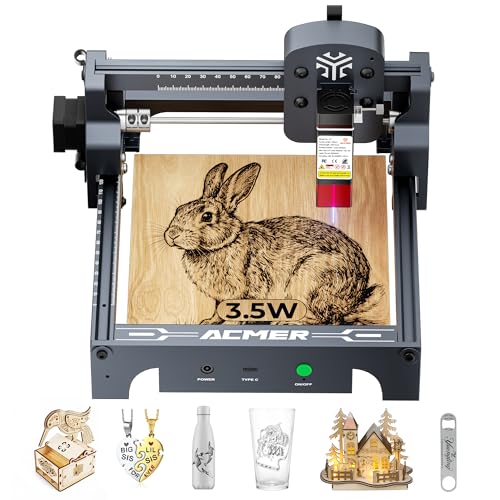
Software trips up more beginners than hardware ever does. This 3500mW S1 variant tackles that head-on with free ACMER studio software featuring built-in AI tools that turn a text prompt or a photo into an engraving-ready design, no design background required.
You’re not locked in either: LightBurn and LaserGRBL both work with it, so skills transfer if you upgrade later. Compared with the 2500mW sibling earlier in this list, the extra diode power gives slightly deeper marks and faster coverage on darker materials.
Best Bits
- AI-assisted design tools remove the learning curve entirely
- Works with LightBurn and LaserGRBL for future-proof workflows
- 3500mW diode marks faster and deeper than the 2500mW version
- Free companion software means zero extra software spend
Honest Caveats
- Still an engraving-first machine; cutting remains off the menu
- AI-generated designs sometimes need manual cleanup before they engrave cleanly
Feature Rundown
Whose Shelf It Belongs On
Complete newcomers who want design help baked in and a gentle price tag.
Reach For A Different Pick When
Detail obsessives chasing the finest possible spot should compare the second 3500mW S1 variant below.
Same S1 family, different emphasis. This variant leans on an ultra-fine 0.04mm laser spot, the smallest in this entire roundup, paired with the same 3500mW diode and 24W machine output. Fine spots matter most on small work: ring boxes, pen barrels, watch faces, anything where a fraction of a millimeter decides whether text looks sharp or fuzzy.
It ships tuned for ACMER’s free AcmerTool software and accepts other mainstream engraving programs too. Between this and the AI-focused S1 above, choose based on whether design assistance or raw precision matters more to your projects.
Positives
- 0.04mm spot delivers the finest detail resolution in this lineup
- Free AcmerTool software works straight from the box
- Broad compatibility with popular third-party engraving programs
- Small footprint suits crowded desks and apartment workshops
Room For Improvement
- Ultra-fine spots reward patience; large fills take longer than on wider-beam machines
- Focus distance needs checking before each session to keep that precision honest
Best Suited To
Jewelry makers and detail-driven crafters working on small, high-value items.
Where A Sibling Pick Shines
Beginners wanting AI design help will prefer the ACMER S1 studio-software variant reviewed just above.
What Matters Most Before Choosing American Made Laser Engravers
Match Power To Material, Not To Marketing
Wattage determines what a machine can actually do. Diodes under 3W engrave surfaces; 5W to 10W units cut thin wood and dark acrylic; 20W machines handle thick stock and even thin steel. Write down the three materials you’ll touch most, then buy the lowest power tier that covers all three. Paying for unused wattage rarely pays back.
Workspace And Footprint Deserve Honest Measurement
A 17-inch bed sounds great until it eats half your desk. Measure your available surface, then compare it against each machine’s stated work area, remembering that open-frame models need clearance around them for safety and airflow. Apartment dwellers and shared spaces often do better with enclosed or compact designs despite smaller beds.
Software Shapes Your Daily Experience More Than Specs Do
The laser fires for minutes; you’ll live inside the software for hours. Free bundled programs lower the entry cost, while LightBurn compatibility protects your skills if you upgrade machines later. Beginners benefit enormously from AI-assisted design tools that skip the blank-canvas problem entirely.
Safety Infrastructure Isn’t Optional Equipment
Higher-power diodes emit light that damages eyes instantly and invisibly. Enclosed covers, included goggles, shields, and fume management aren’t luxuries; they’re part of the true cost of ownership. Budget for ventilation from day one, especially with any machine above 5W.
Key Considerations Across These Picks
Traps First Timers Fall Into
The classic mistake is buying on wattage alone and ignoring bed size, then discovering your flagship project doesn’t fit. The second is skipping ventilation planning; smoke and fumes are part of every cutting job regardless of brand. A third trap: choosing an open frame for a household with kids or pets when an enclosed model would have removed the worry entirely.
What Separates Premium From Basic
Money spent above the entry tier buys three things: cutting depth, speed, and consistency. A 20W module finishes thick jobs in one pass instead of four, and better controllers hold alignment across long production runs. Casual hobbyists rarely feel that gap; anyone selling finished goods usually recovers it quickly in saved time.
Frequently Asked Questions
Can a low-wattage diode engraver cut wood?
Below roughly 5W, diodes generally mark rather than cut. Machines in the 10W to 20W range cut thin to moderate wood thickness, sometimes in a single pass.
Do these engravers work on metal?
Diode lasers typically mark coated or anodized metal rather than cutting it. The LONGER Ray5’s 20W module can cut very thin stainless steel, though results depend heavily on settings.
Is special software required?
Most machines include free proprietary software, and many also support popular third-party options like LightBurn and LaserGRBL. Check compatibility before committing to a workflow.
How much ventilation does a laser engraver need?
Any cutting produces smoke and fumes that shouldn’t linger indoors. A window fan or dedicated extraction setup is a sensible baseline, with stronger filtration for frequent high-power cutting.
Are enclosed engravers safer for home use?
Enclosures block stray light and contain debris, which lowers risk considerably. Eye protection and supervision remain necessary regardless of enclosure design.
Closing Thoughts
There’s no single right answer here, only the right match for your bench and your ambitions. Start with the materials you want to work, let wattage follow from that, and give safety gear the same budget respect as the machine itself. Whichever pick earns its spot in your workshop, measure your space first and buy once, thoughtfully.
