
Bringing a laser cutter into your home workshop used to mean clearing out a garage bay and spending serious money. That’s changed. Today’s desktop machines cut wood, engrave metal, and mark leather from a corner of your desk, and several of the options below cost less than a nice power drill. Whether you’re personalizing gifts, running a small Etsy side business, or just curious about the craft, there’s a machine here that fits your space and skill level. The trick is matching laser power, work area, and safety features to what you’ll actually make, and that’s exactly what this guide sorts out for you.
A Quick View Of The Lineup

LaserPecker LP2 Laser Engraver with Rotary Roller
ACMER S1 Laser Engraver Machine 6000mW
ACMER S1 Laser Engraver Machine 6000mW

Twotrees TTS-55 Pro Laser Engraver 5500mW
Twotrees TS1 Mini 3000mW Laser Engraver

Creality 10W Laser Engraver Machine 17″ x 16″
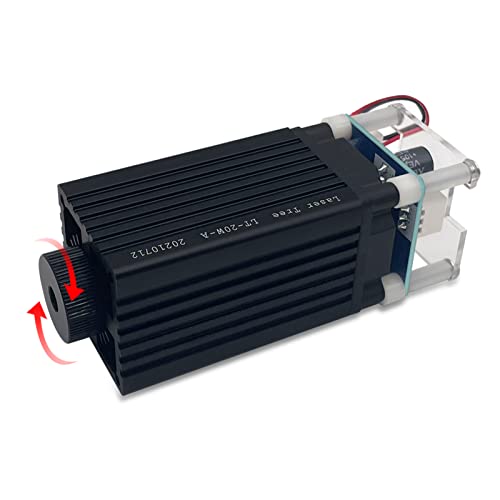
LASER TREE 4W Laser Engraver Module 450nm

Creality Laser Engraver Enclosure 2.0 with Vent

CREALITY FALCON A1 10W Laser Engraver

ACMER S1 Laser Engraver Machine 2500mW
Why These Options Stand Out
Most machines in this guide bolt themselves to a frame, but the LP2 works differently: it’s handheld, so you aim it at the object rather than feeding material through a gantry. The included electric rotary roller adds cylinder mode, which means tumblers, bottles, and rolling pins get even 360-degree coverage without you rotating anything by hand.
The suit set bundles everything into one package, which matters if you’re setting up at a market stall or moving between rooms. Galvo-based heads like this one steer the beam with mirrors instead of motors, so previewing and positioning happen fast.
Everyday Perks
- Handheld design lets you engrave items too large or awkward for a framed bed, like furniture edges or installed fixtures.
- The rotary roller handles cylindrical pieces evenly, a real time-saver for drinkware sellers.
- Galvo steering keeps framing and setup quick compared to slower gantry machines.
- Works across wood, metal, leather, and acrylic, so one tool covers most gift-craft materials.
Things To Consider
- Handheld accuracy depends on a steady mount or jig; owners commonly report better results clamping it down than holding it loose.
- You’ll want eye protection and a stable surface every session, since nothing encloses the beam.
Who It Suits Best
Makers who personalize odd-shaped objects, sell at craft fairs, or simply lack room for a full-frame machine will get the most from this setup.
Where Another Pick Shines
For larger flat projects needing a fixed work area, the Creality 10W Laser Engraver Machine gives you a proper 17″ x 16″ bed instead.
The S1 family shows up three times in this lineup because ACMER sells it at different power levels, and this 6-watt diode version sits in the sweet spot. Diode lasers focus light through a lens onto a tiny point, and here that compressed spot measures around 0.04mm, fine enough for crisp text and detailed line art on wood and acrylic.
It ships optimized for AcmerStudio, the brand’s own design-and-control program, though it also plays nicely with popular third-party workflows many hobbyists already know. For a first real machine, that combination of precision and familiar software is hard to argue with.
Real-World Strengths
- The 0.04mm spot renders small lettering cleanly, useful for jewelry tags and intricate signs.
- AcmerStudio comes ready out of the box, so you’re designing within minutes of unboxing.
- Compatibility with established engraving programs protects your workflow investment later.
- Six watts of diode output cuts thin wood and acrylic without the price jump of bigger modules.
Small Caveats
- An open-frame diode unit like this benefits from an enclosure; smoke and fumes need somewhere to go in a shared living space.
- Thicker hardwoods may need multiple passes, which slows batch production.
Made For
Hobbyists past the toy stage who want genuine detail quality without committing to a large-format machine yet.
Consider Something Else When
Total beginners who want guided AI design help will find the sibling ACMER S1 variant with built-in AI tools more forgiving.
Same six-watt hardware as the previous S1, different personality. This variant leans hard into approachability: the bundled AcmerStudio app includes AI design tools that turn a text prompt or a photo into an engraving-ready layout. You skip the blank-canvas paralysis that stalls a lot of first projects.
In practice, that matters more than raw specs for someone’s initial months. The machine still accepts LightBurn and LaserGRBL once you outgrow the training wheels, so nothing gets locked away from you later.
What Pays Off
- AI-assisted design removes the steepest learning curve in the hobby, turning ideas into files quickly.
- Support for LightBurn and LaserGRBL means the machine grows with your skills instead of capping them.
- Six-watt output handles both engraving and light cutting on common craft materials.
Points To Note
- Like its sibling, it’s an open design, so plan ventilation and keep pets and kids clear during runs.
- AI-generated layouts sometimes need manual cleanup before they burn cleanly.
Right Fit For
Complete newcomers, classroom settings, and anyone who’d rather start creating tonight than study software tutorials all weekend.
Swap It Out When
Experienced users chasing cleaner deep cuts should look at the Twotrees TTS-55 Pro and its air-assist-ready nozzle instead.
Air assist is the upgrade most beginners don’t know they need until they see it. It blows a stream of air at the cut point, blowing smoke and debris out of the beam path so edges come out darker and cleaner. The TTS-55 Pro builds that capability in from the start, with a metal air-assist nozzle fitted and a red laser shield added over the module.
The aluminum-and-plastic frame keeps weight reasonable for a desk, and the 5.5-watt Class II-rated module sits comfortably between the entry ACMER units and the heavier Creality machines below.
Real Benefits
- Built-in air-assist nozzle support produces noticeably cleaner, deeper cuts on plywood and acrylic.
- The red laser shield improves visibility and safety alignment during setup.
- Aluminum construction holds alignment better over months of use than all-plastic frames tend to.
- Mid-range 5.5W output balances detail work against actual cutting ability.
Trade Offs
- You may need to source an air pump separately depending on the bundle you choose, an extra step some listings leave unclear.
- Open-frame layout still demands ventilation planning in smaller homes.
Who Will Love This
Hobbyists stepping up from a starter machine who want pro-style cut quality without jumping to an enclosed premium unit.
Another Choice May Suit
Shoppers wanting everything sealed and supervised-safe from day one should compare the Twotrees TS1 Mini instead.
Every open laser in this list needs careful handling, which is why the TS1 Mini earns its own paragraph. The whole machine sits inside a fully enclosed acrylic cover that contains stray light and debris, goggles are included, and assembly is essentially plug-and-play. The manufacturer positions it for family workshops under adult supervision and classrooms, and the design backs that up.
Phone control is the other quiet win here. You leave the laptop behind and drive jobs from an app, which suits a kitchen-table crafting session far better than a dedicated computer station does.
Benefits That Matter
- The enclosed cover blocks scattered light and traps debris, a meaningful safety layer around curious hands.
- No complex assembly means less frustration between box opening and first project.
- Smartphone control fits casual, occasional use better than a laptop-tethered workflow.
- Included goggles round out the safety kit without a separate purchase.
Less Ideal Details
- At 3000mW, cutting ability is limited; expect mostly engraving on wood and lighter marking tasks.
- The compact footprint restricts project size compared to the Creality open-bed machines.
Whose Shelf It Belongs On
Parents introducing teens to making, teachers equipping a craft corner, and apartment dwellers who value containment over raw power.
Reach For A Different Pick When
Anyone planning to cut thicker stock regularly will be happier with the Creality 10W machine’s stronger output.
This is where the list shifts from hobby-grade to genuinely capable. Ten watts of optical output is enough to slice through a 5mm basswood board or 3mm black acrylic in a single pass, something the five-watt machines above simply can’t match. The 0.06mm spot keeps fine detail intact despite the extra muscle.
The generous 17″ x 16″ bed changes what you make, too. Serving boards, wall art, and multi-item batches all fit without repositioning. Compressed-spot diodes at this power level handle paper, leather, plastic, dark acrylic, plus surface marking on metal and glass.
A Few Strong Suits
- Single-pass cutting of 5mm basswood saves serious time on production runs.
- The large work area accommodates full-size projects and batch layouts.
- High travel speeds keep long engraving jobs from dragging on.
- Broad material range covers cutting and surface marking in one machine.
Potential Sticking Points
- More power means more smoke; pairing it with the Creality Enclosure 2.0 later in this list is a sensible combo.
- The open frame takes up meaningful desk or table space permanently.
Feature Rundown
Who Should Grab It
Home makers selling finished goods or tackling large signage projects need this tier of power and bed size.
Not Your Match When
Desk-space-limited crafters doing small engravings will find the LaserPecker LP2 far easier to live with.
Not everyone needs a whole new machine. This LASER TREE module is a drop-in replacement head for compatible DIY engravers, and upgrading a tired stock module is often the cheapest path to better results. The 450nm blue diode puts out 4 watts optically, with a narrower line width suited to ordinary plywood work.
The adjustable focus range, roughly 20mm to 50mm, is the practical highlight. You dial focus by hand for different material thicknesses instead of being locked to one working distance, which keeps quality consistent across varied projects.
A Favorable Mix
- Adjustable focus adapts to different material heights without swapping hardware.
- Narrower line width suits detailed plywood engraving well.
- Can cut through 1-2mm plywood in a single pass at this output level.
- An original diode with FAC lens technology supports consistent beam quality.
Details To Watch
- Compatibility depends on your existing machine’s mounting and wiring; verify fitment before ordering.
- Four watts won’t match the cutting depth of the 10W Creality units.
The Right Fit
Tinkering types who already own a compatible frame and want sharper results from hardware they trust.
Look Elsewhere When
Starting from zero, a complete package like the ACMER S1 2500mW makes more sense than a bare module.
Here’s the accessory half of this list, and honestly the piece most open-frame owners end up wanting eventually. This enclosure measures 28.3 x 28.3 x 15.7 inches, big enough for the Creality Falcon series and, per the maker, the majority of desktop engravers on the market. Fireproof and dustproof fabric wraps the frame, while a vent fan and pipe route smoke and odor out a window or filter.
The noise reduction alone changes daily life in an apartment. Cooling-fan whine drops significantly behind the fabric, and the viewing panel lets you watch jobs run without lifting anything.
Everyday Advantages
- Ventilation fan and pipe give fumes a controlled exit path, essential indoors.
- Fireproof, dustproof material adds a protective layer around the work area.
- Universal sizing fits most desktop engravers, not just one brand.
- Noticeably quiets cooling-fan noise in shared living spaces.
Some Limits To Know
- Measure your machine first; taller gantry setups may sit close to the 15.7-inch height limit.
- Fabric panels need occasional wiping to stay clear of residue buildup.
Quick Facts
Best Suited To
Apartment and shared-home owners running any open-frame machine from this list who need smoke, smell, and noise contained.
Skip It When
Garage-workshop users with existing ventilation can put that budget toward the Falcon A1’s integrated enclosure instead.
The Falcon A1 is what happens when a manufacturer listens to every complaint about open-frame lasers and fixes them in one product. It arrives fully assembled and enclosed, with air assist built in, a smart camera that shows your material on screen for precise placement, and automatic material recognition that suggests settings for you.
Pre-set parameters per material mean you skip the trial-and-error phase entirely, and the companion Falcon Design Space app combines browsing designs, vector editing, and machine control in one place. At 600mm/s with 10W output, it’s fast enough for small-batch production work.
A Few Highlights
- Smart camera positioning lets you align designs on screen before burning anything.
- Material recognition reduces setup guesswork to nearly zero.
- Integrated air assist delivers clean cuts without separate purchases.
- Fully enclosed body contains light, fumes, and noise from day one.
- Pre-tuned parameter profiles shorten the path from idea to finished piece.
What To Weigh
- The enclosed design limits maximum material thickness versus fully open gantry frames.
- It occupies dedicated floor or table space; this isn’t a tuck-away machine.
Core Details
Perfect Match For
Sellers producing personalized products in volume, and households that want professional results with minimal fuss.
Where A Sibling Pick Shines
Tighter budgets achieve similar core capability with the open Creality 10W machine plus the Enclosure 2.0 combination.
Every hobby has a doorway model, and this is laser crafting’s. The 2500mW diode won’t cut thick stock, but it engraves wood, leather, and coated surfaces cleanly, and it costs about as much as a decent set of chisels. The same AcmerStudio software ships with it, ready to go, alongside support for other popular engraving programs.
The honest read: treat this as a learning tool. You’ll discover whether the hobby sticks before spending four figures, and plenty of users never feel the need to upgrade for gift-making and personalization work.
Key Advantages
- Entry pricing makes trying the hobby low-commitment.
- AcmerStudio support means no additional software spending to start.
- Compact frame suits desks, dorms, and small apartments.
Points To Keep In Mind
- Cutting ability is minimal; this is primarily an engraving machine.
- Slower job times on dense materials compared to the higher-watt picks here.
Who It Suits Best
Curious first-timers, students, and gift-makers testing their interest before investing further.
Another Choice May Suit
Anyone already committed to the hobby should jump straight to the ACMER S1 6000mW for cutting capability.
## What Matters Most Before Choosing An At Home Laser Cutter ### Match Power To Your Materials Laser power, measured in watts of optical output, decides what you can actually cut. Two to three watts engraves beautifully but struggles to slice anything thicker than paper-thin ply. Five to six watts handles thin wood and acrylic with patience, while ten watts cuts 5mm basswood in one pass. Buy for the materials on your project list, not the biggest number available. ### Think About Your Space First Open-frame machines demand ventilation, eye protection, and a dedicated surface. Enclosed models like the Falcon A1 or the TS1 Mini contain light, fumes, and noise, which matters enormously in apartments or shared rooms. Measure your available space before falling for a large bed you can’t accommodate. ### Software Shapes Your Experience The control program determines how quickly ideas become finished pieces. Beginner-oriented suites with AI design assistance flatten the learning curve, while LightBurn compatibility rewards experienced users. Confirm software support before purchasing, since it’s the part you’ll touch every single session. ## Key Considerations Across These Picks ### Traps First Timers Fall Into The most common mistake is buying on wattage alone and ignoring work area, then discovering your serving-board projects don’t fit. Another frequent misstep: skipping ventilation planning for open-frame machines, which turns a fun hobby into an air-quality problem fast. Verify software compatibility too, since a great machine with awkward software gathers dust. ### When Paying More Pays Off Higher-tier machines bundle the extras that budget units charge for separately: enclosures, air assist, cameras, and pre-tuned settings. Those features save hours of frustration and add-on spending. For anyone selling finished goods, the productivity gain typically justifies the premium within the first few dozen orders. ## Frequently Asked Questions ### Can a home laser cutter engrave metal? Yes, most diode machines mark coated or anodized metal and stainless steel with proper settings. Bare metals generally need higher power or specialized approaches. ### Do I need special ventilation? Open-frame machines require airflow to clear smoke and fumes, ideally vented outdoors. Fully enclosed models manage this better but still benefit from a window or filtration setup. ### Are these machines safe around children? Adult supervision is essential regardless of model. Enclosed designs like the TS1 Mini add protection layers, but lasers demand respect in any household. ### How much maintenance do laser engravers need? Routine care involves cleaning the lens, clearing debris from rails, and checking belt tension. Most owners spend a few minutes on upkeep after longer sessions. ### What materials should I avoid cutting? PVC and vinyl release harmful chlorine gas when burned and should never be lasered. Stick to wood, acrylic, leather, paper, and approved coated metals. ## Closing Thoughts Choosing among these ten comes down to honesty about your space, your materials, and your patience for setup. Start small with the ACMER S1 2500mW to test the waters, or commit properly with the Falcon A1’s enclosed convenience. Whichever direction you lean, measure your workspace, plan your ventilation, and pick the machine that matches the projects you actually dream up. Happy making.