
Damp filament is the silent saboteur of 3D printing. Nylon and PETG soak up moisture from the air within days, and even PLA suffers after a humid summer, leaving you with stringy walls, bubbly layers, and clogged nozzles mid-print. A heated dryer box keeps spools crisp while they print or sit in storage, and you no longer need to spend serious money to get one. This shortlist covers seven affordable options from trusted makers like SUNLU, Sovol, Polymaker, and Creality, ranging from single-spool units to four-spool workhorses, so there is something here whether you run one hobby printer or a small farm.
The Shortlist At A Glance

SUNLU Filament Dryer S2 (Black)

JAYO J1 Filament Dryer Box
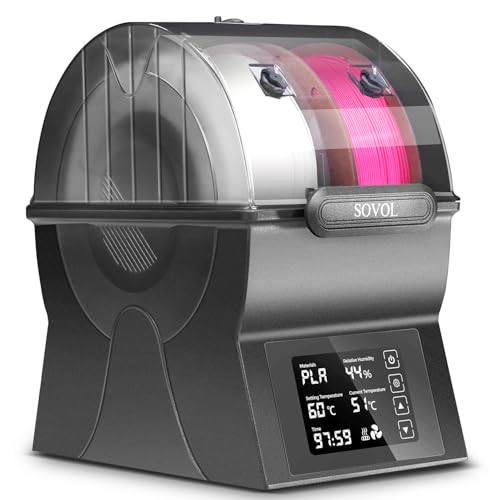
Sovol SH02 Filament Dryer Box

Polymaker Polydryer Filament Storage Box

Creality Space PI Filament Dryer

Creality Space Pi X4 Filament Dryer Box

SUNLU S4 3D Printer Filament Dryer
What Each Pick Brings To The Table
The SUNLU S2 is the unit most people picture when they think of a filament dryer: one spool inside a rounded black shell, fed straight to your extruder through the top port. A large screen handles all the settings, so there is no fumbling with tiny buttons in a dim workshop.
Its 70°C ceiling covers every common material you are likely to run, from TPU and PLA up through PETG and ABS. For a first dryer, that simplicity matters more than raw power.
Practical Pluses
- Large display makes temperature and timer changes obvious at a glance, even across a busy bench.
- 70°C maximum heat handles TPU, PLA, PETG, and ABS without guesswork.
- Doubles as sealed storage between prints, so a spool stays dry for weeks.
- Single-spool footprint fits crowded desks where bigger boxes will not.
Things To Consider
- One spool per cycle means longer total wait times for anyone juggling several materials.
- The curved lid seal deserves an occasional wipe; dust buildup there can loosen the fit over months.
Key Specs
Made For
Hobbyists running their first or second printer who want one dependable box that dries, stores, and feeds a single spool.
A Better Fit Elsewhere
Anyone feeding two printers at once should look at the Sovol SH02 below, which dries two rolls simultaneously.
Where the SUNLU S2 commits to one spool, the JAYO J1 plays a modular game. Its split construction means each half works independently, and you can stack additional units later as your printer count grows. That flexibility is rare at this end of the market.
Inside, a 150W PTC heater (PTC stands for positive temperature coefficient, a self-regulating heating element) pushes the chamber to 70°C quickly, which helps rescue spools that have already gone soft with moisture. Even heating matters here: uneven warmth leaves damp patches that show up as stringing hours into a long job.
Positive Takeaways
- 150W PTC element brings soaked PLA, PETG, and ABS back to printable condition fast.
- Split, stackable body lets you scale from one unit to several without replacing anything.
- Consistent chamber heat translates to fewer bubbles and nozzle clogs during marathon prints.
Small Caveats
- Stacked configurations eat vertical clearance, so measure your shelf before committing.
- Owners commonly report wanting clearer documentation on linking multiple units together.
Right Fit For
Tinkerers building a two- or three-printer corner who would rather add small modules than buy one large cabinet.
Swap It Out When
Bench space is tight and you only ever dry one roll at a time; the compact Creality Space PI later in this list takes up less room.
The Sovol SH02 answers a question single-spool boxes cannot: what happens when two printers need dry filament at the same time? Two PTFE ports sit on the housing, positioned so they reach extruders mounted in different spots, and the chamber holds two 1kg rolls side by side.
Operation stays friendly thanks to a touch screen with a one-key preset approach, so you are not scrolling through menus before every print. Compared with the JAYO J1’s modular route, the SH02 gets you dual capacity in one purchase instead of two.
Where It Helps
- Two filament holes accommodate printers with varied extruder placements.
- Dries a pair of 1kg spools simultaneously, halving queue time for dual-machine setups.
- Touch screen with one-key operation removes menu hunting from daily use.
- Handles both 1.75mm and 2.85mm filament diameters.
Potential Drawbacks
- Running PTFE tube from the box to a distant printer adds drag; keep runs short for smooth feeding.
- Two-spool width demands a wider shelf than single-spool rivals like the SUNLU S2.
Feature Snapshot
Who Should Grab It
Anyone running two printers side by side who wants one box doing double duty instead of two separate dryers.
Consider Something Else When
Nylon and ASA shooters may prefer the Polymaker Polydryer next, whose print-without-opening design suits hygroscopic materials better.
Polymaker built its reputation on engineering-grade filament, and the Polydryer reflects that pedigree. The headline trick is its three-in-one role: it dries a spool, seals it for storage, and feeds your printer without ever breaking the lid seal. That last part is the quiet advantage, because every time you crack open a normal dryer mid-print, humid air rushes in.
Controlled heating paired with even airflow keeps material conditioned before and during a job, which shows up as steadier layers on demanding polymers. Unlike the Sovol SH02’s dual-spool layout, this one concentrates on doing a single 1kg roll extremely well.
Standout Benefits
- Print directly from the closed box, keeping ambient humidity out during long jobs.
- Heat control with promoted airflow supports stable results on finicky materials.
- Accepts 1.75mm, 2.85mm, and 3.00mm filament, including PA nylon, ASA, ABS, PETG, PLA, and TPU.
- Storage mode protects spare spools between projects without extra containers.
Honest Caveats
- Single-spool capacity means batch-drying a backlog takes several cycles.
- The gasket-style seal needs periodic inspection; owners note it performs best kept clean and uncompressed.
Whose Shelf It Belongs On
Printers working with nylon, ASA, or other moisture-hungry engineering filaments where a broken seal costs real quality.
Reach For A Different Pick When
Volume matters more than seal integrity; the SUNLU S4 at the end of this list dries four spools per cycle.
Creality’s Space PI earns its spot through heat distribution. An internal fan circulates warm air a full 360 degrees around the spool, driven by a 110W PTC heater, so the filament closest to the element does not cook while the outer wraps stay damp. Uniformity is what turns a decent dryer into a good one.
The unit runs on standard 110V household power and supports both 1.75mm and 2.85mm material across nylon, ABS, PETG, PLA, and TPU. Against the larger SUNLU S2, it trades some storage polish for that active-air circulation.
Key Advantages
- 360° fan-driven airflow reaches every wrap of the spool evenly.
- 110W PTC heater warms the chamber quickly without complex controls.
- Standard 110V input plugs into any ordinary outlet near your bench.
- Broad material support spans nylon down to flexible TPU.
Less Ideal Details
- A spinning fan adds a faint hum; light sleepers printing overnight may notice it.
- Single-spool throughput slows bulk-drying sessions compared with four-spool units.
Quick Facts
Who Will Love This
Desk-bound makers with limited space who still want genuinely even drying rather than radiant heat alone.
Where A Sibling Pick Shines
Anyone drying four spools weekly will find the Creality Space Pi X4 far more efficient per session.
Step up to the Space Pi X4 and the conversation shifts from convenience to throughput. Four standard 1kg spools fit inside, or two oversized 2kg rolls if you buy filament in bulk. Dual independent heating chambers, each rated to 200W and reaching 85°C, mean one batch can dry while another holds at storage temperature.
That 85°C ceiling is worth pausing on: it sits comfortably above the 70°C limit shared by most budget boxes, which gives high-moisture nylons a proper bake. In our view, this is the point where a dryer stops being an accessory and starts being infrastructure.
What Helps Most
- Holds four 1kg spools or two 2kg spools, covering a week of heavy printing.
- Two independent 200W chambers let you dry and store different materials at once.
- 85°C maximum temperature handles demanding polymers basic boxes cannot.
- Works with both 1.75mm and 2.85mm filament.
Points To Keep In Mind
- The larger chassis claims meaningful bench real estate; plan its home before ordering.
- Dual chambers draw more power overall than single-box units like the Space PI.
- Four-spool loading takes a few minutes of careful arrangement each cycle.
Details At A Glance
The Right Fit
Small print farms, classrooms, and prolific hobbyists cycling through multiple spools every week.
Not Your Match When
Solo printers with one machine and modest filament turnover will find the SUNLU S2 easier to live with.
SUNLU closes the list with the S4, a four-spool machine built around brute heating muscle. A 350W PTC element anchors the system, and three circulation fans push air around the chamber so all four rolls see consistent temperatures rather than relying on proximity to the heat source.
The practical payoff lands hardest during print-and-dry sessions, when a spool feeds your machine while three others finish conditioning beside it. Compared with the Creality Space Pi X4’s twin-chamber approach, the S4 goes wide with one big heated volume and heavy airflow instead.
Useful Touches
- Four 1kg spools dry per cycle, cutting batch time dramatically for busy workshops.
- Three fans deliver surround airflow for uniform temperature across the load.
- 350W PTC heater provides strong thermal headroom for stubborn moisture.
- Dry-while-printing workflow keeps fresh material flowing to the nozzle.
Trade-Offs To Consider
- Higher wattage draws noticeably more electricity than entry-level boxes during long cycles.
- The four-spool interior benefits from occasional dusting; neglected vents can restrict fan performance over time.
The Numbers That Matter
Best Suited To
Operators running several machines daily who need a steady supply of freshly dried filament without babysitting cycles.
Another Choice May Suit
Those wanting independent temperature zones per batch should weigh the Creality Space Pi X4, whose dual chambers split duties differently.
Choosing Between These Dryers Without Regret
Match Heat To Your Materials
Temperature ceiling is the spec that decides everything else. PLA and PETG dry comfortably at moderate settings, but nylon genuinely benefits from the 85°C headroom found on the Creality Space Pi X4. Check your most expensive spool first, then buy to that number rather than settling for the lowest option on the shelf.
Count Your Printers Honestly
A single-spool box like the SUNLU S2 serves one machine beautifully, yet two printers sharing one dryer creates a bottleneck you will feel within a week. Dual-port models such as the Sovol SH02, or four-spool cabinets like the SUNLU S4, remove that friction entirely. Buy for the setup you actually run, not the one you might build someday.
Think About Where It Lives
Footprint and noise deserve real thought. Fan-equipped units circulate air effectively but hum softly during operation, which matters in bedrooms or shared offices. Measure your shelf height too; stacked modular systems and tall four-spool enclosures both demand more clearance than their product photos suggest.
Factor In Daily Handling
Lid seals, touch screens, and PTFE ports all see constant use. Boxes designed for print-without-opening workflows, such as the Polymaker Polydryer, reduce how often you disturb the chamber, and that habit difference compounds over months of ownership.
Key Considerations Across These Picks
Traps First Timers Fall Into
The most common mistake is buying a dryer rated below your filament’s needs, then wondering why nylon still strings. The second is ignoring capacity: drying one spool at a time for a three-printer bench turns into a scheduling chore. Read the wattage and temperature specs against your actual material lineup before committing.
What Separates Premium From Basic
Paying more typically buys wattage, capacity, and control. A 350W heater with triple fans recovers heat faster and dries deeper than a 110W entry unit, and dual chambers let you dry and store simultaneously. Heavy users recoup that premium in saved spools and failed prints; casual makers usually will not.
Frequently Asked Questions
How do I know my filament actually needs drying?
Listen for popping or sizzling sounds as the filament enters the hotend, and watch for stringing, bubbling, or rough surfaces on printed parts. Those symptoms point to absorbed moisture releasing as steam during extrusion.
Can I leave filament in a dryer box permanently?
Most of these units double as sealed storage between prints, which is exactly what manufacturers intend. Running the heater continuously is unnecessary; the sealed chamber alone slows moisture absorption considerably.
Do I need a dryer for PLA?
PLA absorbs less moisture than nylon or PETG, but it is not immune, especially in humid climates or after months of open storage. Many owners report noticeable surface improvements on older PLA spools after a drying cycle.
Does drying filament while printing work well?
Yes, and it is the main reason these boxes have output ports for PTFE tubing. Feeding directly from a heated chamber keeps the filament dry right up to the nozzle, which helps most on long prints.
How often should spools be re-dried?
It depends on your local humidity and the material. Hygroscopic filaments like nylon may need refreshing every couple of weeks in damp environments, while PLA stored sealed can go months between cycles.
Closing Remarks
Every printer owner eventually meets damp filament, and the fix costs less than most people expect. Start by matching temperature rating to your most demanding spool, then size the capacity to your real workload. One of these seven will fit your bench, your budget, and your printing habits without strain.
