
Getting artwork off a screen and onto canvas usually means paying a print shop by the piece. The six options below change that math for hobbyists, home studios, and small businesses that ship or sell printed work regularly. Some are full printers, one is a screen printing kit, and one is simply the right paper, because “canvas printing machine” covers more ground than most shoppers expect.
The Picks In Brief
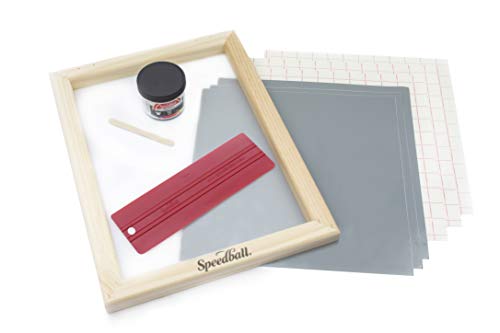
Speedball Beginner Screen Printing Craft Vinyl Kit

Epson Workforce Pro WF-7310 Wide-Format Printer

Liene Amber M110 Bluetooth Photo Printer 80 Sheets

15Pcs Canvas Printer Paper for Inkjet Printers 8.5×11

Canon imagePROGRAF TC-21 24" Large Format Printer
More On The Choices That Made The List
Screen printing has a reputation for messy emulsions and chemical washout booths. This Speedball kit sidesteps all of it by letting you cut your design from vinyl on a cutting machine, apply it to the included 10×14 wood frame and mesh, and pull ink through with the bundled Red Baron squeegee.
The result is a stencil-based setup that works in a spare bedroom or kitchen table without ventilation worries. For anyone who already owns a vinyl cutter and wants to move into fabric printing, this is the gentlest entry point on the list.
Noteworthy Benefits
- Combines vinyl crafting with traditional screen printing, so existing cutting machines become print tools.
- Runs without photo emulsion or reclaiming chemicals, which keeps cleanup to soap and water territory.
- Includes the core hardware: frame with mesh, Red Baron squeegee, and fabric screen printing ink.
- A realistic way to produce custom t-shirts and home decor pieces in small batches at home.
Honest Caveats
- Vinyl stencils limit fine detail compared with photographic emulsion screens, so intricate line work may not survive weeding.
- You still need a separate cutting machine; the kit assumes you already have one.
Made For
Crafters with a vinyl cutter who want their first taste of fabric printing without investing in darkroom equipment.
A Better Fit Elsewhere
Shoppers chasing true photo-quality canvas reproduction will get further with the Epson Workforce Pro WF-7310 instead.
Where the Speedball kit handles fabric, the Epson WF-7310 handles paper, and lots of it. This all-in-one inkjet prints up to 13×19 inches, with borderless output at 11×17, which covers poster proofs, marketing sheets, and canvas-textured stock like the Yncotte sheets later in this list.
In a working home studio, that size range matters: you can proof a design at scale before committing to a large canvas run. Owners commonly report the dual trays and wireless setup make it behave like a small office machine rather than a hobby printer.
Strengths Worth Knowing
- Wide-format capability up to 13×19 gives small businesses real poster and signage output in-house.
- All-in-one functions mean scanning and copying originals alongside printing, useful for reproducing sketches.
- Wireless connectivity lets several people in a shared workspace send jobs from their own devices.
- Optional protection plans covering drops, spills, and breakdowns are available for added peace of mind.
Things To Consider
- It’s an office-oriented inkjet, so gallery-grade color depth on fine art media may fall short of dedicated photo printers.
- The footprint demands a dedicated desk or table; this isn’t a shelf-sitter.
At A Glance
Who Should Grab It
Home-based sellers and designers who need dependable wide-format document and graphics printing every week.
Where A Sibling Pick Shines
Anyone focused purely on dye-sublimation transfers will find the Brother sublimation printer a more purpose-built match.
Dye-sublimation is the process behind those vivid mugs, shirts, and coasters sold at craft fairs: special ink turns to gas under heat and bonds permanently into polyester surfaces and coated blanks. This Brother printer is built around that workflow from day one, paired with the Artspira app for importing and saving up to 20 images and converting photos into poster-style designs on the go.
Compared with the Epson WF-7310’s general-office approach, everything here points toward craft production. The trade-off is scope: sublimation only works on compatible blanks, so it won’t replace a document printer.
The Case For It
- Purpose-built for dye-sublimation, avoiding the conversion hacks common with standard inkjets.
- Artspira integration stores up to 20 designs and offers patterns plus image-to-poster conversion from a phone.
- Protection plans covering accidental damage and power surges can be added at purchase.
- A natural companion to heat presses for anyone selling personalized goods at markets or online.
Small Limitations
- Sublimation ink bonds only to polyester fabrics and polymer-coated items, limiting material choice.
- Owners frequently note idle printers need occasional printing to keep nozzles clear, a maintenance habit worth building.
Feature Snapshot
Right Fit For
Craft-market sellers and hobbyists already running a heat press who want a dedicated, app-friendly transfer printer.
Swap It Out When
Shoppers printing mostly documents and posters should stay with the Epson WF-7310, which handles both far more broadly.
This one shrinks the category down to something that fits in a tote bag. The Liene Amber M110 uses thermal dye-sublimation, the same layered-dye method found in photo kiosks, to produce 4×6 prints and 3-inch sticker-backed squares straight from a phone over Bluetooth.
The bundle arrives generously stocked: 60 sheets of 4×6 paper, 20 square sticker sheets, and two cartridges, enough for a wedding guestbook table or a craft fair demo booth before you reorder anything. It won’t touch canvas sizes, but as an on-the-spot output device it’s hard to argue with.
Positive Takeaways
- Dual tray design handles both 4×6 photo paper and 3-inch sticky-backed sheets without swapping hardware.
- Bluetooth pairing means no computer; guests can print from phones directly at events.
- The 80-sheet bundle keeps you printing through a full event before restocking.
- Thermal dye-sub output resists the smudging typical of wet ink on glossy stock.
Points To Keep In Mind
- Output tops out at snapshot sizes, so wall-art ambitions need one of the larger picks here.
- Cartridge-and-paper refills are a recurring cost tied to the brand’s own consumables.
Whose Shelf It Belongs On
Event photographers, scrapbookers, and families who want physical prints minutes after taking the shot.
Another Choice May Suit
Studio-scale canvas work calls for the Canon imagePROGRAF TC-21 reviewed below, which plays in a completely different size league.
Sometimes the smartest canvas printing machine purchase is no machine at all. These Yncotte sheets are 280gsm printable canvas texture in standard letter size, made specifically for inkjet printers, including models like the Epson XP-15000 and Canon PIXMA Pro series. Feed one through and your existing printer becomes a canvas printer.
The catch sits in the fine print, and it matters: print on the glossy side only, and finished sheets aren’t machine washable or suited to sewing and quilting. Treated as framed or mounted art stock, though, fifteen tear-resistant sheets go a long way for gifts and portfolio pieces.
Notable Upsides
- Adds genuine canvas texture to any inkjet output without new hardware.
- 280gsm weight feels substantial under glass or in a frame, closer to gallery stock than copy paper.
- Tear-resistant coating survives handling during mounting and framing.
- Letter sizing fits standard frames, making gift prints quick to finish.
Worth Bearing In Mind
- Glossy-side-only printing trips up first-timers, so wasted sheets are common until the habit sticks.
- No washing and no needlework: these are display-only sheets, not fabric.
Quick Facts
The Right Fit
Budget-conscious artists and gift makers whose inkjet already handles photo quality well.
Consider Something Else When
Volume printing beyond letter size points back to the Epson WF-7310 or the Canon TC-21, both built for bigger runs.
Everything before this point produces prints; the Canon TC-21 produces products. Its 24-inch roll feed handles full poster and canvas-sheet widths, with an automatic sheet feeder alongside for cut stock, and a four-color ink system aimed at crisp text alongside saturated imagery.
Canon ships it with 280 ml of ink, 70 ml per color, which is a meaningful head start given how quickly wide-format machines drink cartridges. For a print shop corner, a school art department, or a seller moving framed canvas regularly, this is the step where output starts paying for itself.
Key Advantages
- 24-inch roll capacity opens up true poster and multi-panel canvas work.
- Automatic roll and cut-sheet feeding switches formats without manual reloading gymnastics.
- The bundled 280 ml ink set delays the first refill cycle considerably.
- Four-color output balances sharp lettering with punchy graphics on varied media.
Factors To Consider
- It needs serious desk or floor space plus clearances for a 24-inch roll path.
- Consumable costs scale with output volume, so light users won’t see the value.
Core Details
Who Will Love This
Working studios, classrooms, and small businesses producing poster-scale or sellable canvas output weekly.
Not Your Match When
Occasional crafters should stick with the Yncotte canvas paper and their current inkjet rather than stepping up to pro hardware.
What Matters Most Before Choosing Canvas Printing Machines
Match The Machine To Your Output Size
Measure what you actually plan to hang or sell. Letter-size art prints suit the Yncotte paper route, while anything wider than 17 inches pushes you toward the Canon TC-21’s roll feed. Buying bigger than needed mostly buys unused desk space.
Count The True Cost Of Consumables
Ink and media dominate long-term spending in this category. Dye-sublimation ties you to proprietary cartridges, wide-format printers reward bulk ink, and screen printing ink goes surprisingly far once the kit is paid off.
Think About Workflow, Not Just Hardware
The Brother’s Artspira app and the Liene’s Bluetooth pairing exist because phone-first creators skip the desktop entirely. Choose the input style matching how you already work, or the machine becomes shelf decoration.
Key Considerations Across These Picks
Wrong Turns To Avoid
A frequent misstep is buying wide-format horsepower for snapshot-sized needs, then eating high ink costs on tiny jobs. The opposite error hurts too: choosing a compact photo printer for projects that actually demand 24-inch rolls. Check media compatibility before checkout, since sublimation ink and canvas paper serve entirely different ends.
When Paying More Pays Off
Higher-tier machines earn their price through width, ink capacity, and duty cycle. The Canon TC-21’s bundled 280 ml ink set alone offsets much of its premium for anyone printing weekly. Casual users rarely reach that threshold, which is exactly why the budget-friendly paper option exists on this list.
Frequently Asked Questions
Can a regular inkjet printer print on canvas?
Yes, with specially coated canvas sheets like the Yncotte 280gsm stock. Standard printers handle them like thick photo paper, provided you print on the glossy side.
What’s the difference between dye-sublimation and inkjet printing?
Dye-sublimation turns solid dye into gas that bonds into polyester or coated surfaces, producing durable transfers. Inkjet sprays liquid ink onto the surface of paper or canvas.
Do I need a heat press for sublimation printing?
For most projects, yes. The Brother printer creates the transfer sheet, but a heat press applies the heat and pressure that bond the design to your blank.
How large can home canvas prints realistically get?
Consumer inkjets top out around 13×19 inches borderless, as with the Epson WF-7310. Beyond that, a 24-inch roll-fed machine like the Canon TC-21 takes over.
Is screen printing cheaper than digital canvas printing?
Per piece, screen printing wins at volume once the kit is owned. For one-off art reproductions, inkjet canvas paper is faster and cheaper overall.
Closing Remarks
The right choice comes down to honest self-assessment about size, volume, and how often you’ll actually press print. Crafters starting out get real value from the Speedball kit or the Yncotte sheets, while growing studios justify the Epson or Canon step up. Whatever you choose, buy for the work you do now and let the upgrade come naturally.
