
Selling engraved tumblers at a farmers market or cutting acrylic signs on commission changes what you need from a laser. Hobby machines stall on thick stock, and slow engraving speeds turn every order into an evening lost. This roundup focuses on machines built to keep up with paying work: higher optical output, larger beds, faster travel speeds, and the accessories that make a workshop actually livable. You’ll find everything from a budget-friendly starter diode to a 40W cutter with a rotary bundle, plus a smoke purifier worth adding before your first big job. Each entry below breaks down where it earns its place, where it falls short, and who should buy something else instead.
A Snapshot Of The Selections
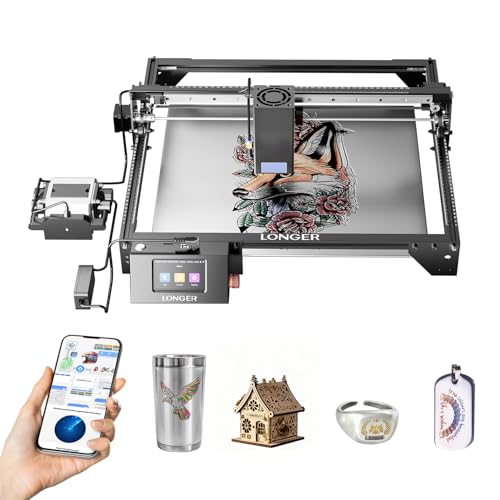
Longer RAY5 Laser Engraver Cutter, 15.16″ x 15.16″

Twotrees TTS-55 Pro Laser Engraver 5500mW

xTool S1 40W Laser Cutter and Engraver, Rotary Bundle

Creality 10W Laser Engraver Machine, 17″ x 16″

LONGER Ray5 40W Laser Engraver and Cutter

xTool SafetyPro AP2 Smoke Purifier

ATOMSTACK A20 Pro V2 20W Laser Engraver
Taking A Closer Look At The Options
The upgraded RAY5 puts 40W of optical power over a square 15.16-inch work area, which is enough real estate for a full sheet of coasters or a mid-size sign without repositioning material. Its laser enhancement technology pushes cutting depth well past typical hobby diodes, so a small shop can take orders that used to require outsourcing.
In a working week, that depth matters most. Wood, dark acrylic, and even thin stainless steel come off the bed in fewer passes, which shortens turnaround on repeat orders. The trade-off shows up in footprint and price, both of which sit above entry-level machines.
Points In Its Favor
- Cuts roughly 20mm wood in a single pass, saving setup time on thick stock
- Handles black acrylic around 30mm deep, rare territory for diode lasers
- Marks stainless steel down to about 0.15mm thickness for metal tags and plates
- Fast travel speed keeps long production runs moving
- Square bed suits consistent batch layouts
Things To Consider
- The 40W module draws serious power, so confirm your circuit and ventilation before installing
- Larger frame demands dedicated bench space you may not have in a spare room
Key Specs
Who It Suits Best
Sellers producing cut wood or acrylic goods weekly will get the most from this machine’s depth and speed.
Where Another Pick Suits Better
Anyone just learning the craft should start with the Twotrees TTS-55 Pro instead, since its lower cost softens early mistakes.
Not everyone needs 40 watts on day one. The TTS-55 Pro runs a 5.5W diode in an aluminum-and-plastic frame, and its headline upgrade is practical rather than flashy: a metal air-assist nozzle ships in the box. Air assist blows a stream of air at the burn point, clearing smoke and debris so edges stay cleaner and cuts go deeper.
That inclusion matters because beginners usually skip the accessory, then wonder why their cuts look scorched. A red laser shield adds another layer of protection while you learn alignment and focusing. Compared with the Longer RAY5 above, this machine sacrifices raw depth for a gentler learning curve and a smaller bill.
Positive Takeaways
- Air-assist nozzle included, giving cleaner cuts without a separate purchase
- Red laser shield improves visibility of the beam position during setup
- Lightweight aluminum-plus-plastic build moves easily between desks
Worth Noting
- At 5.5W, thick hardwood and clear acrylic cutting are largely off the menu
- The plastic frame components may flex under rough handling, so treat the gantry gently during transport
Made For
First-time engravers practicing on wood, leather, and card stock before committing to heavier equipment.
Consider Something Else When
Once paid orders demand deep cuts, step up to the Creality 10W model below for double the output at a modest increase.
This is the production machine of the group. The S1 pairs a 40W laser with a 23.93-by-15.16-inch bed, wide enough for door signs, and engraves at up to 600mm/s. That speed translates directly into output: a large batch like dozens of dog tags fits on one plate, and the rotary attachment in this bundle handles cylindrical items such as tumblers automatically.
For anyone selling personalized drinkware, the rotary alone can justify choosing this over the Longer RAY5, which covers similar wattage but not curved work out of the box. Expect a bigger machine to manage, though, both physically and in learning curve.
Practical Advantages
- Rotary bundle supports tumblers and bottles without third-party add-ons
- Oversized bed fits large-format projects and dense batch layouts
- 600mm/s top speed shortens per-item time noticeably on bulk orders
- Single-pass cuts through 18mm cherry wood reduce handling
Trade Offs
- The large footprint needs a sturdy, dedicated workstation
- More capability means more settings to learn before results look professional
At A Glance
Right Fit For
Established sellers running tumbler, tag, or signage lines who need throughput more than portability.
Look Elsewhere When
Desk-space-limited crafters should weigh the ATOMSTACK A20 Pro V2 later in this list, which delivers strong precision in a smaller frame.
The honest appeal here is value: 10W of true optical output and a 72W machine rating at a price point well under the 40W tier. Creality specs a 0.06mm focal spot, finer than most competitors list, which shows up in crisp text and detailed line art on wood, paper, and leather.
It still cuts, mind you. Basswood around 5mm and black acrylic near 3mm fall in one pass, and travel speeds reach 10,000mm/min. Against the Twotrees TTS-55 Pro, you’re trading the included air nozzle for roughly double the power and a wider bed. In our view, that swap favors the Creality for anyone past the absolute beginner stage.
What Pays Off
- 0.06mm precision spot produces sharp detail on intricate designs
- One-pass cutting of 5mm basswood handles common craft lumber easily
- Generous 17″ x 16″ area for the price bracket
- Works across paper, leather, plastic, dark acrylic, glass, and coated metals
Points To Note
- No bundled air assist mentioned, so cleaner cuts depend on buying that accessory separately
- Clear acrylic and thick hardwood remain beyond what 10W can handle comfortably
Quick Facts
Best Suited To
Cost-conscious makers doing detailed engravings on wood, leather, and slate who don’t yet need industrial depth.
Reach For A Different Pick When
Production deadlines involving thick acrylic point straight to the LONGER Ray5 40W reviewed next.
You’ve already met the RAY5 name once. This version shares the 40W module and its appetite for thick material, cutting black acrylic up to 30mm, wood around 20mm, and stainless steel near 0.15mm, but packages it around a metric-sized 385x385mm bed. Dual-beam technology combines two diodes into one focused point, concentrating energy where it counts.
The 32-bit mainboard is the quiet difference-maker here. Faster processing keeps motion smooth during high-speed runs, which owners commonly report reduces stutter artifacts on long curves. Between this and the item-one RAY5, choose by region sizing conventions and current listing terms; the hardware story is nearly identical.
What It Does Well
- 30mm black acrylic capacity in one pass suits signage shops
- Dual-beam design concentrates power for faster, deeper burns
- 32-bit controller sustains precision at speed
- Handles varied materials from steel to timber efficiently
Small Caveats
- High-power modules generate heat and fumes, so plan extraction and cooldown routines into each session
- Lens and mirror surfaces need regular cleaning to maintain cut quality over months of use
Who Will Love This
Workshops cutting dense acrylic and hardwood daily, where pass count directly affects profit margin.
Another Choice May Suit
Curved drinkware jobs belong with the xTool S1 Rotary Bundle, whose included rotary attachment this fixed-bed unit lacks.
Every laser on this list produces smoke and odor, and running one indoors without filtration gets old fast. The AP2 addresses that with six stacked filter layers and a SuperCyclone system that spins heavy particles out before they clog the main filters. The manufacturer claims removal of 99.99% of dust and odors, and the pull-out magnetic door makes swapping filters a thirty-second chore.
Cyclone pre-separation also stretches filter life considerably, which lowers ongoing costs over a year of regular use. At around 20 pounds it stays put on the floor beside your machine, and quiet operation matters in shared spaces. Pair it with the xTool S1 or any compatible diode or CO2 unit.
Everyday Perks
- Six-layer filtration captures dust and odor from wood, acrylic, and leather jobs
- Cyclone pre-separation extends filter life substantially, trimming yearly upkeep
- Magnetic pull-out door simplifies filter replacement
- Quiet running suits apartments and shared studios
Honest Caveats
- It’s an accessory, not a laser, so budget it alongside rather than instead of a machine
- Roughly 20 pounds makes relocation awkward despite the compact shape
Core Details
Perfect Match For
Home-based sellers engraving indoors who need clean air without window venting or loud extraction fans.
Swap It Out When
Garage workshops with existing external exhaust can skip this and put the money toward the Creality 10W engraver instead.
The A20 Pro V2 splits the difference between the budget Creality and the 40W heavies. Its 20W output uses dot compression technology, shrinking the beam to a 0.08-by-0.1mm dot, so engraving detail rivals machines costing far more. Business cards, pet tags, and gift boxes are squarely in its comfort zone.
ATOMSTACK’s in-house motherboard targets stability, and a Class 4 laser designation signals serious output that deserves careful shielding and eyewear discipline. Compared with the xTool S1, you give up bed width and the bundled rotary but gain a smaller bench footprint and sharper fine-line work.
What Works In Its Favor
- Compressed 0.08 x 0.1mm dot renders tiny text cleanly
- 20W output cuts wood and dark acrylic respectably for its class
- Proprietary mainboard emphasizes stable, repeatable operation
- Suits personalization products from gifts to business cards
The Fine Print
- Class 4 laser output requires proper protective glasses and controlled workspace access
- Bed dimensions aren’t specified in the listing data, so verify fit against your usual stock before ordering
Feature Snapshot
The Right Fit
Gift-personalization sellers prioritizing fine detail over raw cutting depth will find this a sweet-spot machine.
Not Your Match When
Large signage work calls for the xTool S1’s 23.93-inch bed rather than this compact frame.
What Matters Most Before Choosing Commercial Laser Engravers
Optical Power vs. Actual Cutting Depth
Wattage numbers mislead unless you read them carefully. A “40W” label often refers to electrical input, while optical output, the number that determines cutting ability, may be far lower. Check the optical figure first, then match it to your materials: 5W handles engraving only, 10W cuts thin plywood, and 40W reaches thick hardwood and acrylic in one pass.
Bed Size and Batch Workflow
Measure your most common stock before anything else. A 385mm-square bed suits coasters and tags, while door signs and long batches need the 600mm-plus widths of machines like the xTool S1. Bigger beds also mean bigger footprints, so sketch your workspace honestly.
Ventilation and Filtration
Every cut releases fumes, and indoor work without extraction builds residue on optics and lungs alike. Decide early whether you’ll vent through a window or run a filtered purifier like the AP2, because that choice shapes where the machine can live.
Support and Consumables
Diode lasers need occasional lens cleaning, belt tensioning, and eventual module replacement. Brands with active communities and stocked spare parts keep a machine earning years longer than orphaned models.
Key Considerations Across These Picks
Traps First Timers Fall Into
The classic error is buying on headline wattage and ignoring optical output, then discovering the machine won’t cut your material. Second is skipping air assist and filtration, which degrades cut quality and fills the room with smoke within minutes. Confirm both before checkout.
Why Top Tier Costs More
Higher-priced models pay for genuine optical power, rigid frames, faster controllers, and bundled accessories like rotaries. Volume sellers recoup that premium quickly through shorter job times, while casual users rarely will.
Frequently Asked Questions
Can a diode laser really cut metal?
Only very thin stainless steel, typically around 0.15mm, and only with high-power modules like the 40W units listed above. Thicker metal requires a fiber or CO2 system.
Do these machines work offline?
Most connect via USB or offer offline modes through onboard controls, but software setup generally happens on a computer first. Check each model’s connectivity options in the listing.
How often do filters and lenses need attention?
Lenses benefit from a quick wipe every few sessions, while purifier filters last months depending on usage volume. Cyclone-equipped systems stretch filter intervals considerably.
Is a rotary attachment necessary?
Anyone selling tumblers, bottles, or mugs will consider it essential. Flat-goods sellers can skip it entirely and save the cost.
What safety gear does laser engraving require?
Protective eyewear rated for your laser’s wavelength, adequate ventilation, and never leaving the machine unattended while firing. Class 4 units demand stricter controls.
Closing Thoughts
The right choice comes down to your materials and your order volume more than any spec sheet. Start with the Twotrees if you’re learning, step to the Creality for affordable power, and commit to the xTool S1 or a 40W Longer when paid work becomes routine. Add the AP2 purifier the day you move operations indoors. Whatever you choose, measure your workspace and stock first, then let those numbers decide.
