
Cutting machines cover more ground than most shoppers expect. A small craft cutter can turn a kitchen table into a sticker shop, while a guillotine trimmer sits quietly in a back office, slicing reams all day without complaint. The right pick depends entirely on what you’re slicing, how often, and how much room you have to spread out.
The list below mixes desktop paper trimmers, electronic craft cutters, and a heavier-duty saw, so you can match the tool to the job rather than the other way around. Office folks, hobby crafters, and weekend renovators all get a seat at the table.
A Snapshot Of The Selections
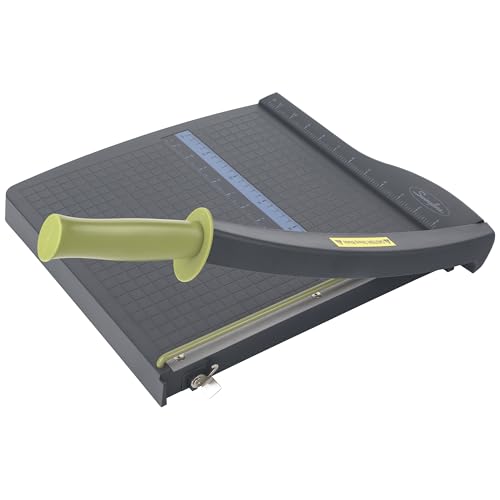
Swingline ClassicCut Lite Guillotine Trimmer 12″ Cut

HFS Heavy Duty Guillotine Paper Cutter 400 Sheet

Likcut S501 Vinyl Cutter Machine 4.5″ (Pink)

Silhouette Cameo 5 Alpha Smart Cutting Machine (White)

Cricut Joy Xtra Smart Cutting Machine

Cricut Maker 4 Smart Cutting Machine (Seashell)

SEESII Reciprocating Saw Cordless with 2 Batteries

Brother SDX125EGY ScanNCut Electronic Cutting Machine

6″ Manual Die Cutting Machine Kit (Blue)

Cricut Joy Xtra Cutting Machine and Smart Vinyl Bundle
More On The Choices That Made The List
The ClassicCut Lite is the kind of trimmer you forget is sitting on the shelf until you need it. Its 12-inch cut length lines up with standard letter and A4 paper, and the alignment grid printed on the base keeps stacks straight without forcing you to measure twice. Compared to the steel-bodied HFS cutter that comes later in this list, this Swingline trades raw power for portability, and most home offices are better off for that swap.
You won’t cut thick stacks here, and the blade is sharp enough to demand respect, so keep fingers clear. The plastic base is light, which means you can move it between desks or tuck it into a drawer between uses.
Features That Help
- Twelve-inch cutting length matches standard office paper, so most jobs need no setup adjustment.
- Lightweight plastic base moves easily between rooms or into storage.
- Printed alignment grid on the base helps you line up stacks without a separate ruler.
- Simple guillotine action means no learning curve for first-timers.
Things To Consider
- Ten-sheet capacity handles everyday paper work but not thick stacks.
- The exposed blade stays sharp, so storage away from children and pets matters.
- Plastic base is steady on a flat desk but can skate on smooth glass surfaces.
Feature Snapshot
Who It Suits Best
Home office users and teachers handling a steady trickle of handouts will find the size and price easy to live with.
Where Another Pick Suits Better
The HFS Heavy Duty Guillotine Paper Cutter 400 Sheet serves print shops and mailrooms that push through far thicker stacks per session.
Where the Swingline handles envelopes and flyers, the HFS paper cutter handles reams. The solid steel frame and built-in clamp put even pressure across the whole cut line, which keeps tall stacks from shifting mid-slice. Versus the lightweight Swingline ClassicCut Lite covered earlier, this is the muscle-bound sibling that belongs on a dedicated workbench.
It’s not subtle, and it shouldn’t be. The 21-by-15-inch base needs a real surface, and the 13.5-inch total height with the bar raised demands a healthy swing arc. For print rooms, school copy stations, and serious home offices, that footprint is the point.
Real-World Strengths
- Steel construction absorbs the force of thick stacks without flexing.
- Built-in clamp holds paper flat, which improves cut accuracy on tall stacks.
- Maximum cutting width covers 12-inch sheets in one pass.
Worth Noting
- Large footprint needs a dedicated workbench or counter.
- Sharp blade and powerful lever mean clear training for new users.
Made For
Print shops, school workrooms, and mailrooms that need to trim reams quickly and cleanly.
Consider Something Else When
Home crafters making cards and labels get more value from a desktop electronic cutter like the Silhouette Cameo 5 Alpha.
The Likcut S501 leans into the fun side of crafting. Its 4.5-inch cutting width targets stickers and cardstock, and the pink color makes it hard to lose on a crowded desk. Where the Swingline guillotine earlier in this list cuts with a single blade stroke, this machine draws designs from text or voice prompts and rolls them out as finished cuts.
For a teen craft nook or a small business making labels, that hands-on convenience matters. The narrow width does mean sticker sheets need to be trimmed down before feeding, depending on the project.
The Helpful Details
- Voice and text-to-design workflow skips the steep learning curve of design software.
- Compact 4.5-inch cutter fits on a small craft shelf or dorm desk.
- Targets both vinyl stickers and cardstock in a single device.
Trade Offs
- Narrow width limits large-format sticker runs.
- Specialty materials may need calibration before each session.
Best Suited To
Sticker hobbyists, party planners, and small craft sellers who want quick designs without learning vector software.
Look Elsewhere When
Heavier vinyl and print-and-cut projects call for the wider bed of the Silhouette Cameo 5 Alpha.
The Cameo 5 Alpha is the quietest cutter in the Silhouette lineup, which matters more than it sounds during late-night craft sessions. Its 4-point registration system handles print-and-cut work, lining up printed designs with cut lines so stickers and heat transfers land where you drew them. Set against the Likcut S501 covered above, this machine trades voice prompts for a more capable design studio and a longer material list.
The included Studio software does take some patience, and the AutoBlade helps but isn’t magic on thick leather or dense felt. For most vinyl, paper, and light fabric projects, though, the workflow is smooth.
A Favorable Mix
- Quiet operation keeps shared spaces livable during long projects.
- 4-point registration improves accuracy on print-and-cut sticker runs.
- Compatible with vinyl, paper, and fabric on a single tool head.
- Studio software supports detailed design work for serious crafters.
Small Caveats
- Studio software has a learning curve for new users.
Who Will Love This
Small studio owners and serious hobbyists who want quiet, accurate cuts across several materials.
Skip It When
Beginners looking for the simplest possible first cutter get a friendlier starting point with the Cricut Joy Xtra.
The Joy Xtra shrinks the Cricut experience down to a footprint that fits on a bookshelf. It cuts, writes, draws, and foils, covering the project types most beginners ask about, from full-color stickers to custom cards. Compared to the Silhouette Cameo 5 Alpha, it sacrifices some material range for a smaller machine and an app-driven workflow that feels friendlier to new users.
The trade-off is a tighter cutting width, so long banners and oversized decals won’t fit. For apartment crafters and label-makers, that’s an easy compromise.
Key Advantages
- Small footprint works in apartments, dorms, and tight home offices.
- App-based design tools keep the setup process simple.
- Handles cutting, writing, drawing, and foiling in one device.
- Bundled digital content helps you start projects right away.
A Few Limitations
- Shorter cutting width rules out large-format banners.
- App dependency means offline sessions are limited.
Perfect Match For
Small-space crafters who mainly make labels, cards, and stickers will find the size and simplicity hard to beat.
Another Choice May Suit
The Cricut Maker 4 takes over once you want to cut leather, engrave metal, or tackle bigger sheets.
The Maker 4 sits at the top of the Cricut family, and the Seashell finish is the only thing gentle about it. It engraves metal, debosses leather, slices thick chipboard, and still handles the everyday vinyl and paper work that the Joy Xtra covers. The big difference versus the Joy Xtra is tool range: you trade a smaller footprint for a much longer list of compatible materials.
You won’t need half those tools on day one, and the up-front learning curve is real. If you grow into the machine, the material library pays off in projects you couldn’t tackle otherwise.
Bright Spots
- Broadest material range in the Cricut line, from cardstock to metal.
- Engraving and debossing tools open premium project categories.
- App and Studio integration work smoothly together.
Points To Note
- Premium tool heads are sold separately and add up quickly.
- Larger footprint needs a real work surface.
- Steepest learning curve of any Cricut model.
Feature Snapshot
Who Should Grab It
Serious crafters and small-business owners ready to invest in a versatile workhorse will get the most from the Maker 4.
Reach For A Different Pick When
Casual users making labels at home will do just as well with the smaller Cricut Joy Xtra.
The SEESII reciprocating saw steps away from paper and craft entirely. It’s a demolition and remodeling tool, with two 4.0Ah batteries and six blades covering wood, metal, and plastic. The cordless setup means no extension cord to drag through a basement or yard, and the fast-charging batteries keep downtime short between cuts.
Versus the HFS guillotine covered earlier, this is a different job altogether: rough cuts on heavy materials, not clean lines on reams. For most homes it lives in the garage, not the office.
What Earns Its Place
- Two batteries keep the saw running through longer projects.
- Six included blades handle wood, metal, and plastic out of the box.
- Cordless design works anywhere a power outlet can’t reach.
Possible Compromises
- Reciprocating saws produce rough cuts compared to circular or jigsaw tools.
- Storage space for blades and batteries needs planning.
Built With In Mind
Weekend renovators, garage tinkerers, and homeowners tackling light demolition jobs.
Swap It Out When
Office paper work belongs on the Swingline ClassicCut Lite or the HFS Heavy Duty Guillotine Paper Cutter.
The ScanNCut’s biggest trick is the built-in scanner, which lets you capture a drawing or fabric swatch and turn it into a cut file without leaving the machine. Materials up to 3mm thick, like felt and foam, cut cleanly with the auto-adjusting blade. Compared to the Silhouette Cameo 5 Alpha, this Brother leans harder into standalone use and skips the design-software requirement for many projects.
The 680-plus built-in designs cover a lot of ground, and the scanner turns hand-drawn sketches into usable patterns. It feels closer to a craft companion than a computer add-on.
The Case For It
- Built-in scanner converts drawings and patterns into cut files.
- Auto Blade adjusts to material thickness automatically.
- Large library of built-in designs covers many project types.
- Handles felt, foam, and fabric up to 3mm thick.
Points To Keep In Mind
- Standalone workflow is less flexible than app-driven cutters for complex designs.
Whose Shelf It Belongs On
Quilters, felt-craft hobbyists, and pattern makers who sketch by hand and want cuts without a computer step.
A Better Fit Elsewhere
Vinyl-heavy projects and print-and-cut workflows run more smoothly on the Silhouette Cameo 5 Alpha.
The manual die cutting machine skips power entirely, which means it costs less, weighs less, and never needs a software update. The 6-inch opening accepts standard embossing folders and dies, and the handle design keeps cranking comfortable during long scrapbooking sessions. Set against the electronic Cricut Joy Xtra, this is a slower tool that rewards patience with simplicity.
You’ll trade speed for portability, and the included starter accessories help new users hit the ground running. For a kid’s craft corner or a budget scrapbooker, that trade is fair.
Useful Strengths
- Manual operation means no power outlet or software required.
- Compact 6-inch width stores on a shelf or in a craft tote.
- Starter accessories included for first projects.
- Low cost makes it a forgiving first cutter.
Room For Improvement
- Manual cranking slows down high-volume projects.
- Die shapes sold separately expand the project library over time.
The Right Fit
Beginning scrapbookers and cardmakers who want a low-cost, no-electricity starting point.
Not Your Match When
Vinyl and decal projects move faster on the Cricut Joy Xtra.
This bundle wraps the Joy Xtra in everything needed for vinyl decal projects from day one. The rainbow permanent vinyl, transfer tape, basic tools, and digital design guides remove the guesswork that frustrates first-time vinyl users. Compared to the standalone Joy Xtra reviewed earlier, the bundle cuts out the back-and-forth ordering step that often stalls new projects.
It targets a very specific use case: labels, decals, water bottles, classroom organization, and similar personal vinyl work. The materials are consumable, so expect to reorder vinyl as projects grow.
Practical Advantages
- All-in-one bundle removes guesswork for first-time vinyl users.
- Design guides shorten the learning curve on the app workflow.
- Compact machine fits small craft spaces.
- Transfer tape included for proper decal application.
Less Ideal Details
- Consumable vinyl supply runs out with heavy use.
- Smaller bed limits larger decal designs.
Who Should Grab It
Vinyl decal beginners and classroom organizers who want one purchase to cover the full starter workflow.
A Better Fit Elsewhere
Pattern-heavy fabric work suits the Brother SDX125EGY ScanNCut with its built-in scanner.
What To Weigh Before You Choose A Cutting Machine
Material Range And Project Type
The fastest way to narrow the list is to ask what you’ll actually cut most weeks. Paper and cardstock trim down to a guillotine like the Swingline ClassicCut Lite or the HFS Heavy Duty, while vinyl, sticker paper, and fabric push you toward an electronic cutter such as the Cricut Maker 4 or the Silhouette Cameo 5 Alpha. Picking the right category up front saves you from overpaying for tools you won’t use, or underbuying and outgrowing the machine within a season.
Footprint And Workspace
Desktop craft cutters range from bookshelf-friendly to workbench-sized. Compact options like the Cricut Joy Xtra fit in a closet, while the HFS guillotine needs a dedicated surface that can hold 21 by 15 inches of base plus room for the lever swing. Measure your space before ordering so the machine has room to operate, not just to sit.
Software And Learning Curve
Each electronic platform uses its own app or studio software, and the time investment varies. The Likcut S501 leans on voice and text prompts, the Cricut family runs on the Design Space app, and the Silhouette Cameo uses its own Studio software with deeper design control. Match the workflow to your patience level, especially if you don’t plan to learn vector design tools.
Maintenance And Long-Term Cost
Blades wear out, mats lose stickiness, and consumable materials add up. The Cricut Maker 4’s tool heads, premium blades, and full material range raise the long-term ceiling, while the manual 6-inch die cutter keeps ongoing costs mostly to consumable dies and cardstock. For most home users, ongoing material cost matters more than the sticker price of the machine.
Key Considerations Across These Picks
Common Buying Traps In The Cutting Machine Aisle
The most common mistake is buying for projects you imagine rather than projects you already do. A Cricut Maker 4 is impressive, but if labels and cards fill your week, the Joy Xtra covers the same ground for less money and a smaller footprint. Another trap is underestimating software ecosystems: check that the platform’s app and design library work on your devices before committing, since switching costs climb quickly once you build a project archive.
Where The Extra Money Goes On Higher-Tier Models
Stepping up to premium machines buys material range, blade precision, and tool versatility rather than raw speed. The Cricut Maker 4 adds engraving and debossing, the Silhouette Cameo 5 Alpha adds print-and-cut registration, and the HFS guillotine adds the steel frame and clamp needed for ream-level work. The upgrade pays off when your project list genuinely stretches into those capabilities; otherwise the mid-tier option often does the same job at a friendlier cost.
Frequently Asked Questions
What Size Cutting Machine Do I Need For Vinyl Stickers?
For small labels and water bottle decals, a compact 4.5- to 6-inch width covers most sticker projects. Larger decals and long banners need a wider bed, so check the maximum cutting width before choosing.
Can One Cutting Machine Handle Both Paper And Vinyl?
Yes, most electronic cutters from Cricut and Silhouette handle both paper and vinyl, often with a mat swap. Manual die cutters handle paper beautifully but need separate dies and pressure for thicker vinyl, which limits versatility.
How Often Do Cutting Machine Blades Need Replacing?
Light hobby use stretches a blade for several months, while daily production work may need a new blade every few weeks. Blade life also depends on material density, with glitter vinyl and thick cardstock wearing edges faster than standard paper.
Are Manual Die Cutters Still Worth Buying?
For beginners and scrapbookers on a budget, manual die cutters stay useful because they cost less, need no software, and teach fundamentals. The trade-off is speed, since every cut requires hand-cranking.
Do Cordless Cutting Saws Belong On This List?
Power saws serve a different purpose than craft and paper cutters, so they fit a different shopper. The SEESII reciprocating saw belongs here for anyone handling light demolition alongside craft and office work.
Wrap Up
The best cutting machine for you lives at the intersection of material, space, and patience level. A home office benefits most from a guillotine trimmer, a craft corner runs on a compact electronic cutter, and a renovation project needs a reciprocating saw with real muscle. Match the tool to the task you tackle most, and the rest of the list becomes easier to skip.
