
Anyone who runs a printer knows the print is only half the job. Supports need trimming, nozzles clog, beds drift out of level, and the wrong tool turns a five-minute cleanup into a scratched build plate and a mangled part. The right kit sits next to the machine and quietly handles all of it. Below you’ll find ten options that cover everything from a single pair of flush cutters to full workshop setups, matched to different budgets and skill levels.
The Shortlist At A Glance

LBOKLING Micro Flush Cutter 2-Pack

Intarsio 34pcs 3D Printer Tools Kit

Intarsio 68Pcs 3D Printer Tool Kit with Case

Creality 74Pcs 3D Printing Tool Wrap Kit
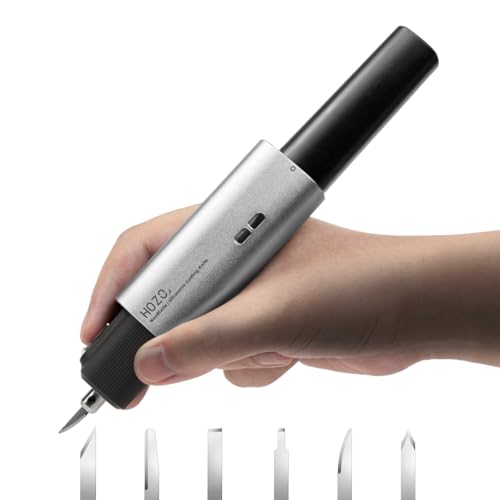
HOZO NeoBlade Wireless Ultrasonic Cutter

VASTOOLS 18Pcs Deburring Tool Kit

Creality CR Touch Auto Leveling Kit

Yibrvoik 50Pcs 3D Printer Tool Kit with Case

Intarsio 52-in-One 3D Printer Tools Kit

EILKBLA 38PCS Nozzle Cleaner & Scraper Set
More Details On Our Top Picks
A flush cutter is the single tool most printer owners reach for daily, and this two-pack means one lives at the printer while the other stays in your toolbox. The compact body suits close work around small parts, where bulky pliers get in the way.
The extra-long edge slices cleanly through filament offcuts, zip ties, and support nubs, and it handles wire up to 12 AWG gauge, which covers most electrical splicing jobs too.
Strong Points
- Two cutters in one purchase, so a spare is always within reach
- Flush edge leaves support stubs nearly flat against the part surface
- Chrome-vanadium steel construction resists wear through repeated daily snips
- Small enough to work inside tight model geometry without marring walls
Things To Consider
- The fine tips demand careful storage; dropping them can misalign the edges
- Hardened steel wire or thick cable exceeds what these are built for
Key Specs
Who It Suits Best
Hobbyists printing PLA or PETG who want clean support removal without spending on a full kit yet.
Where Another Pick Suits Better
Shoppers wanting files, scrapers, and nozzle care bundled together will find more value in the Intarsio 34-piece kit at number two.
This 34-piece set hits the sweet spot for someone unboxing their first printer. Rather than buying scrapers, brushes, and cleaning needles separately, you get the whole maintenance baseline in one order, curated by a team of long-time printing enthusiasts.
The contents lean practical: MK8 brass nozzles as spares, five cleaning needles for clogged hotends, a steel removal scraper plus a razor spatula with spare blades, five file types, brushes, a wire cutter, and an engraving knife. That covers removal, finishing, and hotend care in a single box.
What We Like
- Spare brass nozzles save a print day when a bore wears out or clogs permanently
- Razor spatula with eleven spare blades handles stubborn first layers on glass beds
- Works with both FDM and resin machines, so it survives a future second printer
- Five file profiles let you smooth flat faces, curves, and internal holes alike
Worth Noting
- No storage case is mentioned, so plan a drawer tray or pouch to keep pieces together
- Blades are consumables; heavy use means reordering spares eventually
Made For
Beginners with any FDM or SLA machine who want a complete starter toolkit without overbuying.
Consider Something Else When
Owners planning drilling, pliers work, or deeper modification projects should step up to the Intarsio 68-piece kit reviewed next.
Where the 34-piece Intarsio stops, this one keeps going. Sixty-eight pieces arrive organized in a storage case, which matters more than it sounds once loose needle files start migrating around a desk. Compatibility spans popular machines like Bambu Lab printers, the Ender 3 line, and Anycubic Kobra models.
The additions that justify the step up are the hand drill with ten drill bits, needle-nose pliers, tweezers, and five types of metal files. Together they open up post-processing work that basic kits simply can’t touch, like clearing mounting holes or deburring printed enclosures.
Highlights
- Hand drill with ten bits lets you resize pilot holes without a power tool
- Storage case keeps sixty-eight small pieces sorted and portable
- Needle-nose pliers grip tiny supports and hardware regular cutters can’t hold
- Fits major printer brands, so it carries over through upgrades
- Cuts and trims PLA and similar filaments cleanly for fast part prep
Trade Offs
- More pieces mean more to keep track of during a busy session
- Case footprint takes a shelf spot smaller kits don’t need
At A Glance
Right Fit For
Intermediate makers who modify, drill, and finish their prints regularly rather than just snapping supports off.
Not Your Match When
Minimalists who only trim supports will find the LBOKLING flush cutter pack simpler and cheaper.
Coming from Creality itself, this 74-piece wrap kit understands how Ender-series owners actually work. The roll-style organizer spreads every tool flat and visible, so grabbing a hex driver mid-print doesn’t turn into a drawer excavation. Brand matching also helps when you’re servicing the printer’s own hardware.
The range stretches from assembly to finishing: screwdrivers and wrenches for building and maintaining the machine, chamfer and machining tools for models, nozzle cleaning gear, plus scraping and cutting implements. Few kits cover printer-side repair and part-side finishing in one package.
Upsides
- Roll layout shows all 74 pieces at once for quick selection
- Includes screwdrivers and wrenches sized for printer assembly and belt tensioning
- Chamfer tools soften sharp printed edges faster than sandpaper alone
- Suits both newcomers and experienced operators maintaining their own hardware
Minor Gripes
- Designed around FDM machines; resin users gain less from the scraper lineup
- Unrolled, the wrap needs more desk space than a lidded case
- Some specialty pieces may sit unused unless you tinker with the printer itself
Who Will Love This
Ender and CR-series owners who assemble, tune, and maintain their own printers alongside everyday printing.
Look Elsewhere When
Resin-focused finishers chasing hardened blades will prefer the VASTOOLS deburring kit further down this list.
An ultrasonic cutter vibrates its blade tens of thousands of times per second, letting it glide through plastic with far less pressure than a knife needs. The NeoBlade runs at 40kHz and weighs just 124 grams without its battery, so long finishing sessions don’t fatigue your wrist the way sawing through thick supports does.
Its 40-watt output adjusts automatically to the material, which means switching from PLA supports to a wooden prototype doesn’t require fiddling with settings. Two cutting modes, a replaceable battery, and active turbo cooling round out a genuinely modern tool.
Bright Spots
- Cordless design frees you from dragging a cord across the print bed
- Auto power adjustment adapts between plastics, wood, and foam without manual tuning
- Featherweight body reduces hand strain during extended trimming
- Swappable battery keeps a charged spare ready for marathon sessions
Points To Note
- Blades are specialized consumables; stock spares before a big project
- Overkill for occasional hobbyists who trim a few supports weekly
- Battery-powered tools need charging discipline before deadline work
Quick Facts
Perfect Match For
Prototypers and scale-model builders who cut dense materials often enough to justify a powered tool.
A Better Fit Elsewhere
Print-only households trimming standard PLA supports get everything they need from the LBOKLING flush cutters at a fraction of the commitment.
Deburring means shaving away the thin ridges and rough spots left on a part’s edges, and doing it well depends entirely on blade quality. VASTOOLS leans into that with three distinct blade grades: BS1010 blades rated 64 HRC for aluminum and general plastic, harder BS1018 blades at 67 HRC for stainless steel, and BK3010 blades shaped for resin and copper work.
Alongside the handle and ten blades come six needle files and a micro wire cutter, forming a focused finishing station rather than a sprawling generalist kit. Resin print owners in particular will appreciate blades actually specified for cured resin instead of repurposed metalworking stock.
Reasons To Buy
- Three blade hardness grades match the exact material on your bench
- Interchangeable design swaps blades in seconds as tasks change
- Needle files reach interior corners flat files can’t access
- Micro wire cutter trims filament and fine leads without crushing them
Softer Spots
- No storage case listed, so blades need a magnetic tray or tin
- Narrow scope; you’ll still want scrapers and nozzle tools separately
Feature Rundown
Who Should Grab It
Resin printer owners and miniature painters who chase glass-smooth edges before priming.
Swap It Out When
Shoppers wanting removal scrapers and nozzle care bundled in should look at the Yibrvoik 50-piece kit instead.
Bed leveling is the frustration that drives more people away from printing than any other issue, and this sensor attacks it directly. The CR Touch probes the bed at multiple points and builds a height map, compensating for slight tilts automatically before every print. Manual paper-slide leveling becomes a thing of the past.
Compatibility is deliberately broad: Ender 3, Ender 3 Pro, Ender 3 V2, Ender 3 Max, Ender 5, Ender 5 Pro, and CR-10 machines running 32-bit V4.2.2 or V4.2.7 mainboards. Installation involves wiring and firmware steps, so budget an evening rather than five minutes.
Plus Points
- Automatic mesh leveling removes the most common source of failed first layers
- Fits a wide family of popular Creality printers with known mainboard requirements
- Repeatable probing means consistent adhesion across the whole plate
Small Caveats
- Firmware flashing is required, which intimidates absolute beginners
- The probe adds a small component hanging near the print area; check clearance on tall mods
The Right Fit
Ender-series owners tired of babysitting first layers who are comfortable following a firmware guide.
Another Choice May Suit
Complete newcomers still learning their machine may prefer starting with the EILKBLA 38-piece maintenance set and adding this upgrade later.
Fifty pieces with a case puts this Yibrvoik set right between the lean 34-piece Intarsio and the sprawling 68-piece version earlier in the list. For a household setting up its first printer, that middle ground tends to be the comfortable one: everything essential, nothing overwhelming.
The emphasis falls on nozzle maintenance and post-processing. A dedicated cleaning kit with needles and brushes keeps hotends flowing, while scrapers, a deburring tool, and assorted files handle part removal and edge cleanup. Universal FDM and SLA compatibility means it works regardless of which brand sits on your desk.
Standout Traits
- Case included, solving the lost-tool problem from day one
- Nozzle cleaning needles and brushes extend hotend life between replacements
- Deburring tool smooths edges without marring visible surfaces
- Balanced count stays manageable for a shared family workspace
Areas To Watch
- Lacks pliers and drilling gear found in larger competitor kits
- File assortment is narrower than dedicated finishing sets offer
Built With In Mind
Households and classrooms setting up a first FDM or SLA printer and wanting tidy, complete coverage.
Where A Sibling Pick Shines
Makers needing hand drills and pliers should move up to the Intarsio 68-piece kit with its broader mechanical range.
This third Intarsio entry carves out its own identity with eighteen tools the brand’s smaller kits skip. A self-healing cutting mat protects your desk during knife work, heat block wrenches service the hotend safely, and a PTFE tube cutter trims bowden tubing square, something ordinary scissors do poorly.
The rest reads like a seasoned operator’s checklist: deburring set, replacement nozzles, scrapers, a precision knife, a files set, and a storage bag holding all fifty-two pieces. Compared with the 68-piece sibling, this one trades the drill and pliers for hotter-end maintenance depth, which many owners will value more.
Best Bits
- Self-healing mat gives knife and blade work a safe, durable surface
- Heat block wrenches make nozzle swaps safer on a hot hotend
- PTFE tube cutter produces clean, square tubing ends for better airflow
- Storage bag keeps the full set portable between rooms or maker spaces
- Replacement nozzles included, covering a wear item most kits ignore
Honest Caveats
- Soft bag offers less crush protection than a hard case
- No drilling capability limits modification projects
Whose Shelf It Belongs On
Regular printers who service their own hotends and want a complete, portable maintenance bench.
Reach For A Different Pick When
Drilling and gripping tasks dominate your workflow; the Intarsio 68-piece kit covers those gaps directly.
Clogged nozzles cause more abandoned prints than almost anything else, and this EILKBLA set answers with ten 0.4mm cleaning needles, enough that losing a few to bending won’t leave you stranded. Pair those with both a steel scraper and a plastic scraper carrying eleven spare blades, and stuck first layers lose their sting.
The remaining thirty-eight pieces cover finishing basics: five files, two brushes, a wire cutter, a craft knife with six blades, a wrench, and a tweezer. Nothing exotic, just the consumable-heavy items a busy printer burns through fastest.
Positives
- Ten cleaning needles keep a clogged nozzle fixable for months of printing
- Plastic scraper protects coated build plates where steel would scratch
- Generous spare blades mean dull edges never stall a session
Room For Improvement
- No storage case mentioned, unlike several rivals on this list
- Skips advanced items like drills, pliers, and cutting mats
Core Details
Best Suited To
High-volume hobbyists who prioritize nozzle upkeep and plate-safe removal over workshop breadth.
Skip It When
You want one purchase to cover every task; the Creality 74-piece wrap kit delivers far wider coverage.
What Matters Most Before Choosing 3d Print Tools
Match The Kit To Your Actual Workflow
Count what you do weekly. Support trimming and part removal call for flush cutters and scrapers above all else, while frequent filament changes push nozzle cleaning needles toward the top of the list. A kit loaded with tools you’ll never touch is money sitting in a drawer.
Material And Build Quality
Chrome-vanadium steel cutters and hardened deburring blades, like the 64 and 67 HRC grades in the VASTOOLS set, hold their edges far longer than unmarked generic steel. Dull blades tear prints instead of trimming them, so quality here pays back quickly.
Storage And Organization
Small tools vanish fast. Hard cases and roll organizers, such as the Creality wrap layout, keep everything visible and protected. Bag-based storage trades some protection for portability, which suits makers who carry kits between locations.
Printer Compatibility And Upgrades
Most hand tools suit any FDM or SLA machine, but electronic add-ons differ. The CR Touch sensor, for example, lists specific mainboard requirements, so verify your printer’s board revision before ordering anything that plugs in.
Key Considerations Across These Picks
Traps First Timers Fall Into
The classic mistake is buying a giant kit before printing a single spool, then discovering half of it goes unused. Start with cutters, a scraper, and cleaning needles, then expand based on real friction points. Also check blade and needle sizes against your nozzle diameter; mismatched tools damage hotends.
What Separates Premium From Basic
Higher-tier kits spend on hardened steels, branded components, and thoughtful extras like self-healing mats and auto-leveling sensors. Those upgrades matter most once you print daily and maintain your own hardware. Casual weekend users rarely feel the difference, so paying up early often buys capability you don’t yet need.
Frequently Asked Questions
Do I need special tools for resin versus FDM printing?
Both benefit from scrapers and files, but resin prints need finer deburring blades for delicate cured parts. FDM users lean harder on flush cutters and nozzle maintenance gear.
How often should I clean my printer nozzle?
Light cleaning whenever under-extrusion appears works for most setups. Heavy users often run a needle through the nozzle weekly as routine prevention.
Are cheap tool kits worth it?
Entry kits cover basics adequately for casual printing. Frequent makers usually upgrade individual pieces, especially cutters and deburring blades, as they wear out.
Can I use regular craft knives instead of a deburring tool?
Craft knives handle straight edges reasonably well. Curved corners, holes, and internal channels are where purpose-built deburring blades clearly perform better.
Is an auto-leveling sensor necessary?
It isn’t mandatory, but it removes the most common beginner failure point. Owners of older Ender-series machines report the biggest quality-of-life jump from adding one.
Closing Thoughts
Building a 3d print toolkit works best in stages. Start with the LBOKLING flush cutters or the EILKBLA set for daily essentials, add a case-equipped kit like the Yibrvoik 50-piece once printing becomes routine, and let upgrades such as the CR Touch follow genuine need. Match the tool to the problem you actually have, and your bench will grow exactly right.