
Multicolor printing used to mean babysitting a single-extruder machine through endless filament swaps. That era is over. The machines below handle color changes automatically, so you can queue up a four-color figurine before work and come home to a finished print instead of a tangled spool mess. Whether you’re a hobbyist making cosplay props or a small shop fulfilling custom orders, this list sorts out which system fits your desk, your budget range, and your patience level.
The Shortlist At A Glance
FLASHFORGE AD5X Multi-Material 3D Printer 4-Color

Creality K2 Pro Combo (A) 3D Printer with CFS

FLASHFORGE AD5X Multi-Color 3D Printer with IFS

ELEGOO Centauri Carbon 2 Combo 3D Printer

Anycubic Kobra S1 Combo Multicolor 3D Printer

Anycubic Kobra X Multicolor 3D Printer

FLASHFORGE AD5X Multi-Color & Material 3D Printer

Anycubic Kobra X Multicolor 3D Printer One-Click
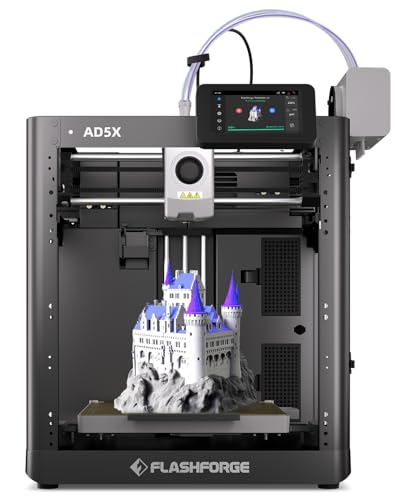
FLASHFORGE AD5X Multi-Color 3D Printer with IFS

ANYCUBIC Kobra X 3D Printer Native 4-Color
More Details On Our Top Picks
The AD5X is built around one idea: keep the machine printing even when something goes wrong mid-job. Its Intelligent Filament System swaps between four spools automatically, and the filament backup feature means an empty spool doesn’t kill an overnight run. At up to 600mm/s with strong acceleration, it’s quick enough that batch jobs finish in hours rather than days.
In a working studio where several prints stack up daily, that combination of speed and self-correction matters more than any single spec. Full-auto calibration handles bed leveling at multiple points, so setup stays hands-off.
Strong Points
- Four-color printing without manual spool swaps, which turns a weekend project into a background task
- Filament backup keeps long jobs alive when a spool runs dry
- One-click printing lowers the barrier for newer users
- Full-auto calibration measures the bed at several points for consistent first layers
- High top speed suits anyone producing parts in volume
Things To Consider
- Multicolor systems add moving parts, so periodic cleaning of feed paths is part of ownership
Who It Suits Best
Makers running frequent or commercial print queues who want automation to do the boring work.
Where Another Pick Suits Better
Shoppers needing a bigger build area should look at the Creality K2 Pro Combo instead.
Where the Flashforge above focuses on workflow resilience, the K2 Pro Combo goes big on capacity. Its 300×300×300mm build volume dwarfs the 220mm cubes most competitors offer, which means helmets, large vases, and multi-part assemblies print in one piece rather than sections glued together later.
The CFS Smart Filament System identifies loaded filaments automatically, feeds them intelligently, and stores them away from moisture. A dual AI camera watches prints for problems, and active chamber heating helps materials like ABS behave. You can scale toward sixteen colors with additional units, though that expansion adds cost and desk space.
What We Like
- Cube-sized build area fits genuinely large single-piece models
- Moisture-proof storage protects hygroscopic filaments between sessions
- Dual cameras give remote peace of mind during long jobs
- Path to sixteen colors for serious palette work
Worth Noting
- The full combo footprint demands more shelf or bench room than compact machines
- Chamber heating draws meaningful power, worth checking your circuit
At A Glance
Made For
Intermediate hobbyists and cosplayers who regularly print oversized models and want monitoring built in.
Consider Something Else When
Desk space is tight; the Flashforge AD5X delivers similar speed in a smaller package.
This variant of the AD5X family shares the four-color Intelligent Filament System and 600mm/s ceiling of our first pick, but the headline difference sits at the hotend: a maximum 300°C nozzle. That extra thermal headroom opens the door to higher-temp engineering filaments beyond basic PLA, which matters once you start printing functional brackets or outdoor parts.
You still get fully automatic bed leveling and the same 220×220×220mm build area, so day-to-day operation feels identical. The honest read is that casual PLA-only printers won’t use that nozzle temperature much, but tinkerers who like experimenting will appreciate having it on tap.
Highlights
- 300°C-capable nozzle supports demanding filament types
- Automatic four-color switching keeps multi-hue designs simple
- Fast print speeds suit iterative design work
- Self-leveling bed removes a classic beginner headache
Trade Offs
- Higher-temperature filaments often need a controlled environment for clean results
- Same 220mm cube as cheaper siblings, so no size advantage here
Right Fit For
Hobbyists ready to move past PLA into tougher materials while keeping multicolor convenience.
Not Your Match When
Pure beginners who’ll never touch exotic filaments may prefer the simpler ELEGOO Centauri Carbon 2 Combo.
Failed multicolor prints hurt double: wasted time and wasted filament from every purge tower. The Centauri Carbon 2 Combo attacks that problem directly with its CANVAS system, which detects filament state instantly and switches colors without drama. Tangle detection and auto refill round out a safety net that catches the mistakes new operators make most.
Beyond color handling, the machine spans everything from entry-level PLA to engineering-grade materials thanks to its process and temperature control. For someone stepping up from a basic single-color printer, that breadth plus the guardrails makes this an easy recommendation over pricier rivals like the K2 Pro Combo.
Upsides
- Instant color switching via CANVAS keeps four-color jobs flowing
- Tangle detection prevents a common cause of abandoned prints
- Auto refill reduces mid-print intervention
- Handles both basic and engineering-grade materials
Small Caveats
- Four colors is the ceiling unless you invest in expansion hardware
- Newer platform, so community troubleshooting resources are still growing
Quick Facts
Who Will Love This
Beginners upgrading from single-color machines who want training wheels that don’t feel limiting.
Look Elsewhere When
You already print confidently; the Anycubic Kobra S1 Combo’s drying system adds more value for experienced users.
Humidity is the quiet killer of good prints. Damp filament bubbles, strings, and snaps mid-layer, and no amount of tuning fixes wet plastic. That’s why the Kobra S1 Combo’s ACE Pro unit stands out: it actively dries filament while feeding it, using dual PTC heating modules, so spools stay in printable condition even in muggy basements or coastal homes.
Out of the box you get four-color printing, and pairing a second ACE Pro doubles that to eight. Anti-entanglement design and intelligent multi-filament drying further smooth the experience. Owners commonly report the drying alone justifies the combo layout in humid climates.
Bright Spots
- Active drying keeps filament reliable regardless of season
- Expandable to eight colors with a second ACE Pro unit
- Anti-tangle feeding cuts another failure point
- Four-color output covers most decorative and educational projects
- Compact combo footprint fits typical desks
Points To Note
- Reaching eight colors requires buying additional hardware later
- The drying module adds a component to maintain and occasionally empty of moisture
Best Suited To
Home workshop owners in humid regions who’ve fought stringy prints from damp spools.
A Better Fit Elsewhere
Dry-climate users chasing maximum color count get more from the Kobra X’s nineteen-color path.
Four colors cover most needs; nineteen colors cover art commissions. The Kobra X ships with native four-color capability and scales to nineteen when you attach four ACE 2 Pro units, a palette depth that approaches what dedicated multi-toolhead industrial machines offer at far higher cost. Setup is deliberately simple, aimed at people who’d rather print than calibrate.
Anycubic also targets the purge problem directly, cutting filament change length substantially so each color swap wastes less material. Compared with the Kobra S1 Combo reviewed earlier, this model trades the older ACE Pro drying focus for a leaner, faster-swapping generation of hardware. Note that ACE 2 Pro units are not cross-compatible with the original ACE Pro.
Reasons To Buy
- Nineteen-color ceiling enables genuinely painterly gradient work
- Shortened change length trims purge waste on every swap
- Native four-color works immediately, no add-ons required
Softer Spots
- Full nineteen-color setup means purchasing four separate ACE 2 Pro units
- No compatibility with earlier ACE Pro accessories, which complicates mixed households
Feature Snapshot
Perfect Match For
Artists and commission sellers whose work genuinely needs more than eight hues in one piece.
Skip It When
Your projects stay under four colors; the ELEGOO Centauri Carbon 2 Combo does that job for less.
This AD5X configuration leans into endurance. Beyond the familiar four-color IFS switching, it supports automatic refilling across up to 4kg of filament, meaning a production run measured in days can continue without anyone standing by to reload. For a small business fulfilling orders overnight, that’s the difference between shipping on schedule and apologizing to customers.
The 220×220×220mm build area matches its siblings, and mixing different filament types within the four slots broadens what a single job can accomplish, say a rigid body with flexible grips. It’s less flashy than the Kobra X’s color count but arguably more useful for volume work.
Plus Points
- Up to 4kg of auto-refill capacity supports marathon unattended runs
- Four-slot system accepts mixed filament types in one job
- Automatic loading and unloading removes manual spool handling
Areas To Watch
- Multi-material combinations demand slicer profiles tuned per pairing
- Modest 220mm cube limits single-piece part size
Who Should Grab It
Side-business operators and teachers running long batch queues with minimal supervision.
Swap It Out When
Large single pieces matter more than runtime; the Creality K2 Pro Combo’s 300mm cube wins there.
Most multicolor machines treat flexible filament as an afterthought. This Kobra X listing emphasizes the opposite: an adaptive extrusion force compensator that adjusts pressure automatically, letting the same machine move from rigid PLA to soft TPU without manual reconfiguration. Anyone who has fought a squishy filament through a standard feeder knows how rare that convenience is.
The rest follows the Kobra X formula covered in pick six: native four-color operation, one-click printing for simplicity, and the nineteen-color expansion path via ACE 2 Pro units. In practice, this variant suits makers whose project list swings between firm structural parts and bendable phone stands or gaskets.
Best Bits
- Adaptive extrusion force handles TPU alongside PLA automatically
- One-click operation minimizes menu diving for routine jobs
- Same nineteen-color expansion ceiling as other Kobra X variants
- Multi-material transitions happen without hand adjustments
Honest Caveats
- Soft filaments still benefit from slower speeds, so expect longer print times on flex jobs
Built With In Mind
Makers alternating between rigid and flexible materials who hate swapping settings between jobs.
Another Choice May Suit
Strictly PLA-and-PETG users save money with the straightforward Flashforge AD5X listed at number three.
Bed leveling is the first skill every FDM owner learns and the last thing anyone enjoys doing. This AD5X variant automates it completely, measuring the surface so first layers lay down consistently without paper-shim rituals. Paired with Intelligent Filament Switching for four colors and speeds reaching 600mm/s, it covers the fundamentals that matter daily.
Against the AD5X picks earlier in this list, the differences come down to bundle specifics rather than core behavior; all share the 220mm cube and fast motion system. For a first multicolor purchase, this version’s emphasis on set-and-forget basics makes it an easy starting point, and the 300°C-class nozzle options elsewhere in the family remain available if you upgrade later.
Standout Traits
- Fully automatic leveling produces dependable first layers every session
- Intelligent Filament Switching handles four-color jobs cleanly
- 600mm/s capability shortens iteration cycles noticeably
Minor Gripes
- Bundle contents vary between AD5X listings, so confirm what’s included before ordering
- Build volume stays at 220mm per side
Spec Overview
The Right Fit
First-time multicolor owners who want automation to mask early learning-curve mistakes.
Where A Sibling Pick Shines
Volume producers get more mileage from the 4kg auto-refill AD5X at position seven.
Purge waste is the hidden tax of multicolor printing: every swap flushes mixed filament into a tower you throw away. Anycubic claims this Kobra X configuration shortens filament change length by roughly 81 percent, which translates directly into lower material costs across a production month. For anyone selling prints, that arithmetic compounds fast.
The machine retains the family’s native four-color base and nineteen-color ceiling with four ACE 2 Pro units, positioning it for custom-order shops handling complex, high-value work. Compared with the Kobra X variants at positions six and eight, this listing leans hardest into efficiency framing, and that’s exactly who it serves best.
Positives
- Dramatically shortened change length cuts purge waste per swap
- Lower material spend improves margins on paid orders
- Native four-color works immediately, expandable to nineteen
- Suits complex custom commissions with many hues
- Industrial-style efficiency for repeat production
Room For Improvement
- Realized savings depend heavily on how color-heavy your typical models actually are
- Expansion units represent a separate purchase decision down the road
Core Details
Whose Shelf It Belongs On
Sellers and studio operators tracking cost-per-part who print multicolor orders daily.
Reach For A Different Pick When
You’re a weekend hobbyist; the budget-friendly ELEGOO Centauri Carbon 2 Combo covers casual needs comfortably.
Choosing Between These Multicolor Machines
Match The System To Your Workflow
Start with what you actually print. Decorative figurines rarely exceed four colors, so a Flashforge AD5X or ELEGOO Centauri Carbon 2 covers them well. Artistic gradient work pushes you toward the Kobra X family’s nineteen-color ceiling. Volume sellers should weight auto-refill capacity and waste reduction over raw color count, since downtime and purged filament eat profits quietly.
Think About Space And Power
Combo systems pair a printer with external filament units, and those boxes need shelf space plus clearance for tubing runs. Chamber-heated models draw more current too, so verify your outlet situation before ordering. Measure twice; a printer that doesn’t fit the desk gets returned, not admired.
Factor In Filament Care
Moisture ruins multicolor prints faster than almost anything else, because color-change mechanisms punish brittle, damp spool ends. Active-drying systems like the ACE Pro solve this at the source. Otherwise, plan on sealed storage containers with desiccant as part of your real operating cost.
Plan Your Expansion Path
Some platforms grow gracefully; others lock you into proprietary accessories. Check compatibility between generations before buying, since Anycubic’s ACE 2 Pro units don’t work with the original ACE Pro, for example. Buying into an ecosystem with a clear upgrade road saves money later.
Key Considerations Across These Picks
Traps First Timers Fall Into
The biggest mistake is buying nineteen-color capability for projects that use two. Purge towers grow with every added spool, so unused capacity costs time and material on every job. Another common slip: ignoring filament storage entirely, then blaming the printer for stringy results caused by humidity.
The Case For Spending Up
Higher-tier combos buy automation that compounds: auto-refill, moisture control, and smarter waste management each remove hours of monthly labor. Casual hobbyists won’t recoup that premium. Shops printing daily usually will, sometimes within a few months of saved filament and failed-run reductions.
Frequently Asked Questions
Do multicolor 3D printers waste a lot of filament?
Yes, traditional systems purge mixed material at every color change. Newer models like the Kobra X shorten that change length significantly, cutting waste substantially per swap.
Can these printers mix materials, not just colors?
Several can, including the AD5X family and the Kobra X with adaptive extrusion force. Rigid-to-flexible transitions work best when the slicer profile is tuned for the specific pairing.
Is automatic bed leveling really necessary?
For most owners, absolutely. It eliminates the most common cause of failed first layers and makes multicolor jobs, which take longer, far safer to start unattended.
How hard is setup on these combo systems?
Manufacturers have streamlined it considerably, with one-click printing and guided calibration common across this list. Budget an afternoon for unboxing, placement, and a first test print.
Will humid weather ruin my multicolor prints?
Damp filament causes bubbling and breakage that color-change hardware amplifies. Active-drying units like the ACE Pro, or sealed storage with desiccant, largely solve the problem.
Bottom Line
Pick based on your actual print habits rather than spec-sheet maximums. Four colors handles most household and gift projects, the Flashforge AD5X line nails everyday reliability, and the Kobra X family rewards artists and sellers who genuinely need deep palettes and low waste. Match the machine to the work, give your filament a dry home, and multicolor printing becomes pleasantly routine rather than a gamble.