
Screen-equipped drawing tablets used to cost a month’s rent. Not anymore. Whether you’re sketching on the couch, teaching yourself digital art at a desk, or doodling between classes, today’s affordable pen displays deliver laminated screens and thousands of pressure levels that were luxury features just a few years ago. This guide sorts seven of them by who they actually suit, because a student and a freelance illustrator need very different things.
A Fast Comparison Of The Options

HUION Kamvas 13 (Gen 3) Drawing Tablet with Screen 13.3″ Black
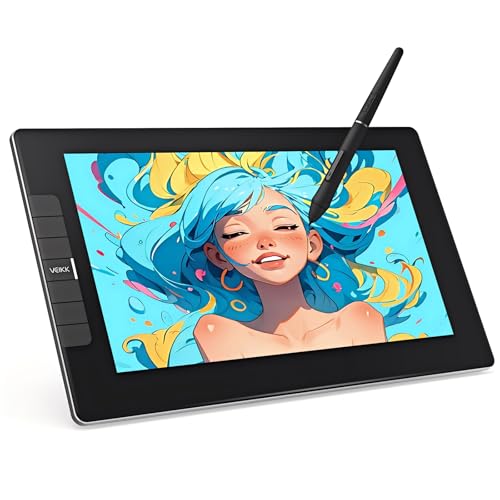
VEIKK VK1200V2 Drawing Tablet with Screen 11.6″

PicassoTab 10″ Standalone Drawing Tablet A10

XP-PEN Artist 13.3 Pro V2 Drawing Tablet with Screen

UGEE UE12 11.6 inch Drawing Tablet with Screen

XPPen Artist 12 3rd 11.9″ Drawing Tablet Pink

XPPen Artist 13.3 Pro Drawing Tablet with Screen
More On The Choices That Made The List
The third-generation Kamvas 13 leans on HUION’s Canvas Glass 2.0, an anti-sparkle surface that cuts glare under desk lamps or window light. Full lamination fuses glass to panel, so your pen tip lands where the cursor sits instead of hovering above it. That accuracy gap is what separates pleasant drawing from constant micro-corrections.
The dual dial gives you two physical controls for brush size and canvas zoom, which matters once muscle memory kicks in during long sessions. Note that this is not a standalone device; it needs a connected computer or laptop to function.
Strengths Worth Knowing
- Fully laminated 13.3-inch screen keeps parallax low, so strokes land exactly where you aim.
- Anti-glare canvas glass stays readable in bright rooms, handy near windows.
- Dual dial hardware speeds up brush sizing and zooming without menu diving.
- Compact footprint fits shared desks and dorm tables.
Things To Consider
- No standalone operation: a computer must be tethered via cable.
- Laminated panels deserve gentle cleaning; harsh solvents can damage the coating.
Who Will Love This
Intermediate hobbyists and illustration students ready to move past entry-level pads.
A Better Fit Elsewhere
Total newcomers without a computer should look at the Simbans PicassoTab A10 instead.
Pressure sensitivity measures how finely a tablet reads how hard you press, and the VK1200V2 reads 16,384 levels, which is genuinely generous at this tier. The full-laminated IPS panel runs 1920×1080 with a 120% sRGB gamut, so colors stay vivid enough for social-ready work. Shipping two styluses in the box is the detail that seals its value argument.
Like the HUION Kamvas 13 above it, this is a monitor-style device requiring a PC connection. The difference is price positioning: this one targets shoppers stretching every dollar.
Bright Spots
- 16,384 pressure levels give fine control over line weight and shading.
- Two bundled styluses mean a backup pen is already in your drawer.
- 120% sRGB color output suits casual illustration and fan art.
- Works across Windows, Mac, and Linux setups.
Worth Noting
- Requires a wired computer connection; plan cable routing on a tidy desk.
- An 11.6-inch canvas can feel tight for wide panoramic compositions.
Made For
Students and self-taught artists who want maximum spec per dollar.
Consider Something Else When
Creators wanting a larger canvas and modern USB-C convenience will prefer the XP-PEN Artist 13.3 Pro V2.
This is the odd one out here, and that’s the point. Every other pick needs a computer; the PicassoTab A10 runs entirely on its own, which makes it the only true grab-and-go option in the group. Five creative apps come preloaded, covering drawing, painting, animation, tutorials, and guided lessons, so there’s no software hunting on day one.
In our view, that independence makes it the natural gift pick. A kid or curious adult can open the box and start creating on the couch, in the car, or anywhere else a laptop can’t follow.
Key Advantages
- Truly standalone: no PC, no cables, no setup friction.
- Five creative apps preinstalled, including guided lessons for absolute beginners.
- Compact 10-inch body travels easily in a backpack.
- Doubles as a general-purpose tablet beyond art apps.
Small Caveats
- A 10-inch screen limits detailed linework compared to the 13-inch displays here.
- Battery charging adds one more routine to remember versus always-powered pen displays.
Right Fit For
Children, teens, and complete beginners who don’t own or want a dedicated computer setup.
Where A Sibling Pick Shines
Growing artists who outgrow it should step up to the HUION Kamvas 13 Gen 3 for finer pressure control.
Cable clutter is the quiet annoyance nobody mentions until they live with it. The Artist 13.3 Pro V2 answers with a full-featured USB-C port that drives video, data, and power over one cable to compatible Mac, Windows, Chromebook, and Android devices. A legacy port remains for traditional three-in-one HDMI rigs, so older laptops aren’t left behind.
Compared to the VEIKK VK1200V2’s multi-cable arrangement, this single-wire setup earns its keep for anyone moving between a desktop and a laptop. The foldable stand included in the box saves a separate purchase too.
Everyday Wins
- Single-cable USB-C connection tidies desks and simplifies laptop swaps.
- 16K pressure sensitivity delivers smooth, responsive stroke response.
- Broad compatibility spans Windows, Mac, Chromebook, and Android.
- Foldable stand arrives in the box rather than costing extra.
Potential Sticking Points
- The direct USB-C path requires devices supporting USB 3.1 with DisplayPort mode; older ports fall back to the HDMI route.
Quick Facts
Who Should Grab It
Cross-platform creators juggling a laptop, desktop, or Android device in one workflow.
Swap It Out When
Shoppers on the tightest budgets get similar core specs from the VEIKK VK1200V2 at less cost.
The UE12 packs a 124% sRGB color gamut into an 11.6-inch frame, edging out the VEIKK VK1200V2’s 120% figure on paper. Its anti-glare, fully laminated FHD panel aims for zero parallax, meaning what you see under the nib is what you draw on. Eight shortcut keys sit along the edge for undo, eraser, and brush commands.
The battery-free stylus deserves a mention too: no charging routine, ever, which removes one small chore from every session. For cramped apartments and shared desks, the modest footprint is a genuine advantage over the 13-inch models here.
What Earns Its Place
- Wide 124% sRGB gamut renders saturated, lifelike color for its size class.
- Battery-free stylus means zero charging interruptions mid-sketch.
- Eight programmable keys keep frequent tools one tap away.
- Small body tucks into narrow workspaces and bags.
Less Ideal Details
- Android compatibility depends on your specific phone or tablet model, worth verifying before committing.
- The 11.6-inch canvas may feel restrictive for large-format compositions.
Details At A Glance
Who It Suits Best
Apartment dwellers and students working at small desks who still want strong color accuracy.
Look Elsewhere When
Artists craving more canvas real estate will find the XP-PEN Artist 13.3 Pro V2 roomier.
Most budget pen displays arrive in the same black slab, so the Artist 12 3rd’s pink finish stands out immediately. Underneath the color sits XP-Pen’s X4 smart-chip stylus delivering 16,384 pressure levels with a light 2g activation force and short 0.3mm nib travel, which translates to strokes that feel stable rather than springy.
Its 11.9-inch size splits the difference between the UGEE UE12 and the 13-inch options, and full lamination keeps the drawing surface feeling natural. You may find the playful color polarizing in professional settings, but for personal studios it lands well.
Reasons It Performs
- X4 chip stylus offers smooth, lag-free pressure response up to 16K levels.
- Light activation force reduces hand fatigue over long sessions.
- Pink finish gives the desk personality most rivals lack.
Points To Note
- Color choice won’t suit everyone; check whether alternate finishes are available.
- Nib tips wear with heavy use, so keeping spares on hand is sensible.
Perfect Match For
Style-conscious students and hobbyists who want capable internals wrapped in something cheerful.
Another Choice May Suit
Minimalists preferring a neutral look should consider the black HUION Kamvas 13 Gen 3.
This is the model the newer V2 replaced, and its staying power says plenty. Tilt support up to 60 degrees lets you shade by angling the pen the way you’d tilt a pencil on paper, no brush reconfiguration inside your software. Owners commonly report years of dependable service from this generation, which explains why it still sells alongside its successor.
It connects through the included three-in-one cable rather than the V2’s single USB-C, so expect a slightly busier desk. For traditionalists on older machines, that legacy connection is arguably a feature, not a flaw.
Practical Pluses
- Up to 60 degrees of tilt support enables natural pencil-style shading.
- Full lamination delivers a close, paper-like pen-to-screen feel.
- Long production run means mature drivers and plentiful community guidance.
Trade Offs
- Three-in-one cabling takes more desk space than newer USB-C designs.
- A computer is mandatory; there’s no standalone mode like the PicassoTab offers.
Feature Rundown
Whose Shelf It Belongs On
Illustrators who shade heavily and value proven hardware over the newest connector.
Reach For A Different Pick When
Anyone wanting cleaner cabling gets it from the XP-PEN Artist 13.3 Pro V2 in the same family.
What Matters Most Before Choosing Budget Drawing Tablets With Screen
Size And Parallax First
Screen size decides comfort more than any spec sheet suggests. An 11.6-inch panel suits sketchbooks and character art; 13 inches gives breathing room for compositions with backgrounds. Parallax, the tiny gap between pen tip and cursor caused by non-laminated glass, is the second factor. Full lamination costs manufacturers more but pays you back in stroke accuracy every session.
Pressure Levels And Pen Feel
Pressure sensitivity determines how softly or firmly you can press before line weight changes. Anything from 8,192 levels upward handles most styles; 16,384-level pens add finesse for delicate rendering. Activation force matters equally: a lighter threshold responds to feather touches without strain.
Connections And Device Fit
Modern single-cable USB-C displays simplify everything, though they demand a compatible port on your machine. Legacy three-in-one cables work nearly everywhere but clutter the desk. Confirm your computer’s outputs before committing, since returns are far more annoying than a five-minute spec check.
Standalone Versus Tethered
Tethered pen displays lean on your computer’s power, giving smoother performance for complex files. Standalone tablets trade some horsepower for freedom from cables entirely. Match the format to where you actually create.
Key Considerations Across These Picks
Wrong Turns To Avoid
The most common mistake is buying a display larger than your desk or arm span supports, then fighting posture problems within weeks. Another trap: skipping the compatibility check between a USB-C-only tablet and an older laptop. Shoppers also overlook consumables; replacement nibs and a soft cloth for laminated coatings are cheap insurance.
The Case For Spending Up
Higher tiers buy better color calibration, stronger build materials, and refined pens with lower activation force. Those gains compound for anyone logging daily hours. Casual weekend sketchers rarely notice the difference, while freelancers billing by the piece usually do.
Frequently Asked Questions
Do all budget drawing tablets with screens need a computer?
Most pen displays act as secondary monitors and require a connected PC or laptop. The Simbans PicassoTab A10 is the exception here, running entirely on its own.
Is full lamination really important?
Yes, it bonds the glass directly to the display, removing the air gap that causes parallax offset. Your pen tip visually meets the cursor, which builds accuracy faster.
How many pressure levels are enough?
For learning and everyday illustration, 8,192 levels serve well. Stepping to 16,384 benefits detailed shading and fine line work.
Can these tablets work with Android phones?
Several picks list Android among supported systems, though requirements vary by device port and model. Verify your specific phone supports display output before purchasing.
What maintenance do pen displays need?
Wipe laminated screens gently with a dry or slightly damp microfiber cloth, avoiding solvents. Swap worn nibs periodically and coil cables loosely to protect internal wiring.
Bottom Line
Seven solid options, seven different kinds of artist. Start with the HUION Kamvas 13 Gen 3 for balanced quality, the PicassoTab if a computer isn’t part of your life yet, or the VEIKK VK1200V2 when budget rules everything. Whichever direction you take, matching the screen size and connection type to your actual workspace matters more than chasing any single spec. Happy drawing.
