
Diode lasers have quietly gotten good. A few years back, cutting through a quarter inch of plywood meant spending thousands on a CO2 machine; now a few hundred dollars buys you clean single-pass cuts, engraving on steel, and workspaces big enough for real projects. The catch is that the budget tier spans everything from bare-bones modules to enclosed machines with cameras, so picking wrong costs you either money or capability.
That’s where this list comes in. It covers seven machines built for hobbyists, Etsy sellers, and weekend makers who want serious output without a workshop-sized investment. Whether you’re personalizing tumblers in a garage corner or cutting signage from your apartment desk, one of these will fit the way you actually work.
An Overview Of The Picks
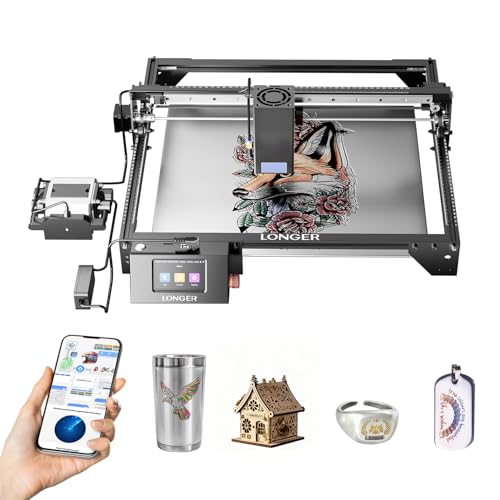
Longer RAY5 Laser Engraver Cutter 15.16″x15.16″

Twotrees TTS-55 Pro Laser Engraver 5500mW

Creality 72W DIY Laser Engraving Machine 17″x16″
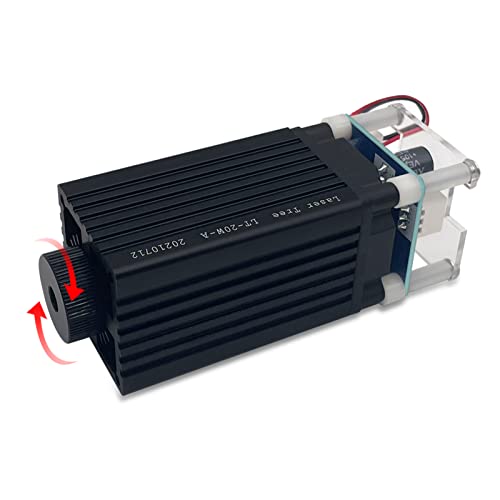
LASER TREE 4W Laser Engraver Module 450nm

Creality Falcon 10W Laser Engraver 15.7″×16.3″

Creality Falcon A1 10W Enclosed Laser Engraver

Longer Ray5 20W Laser Engraver 400×356mm
Why These Options Stand Out
This is the muscle of the list. Its 40W optical module uses laser enhancement technology to push cutting depth well past what most diodes manage, slicing roughly three-quarters of an inch of wood or over an inch of black acrylic in one pass. It even marks thin stainless steel, which opens door signs and metal tags to hobby budgets.
The square 15.16-inch bed suits batch work like coasters, ornaments, and layered plywood art. Compared with the Twotrees TTS-55 Pro below, this machine trades a friendlier price for raw capability, and that trade makes sense once you’re selling finished pieces.
Useful Touches
- Cuts thick hardwood and acrylic without stacking passes, saving real time on production runs.
- Handles stainless steel marking, rare at this price point.
- Square work area fits standard sheet offcuts with little waste.
- Dual-motor speed design keeps long jobs moving briskly.
- Strong headroom for growth as your projects get more ambitious.
Things To Consider
- The high-output module generates heat and smoke, so ventilation and lens cleaning become part of your routine.
- More power means more careful material setup; thin veneers can scorch if you skip test runs.
Key Specs
Who Will Love This
Intermediate makers and small-batch sellers who cut thick wood or acrylic regularly and want headroom they won’t outgrow.
A Better Fit Elsewhere
Total beginners should start with the Twotrees TTS-55 Pro instead, since its lower power and simpler setup make early mistakes cheaper.
Not everyone needs to slice inch-thick acrylic. The TTS-55 Pro runs a 5.5W diode aimed squarely at first-timers who want to engrave wood, leather, and coated metals without wrestling an industrial machine. Its aluminum-and-plastic frame keeps weight and cost down, and the whole thing lives comfortably on a desk.
The Pro refresh adds a metal air-assist nozzle and a red laser shield, two upgrades that matter more than they sound. Air assist blows debris out of the cut line for cleaner edges, and the shield tames the glare that makes open-frame diodes hard on the eyes. Owners commonly report straightforward assembly, though expect light-duty cutting only.
Everyday Advantages
- Included air-assist nozzle support delivers noticeably cleaner cuts once hooked up.
- Red laser shield reduces stray light exposure during alignment.
- Compact aluminum build stores easily in a closet between sessions.
- Low entry cost makes experimentation feel low-stakes.
Softer Spots
- A 5.5W diode tops out around thin plywood, so dense hardwoods are off the menu.
- Plastic frame components flex more than all-metal rivals under heavy use.
Right Fit For
Complete newcomers engraving gifts, pet tags, and hobby pieces on a modest budget.
Swap It Out When
You already know you’ll cut thick materials regularly; the Longer RAY5’s 40W module handles that load far better.
Bed size is the quiet spec that shapes every project you’ll ever run. This Creality gives you a 17-by-16-inch canvas, roomier than the Falcon below, which means full-width signs and multi-item layouts without repositioning stock mid-job. The 10W output module cuts 5mm basswood or 3mm black acrylic in a single pass at speeds up to 10,000 mm/min.
Its compressed-spot optics produce a fine 0.06mm focal point, the detail level that separates crisp photo engravings from fuzzy ones. Wood, leather, paper, dark acrylic, plus surface marking on glass and metal are all fair game. For the price bracket, the combination of area and precision is genuinely hard to argue with.
Where It Helps
- Oversized bed fits door-hanger and sign projects whole.
- 0.06mm spot resolves fine text and photo detail cleanly.
- Single-pass 5mm basswood cutting trims job time considerably.
- Handles both cutting and surface engraving across many materials.
- Open-frame layout simplifies cleaning and maintenance access.
Points To Note
- An open frame emits bright light and fumes, so plan eye protection and airflow before the first run.
- Assembly takes patience; belt tensioning affects accuracy and may need adjustment after initial use.
Feature Rundown
Made For
Hobbyists producing larger flat goods like signage and wall art who want maximum bed per dollar.
Reach For A Different Pick When
Apartment dwellers worried about fumes and light should look at the enclosed Creality Falcon A1, which contains both behind a lid.
Here’s the oddball on the list, and proudly so. Rather than a complete machine, this is a drop-in 4W laser module for anyone upgrading an older engraver frame or building their own. The 450nm blue diode carries a narrower line width suited to ordinary plywood, and it slices through 1 to 2mm sheets in a single pass.
The adjustable focus head is the standout detail: twist it anywhere across a 20mm-to-50mm range to match material thickness, no shims or spacers required. That flexibility translates directly into sharper results across varied stock. It’s a Class 1 unit, which eases safety concerns somewhat compared with higher-power open diodes, though eye protection remains sensible practice.
Points In Its Favor
- Tool-free focus adjustment across 20-50mm suits mixed-material shops.
- Narrow beam width yields finer engraving lines on plywood.
- Revives an aging frame instead of forcing a full replacement purchase.
Small Caveats
- Four watts limits you to engraving and very thin cuts; thicker stock needs multiple slow passes.
- Compatibility with your specific frame’s mounting and wiring isn’t universal, so verify fitment first.
Quick Facts
Who Should Grab It
Tinkerers and DIY builders refreshing an existing gantry who value precision over raw cutting depth.
Where A Sibling Pick Shines
Anyone wanting a ready-to-run complete system will find the Creality Falcon 10W a far simpler path from box to first project.
The Falcon sits in an interesting spot against its own sibling, the item above. Both run 10W optical output with a 72W machine rating, but the Falcon pushes deeper: 12mm wood boards and 5mm black acrylic fall in a single pass, roughly double the thickness its stablemate manages. A 32-bit control chip drives motion smoothly, and repositioning accuracy holds within about four thousandths of an inch, which matters enormously for multi-pass jobs and aligned batches.
The 0.06 by 0.06mm compressed spot keeps fine engraving detail intact despite the extra muscle. You give up a bit of bed width compared with the plain Creality model, gaining cutting depth in exchange. In our view that’s the right trade for most craft sellers working dimensional lumber and acrylic blanks.
Positive Points
- Cuts 12mm wood in one pass, double the depth of the standard Creality unit.
- Tight repositioning accuracy keeps repeatable batch work aligned.
- 32-bit electronics deliver steady motion at speed.
- Compressed spot preserves photo-quality engraving detail.
Trade Offs To Consider
- Deeper cuts mean heavier smoke load; an external exhaust fan is worth planning for.
- Bed is slightly smaller than the non-Falcon Creality, which matters for oversized panels.
The Right Fit
Craft producers cutting half-inch pine and acrylic blanks weekly who want dependable depth without stepping up in price class.
Another Choice May Suit
Shoppers prioritizing sheer workspace over depth should pick the wider 17″x16″ Creality machine reviewed earlier.
Every open-frame laser on this list shares one awkward truth: bright light, drifting smoke, and a workspace that looks like a science experiment. The Falcon A1 solves that by enclosing everything. An integrated air assist clears the cut path, a smart camera previews material placement on screen, and automatic material recognition suggests starting parameters so you’re not burning test coupons all afternoon.
It arrives essentially ready to run, with preset profiles bundled into the companion design software alongside vector tools and device control. Motion peaks at 600mm/s, quick enough that batch personalization doesn’t eat your evening. The honest caveat is cost: this is the priciest option here, and you’re paying for convenience and containment rather than raw wattage.
The Practical Payoff
- Fully enclosed body contains light and fumes, making indoor shared-space use realistic.
- Built-in camera lets you position designs precisely on screen before committing.
- Material recognition and presets remove most trial-and-error from new stock.
- Integrated air assist produces cleaner edges without add-on plumbing.
- 600mm/s top speed shortens repetitive jobs noticeably.
What To Weigh
- Highest cost on the list, a real stretch for casual hobby budgets.
- Enclosed design restricts maximum material height versus open gantries.
Details At A Glance
Who It Suits Best
Makers working in apartments, offices, or family rooms where an open laser simply isn’t livable.
Consider Something Else When
Budget-conscious beginners get more cutting power per dollar from the Longer Ray5 20W, accepting an open frame in return.
Speed and stability rarely share a bill at this price, yet the Ray5 20W pulls it off. Its 240MHz ESP32 controller, the same chip family found in popular DIY electronics, drives engraving speeds up to 24,000 mm/min while keeping motion steady. Single-pass cutting reaches 15mm pine, 8mm acrylic, and even hairline stainless marking at 0.05mm thickness.
Set beside the flagship Longer RAY5 from earlier, this one surrenders some cutting depth but keeps the same blistering pace and a generous 400-by-356mm bed. For sellers running repeated ornament or coaster batches, throughput often beats maximum depth. Multiple-pass modes extend its reach into thicker stock when a project demands it, though patience becomes part of the workflow there.
Practical Advantages
- 24,000 mm/min ceiling makes high-volume batches genuinely fast.
- ESP32 platform supports firmware tinkering and community tooling.
- Single-pass 15mm pine covers most dimensional lumber crafts.
- Stainless marking at 0.05mm adds metal personalization options.
- Large bed accommodates sheet goods with minimal trimming.
Less Ideal Details
- Thick hardwood beyond its single-pass range demands slow multi-pass runs.
- Like all open diodes, it needs dedicated ventilation and regular lens upkeep.
Core Details
Whose Shelf It Belongs On
Etsy sellers and frequent-use hobbyists whose priority is finishing many pieces quickly rather than cutting the thickest possible board.
Skip It When
Your projects center on deep single-pass cuts in hardwood; the 40W Longer RAY5 handles that workload with less fuss.
What Matters Most Before Choosing Budget Laser Cutters
Match Power To Your Materials
Optical wattage decides what you can actually cut. Modules around 5W engrave beautifully but struggle past thin plywood, while 10W units handle roughly 5mm basswood in one pass, and 20W-plus machines push toward 15mm pine and beyond. List the three materials you’ll use most, then buy one power tier above the minimum. That buffer saves frustration when a project calls for something denser than planned.
Work Area Shapes Your Projects
A cramped bed forces you to split designs or reposition stock, and misaligned seams are the classic giveaway of amateur laser work. Measure the largest item you realistically want to make, whether that’s a door hanger or a set of twelve coasters, and choose a machine whose bed exceeds it. Batch producers especially benefit from extra width since more items fit per run.
Enclosure, Air Assist, And Ventilation
These three features separate pleasant ownership from a smoky chore. Air assist blows debris away from the cut for cleaner edges, an enclosure contains the bright light and fumes that make open frames impractical indoors, and proper exhaust protects both lungs and lenses. Apartment and office users should treat containment as non-negotiable rather than optional.
Software And Setup Reality
Budget machines vary widely in how quickly you reach a finished piece. Preset parameter libraries and camera positioning shave hours off the learning curve, while bare-bones kits assume comfort with manual focusing and third-party software. Honest self-assessment here prevents an expensive shelf ornament.
Key Considerations Across These Picks
Traps First Timers Fall Into
The most common mistake is buying on wattage alone and ignoring bed size, then discovering your signature project doesn’t fit. Second is skipping ventilation planning entirely; even low-power diodes produce fumes you shouldn’t breathe. Third, shoppers often overlook assembly complexity. Open-frame kits can take an evening to build and calibrate, so factor that time honestly before ordering.
Where The Extra Money Goes
Stepping up in price typically buys enclosure, integrated air assist, camera positioning, and preset software rather than dramatically more power. Those features compress the learning curve and make daily use cleaner and safer. Casual hobbyists can skip them happily; anyone running regular production batches usually recovers the difference in saved time within months.
Frequently Asked Questions
Can a budget laser cutter really cut wood?
Yes, within thickness limits tied to optical power. Expect 5W units to manage thin plywood, 10W machines around 5mm basswood, and 20W-plus models up to roughly 15mm softwood in one pass.
Do these machines work on metal?
Diode lasers mark coated or thin stainless surfaces rather than cutting through solid metal. Dedicated fiber lasers are required for genuine metal cutting.
Is ventilation truly necessary?
It is. All diode lasers release smoke and particulates when cutting or engraving, so a window vent, exhaust fan, or enclosed machine with filtration keeps your space usable and your lungs happy.
How much assembly do budget lasers require?
It varies widely. Complete machines like the Falcon A1 arrive nearly ready, while open-frame kits involve frame construction, belt tensioning, and wiring that can consume several hours on day one.
What software do these engravers use?
Most accept common formats like SVG and G-code through free or included programs, and several brands bundle their own design suites with preset material profiles to shorten setup time.
Closing Thoughts
There’s no single right answer here, just the right match for your materials, space, and ambitions. Start with what you actually cut, add one tier of power as insurance, and let your living situation decide whether an enclosure is a luxury or a requirement. Any of these seven will put a finished project on your table this month, and that’s the whole point.
