
Diode lasers have quietly become the most accessible way to personalize wood, metal, acrylic, and leather from a spare desk or garage bench. The catch is that power ratings, work areas, and safety designs vary wildly between models, and picking wrong means a machine that either can’t cut what you want or takes over your whole workspace. This roundup sorts seven current options by real strengths: raw cutting muscle, beginner safety, compact footprints, and smart features like camera positioning. Whether you’re marking tumblers for an Etsy side hustle or cutting sign blanks on weekends, one of these will fit your bench.
A Side-By-Side Look
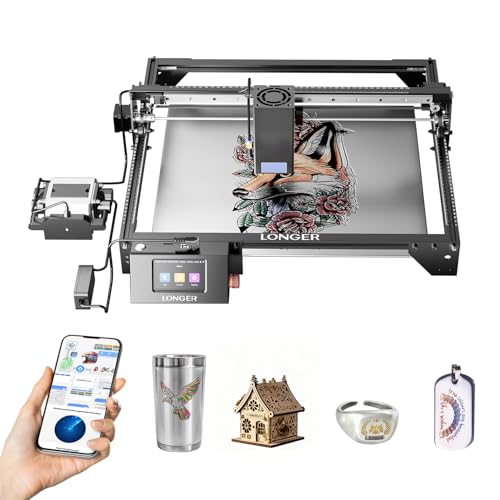
Longer RAY5 Laser Engraver Cutter 15.16″x15.16″

Twotrees TTS-55 Pro 5500mW Laser Engraver
Twotrees TS1 Mini 3000mW Laser Engraver

LONGER Ray5 20W Laser Engraver 400×356mm

LONGER Ray5 40W Laser Cutter 385×385mm

ACMER S1 2500mW Laser Engraver

Creality Falcon A1 10W Laser Engraver
Taking A Closer Look At The Options
This upgraded RAY5 sits at the top of Longer’s diode lineup, pairing a square 15.16-inch work area with a module built to slice thick stock rather than just scorch surfaces. For anyone cutting sign blanks, box joints, or layered acrylic art on a weekly basis, that combination changes what’s realistic in a home shop.
The generous bed also means fewer repositioning jobs. Compared with the smaller ACMER S1 further down this list, you trade portability for capacity, and most serious makers will take that deal.
Advantages To Know
- Cuts roughly three-quarters of an inch of wood in one pass, so thick projects skip tedious multi-pass setups
- Handles black acrylic up to about 1.18 inches deep, opening the door to chunky signage
- Can mark thin stainless steel directly, useful for tool tagging and metal keepsakes
- Fast travel speeds shorten batch runs when you’re producing multiples of the same design
- Square bed geometry suits symmetric layouts like coasters and tile grids
Trade Offs
- An open-frame diode this powerful demands eye protection and ventilation every single run, no exceptions
- Its footprint and weight make it a poor fit for desks or shelves; plan dedicated bench space
Key Specs
Who It Suits Best
Makers running a small production line of wood and acrylic goods who need depth and bed size over portability.
Where Another Pick Suits Better
Apartment crafters with limited bench space will find the Creality Falcon A1’s enclosed, pre-assembled body far easier to live with.
The TTS-55 Pro is the kind of machine you grow into rather than out of quickly. Its 5.5-watt diode handles engraving and light cutting comfortably, and the aluminum-plus-plastic frame keeps weight down enough to move between a desk and a workbench without drama.
Where it earns its place in this roundup is the air-assist path. An air assist blows a jet of air at the burn point, clearing smoke so edges come out cleaner and darker cuts go deeper. Many budget machines leave you improvising a mount; this one ships with a metal nozzle designed for it.
What Stands Out
- Included air-assist nozzle means cleaner char-free edges on plywood and leather once connected
- Red laser shield helps you frame work safely before firing
- Aluminum extrusion frame holds alignment better than all-plastic rivals over months of use
- Light enough to relocate around a shared craft room
Minor Gripes
- At 5.5 watts, thick hardwood cutting stays off the menu; expect shallow passes and patience
- You’ll likely add an air pump separately, which adds cost and a hose to route
- Open-frame layout means smoke management is on you, so a fan or window setup matters
At A Glance
Made For
Hobbyists who want one affordable machine now and a clean upgrade path via air assist later.
A Better Fit Elsewhere
Total newcomers who’d rather not assemble anything should look at the Twotrees TS1 Mini, which arrives essentially plug-and-play.
Most diode lasers are bare frames with exposed beams, which makes them a hard sell anywhere kids or students wander nearby. The TS1 Mini flips that script with a fully enclosed acrylic cover that contains both the light and the debris, so the machine behaves more like a small appliance than a workshop hazard.
Setup is close to nonexistent: it’s positioned as plug-and-play, with goggles included in the box. Phone-based control means you can run jobs from a tablet at the kitchen table instead of tethering a laptop, a genuine quality-of-life win for classroom demos or family craft nights under adult supervision.
Strong Points
- Enclosed housing blocks stray laser light, a major reassurance in shared living spaces
- No complex assembly, so first jobs can happen the same day it arrives
- Smartphone control removes the laptop-from-the-desk hassle entirely
- Compact size stores on a shelf between sessions
Small Caveats
- A 3-watt diode is engraving-first; cutting anything beyond thin veneer or paper will frustrate you
- The enclosure limits material thickness and taller objects compared with open-frame machines
- Adult supervision remains essential around younger users regardless of the safety design
Right Fit For
Teachers, parents, and beginners who value contained operation and simple phone-driven workflow over raw power.
Reach For A Different Pick When
Anyone planning regular wood cutting should step up to the LONGER Ray5 20W, which trades the enclosure for real slicing ability.
Between the entry-level diodes and the 40W bruisers sits this Ray5 configuration, and honestly, it’s where many makers land happiest. Twenty watts of optical output cuts roughly 15mm pine in a single pass and even marks stainless foil-thin steel, while the wide 400×356mm bed swallows standard lumber offcuts whole.
Underneath, a 240MHz ESP32 mainboard drives travel speeds up to 24,000 mm/min. In practice that translates to brisk engraving sessions and less waiting between batches. Against its 40W sibling reviewed next, you give up some acrylic depth but keep a lighter machine and easier power requirements in a typical home outlet scenario.
Positive Takeaways
- Single-pass 15mm pine cutting covers most furniture-scale and decor projects
- Large rectangular bed fits long items like serving trays and ruler-sized blanks
- Modern chipset supports high-speed runs without stuttering on detailed files
- Thin steel marking adds personalization options beyond wood and leather
- Mid-tier power draw suits ordinary household circuits
Points To Note
- Open gantry design still calls for goggles, airflow, and a fire-watch habit during unattended minutes
- Thick dark acrylic beyond about 8mm needs multiple passes or the 40W model instead
Feature Snapshot
Who Will Love This
Intermediate makers doing mixed wood, leather, and acrylic work who want capability without stepping into heavy-duty territory.
Skip It When
Your projects center on thick cast acrylic signs; the LONGER Ray5 40W clears that bar in one pass.
This is the muscle car of the Longer family. Dual-beam technology combines two diodes into one spot, effectively doubling delivered power, and the result shows in the spec sheet: 30mm black acrylic, 20mm wood, and 0.15mm stainless steel cut in a single pass. Those are numbers that used to require a CO2 tube and a four-figure budget.
A 32-bit mainboard keeps the motion smooth at speed, which matters because sloppy motion ruins fine detail faster than low power does. Compared with the 20W version above, you pay more and haul more, but production sellers cutting dense material daily will recoup that in saved pass time alone.
Benefits That Matter
- Single-pass 30mm acrylic slicing eliminates slow multi-pass routines on thick display pieces
- Dual-beam focusing concentrates energy for cleaner kerfs on hardwoods
- Direct thin stainless marking supports serialized tags and branded metal goods
- Square 385mm bed simplifies nesting multiple parts per sheet
Potential Drawbacks
- High-output diodes generate real heat, so lens cleaning becomes part of your weekly routine to protect beam quality
- Ventilation isn’t optional at this power level; fumes from acrylic demand proper extraction
- The heaviest footprint in this list, worth measuring your bench before committing
Quick Facts
The Right Fit
Sellers and workshop owners producing thick-sign and hardwood products at volume who treat the machine as equipment, not a toy.
Another Choice May Suit
Casual weekend users will find everything they need in the LONGER Ray5 20W at a friendlier outlay and lighter frame.
Every hobby has a doorway model, and for laser work this is a credible one. The S1 pairs a 2500mW diode with companion software that’s ready from the first boot, removing the usual friction of hunting down compatible programs before your first job. It also plays nicely with other popular engraving applications, so nothing locks you in.
Set expectations correctly and it delivers: wood burning, leather marking, cork coasters, and coated-metal tumblers are all well within reach. Cutting is where the honest limits show, since 2.5 watts etches rather than slices through most stock. As a learning platform before upgrading to something like the TTS-55 Pro, though, it’s a sensible first step.
Notable Gains
- Bundled software works immediately, no license hunting or compatibility guesswork
- Low total commitment makes it an easy trial run for the hobby
- Compact body tucks into a drawer or closet between projects
- Supports alternative engraving programs if your workflow changes later
Worth Noting
- Engraving-focused output means cutting wood or acrylic beyond paper-thin sheets is unrealistic
- Slower job times than higher-watt machines, noticeable on larger fills
Whose Shelf It Belongs On
Curious first-timers and students testing whether laser crafting deserves a permanent spot in their routine.
Swap It Out When
You already know you want cutting ability; the Twotrees TTS-55 Pro gives you that headroom for modestly more spend.
The Falcon A1 approaches the category from the convenience angle. It arrives fully assembled inside a Class 1 safety enclosure, meaning the housing itself contains the laser light during operation, and a built-in HD camera handles positioning for you: drop a blank on the bed, preview placement on screen, and start. That removes the alignment guesswork that trips up so many newcomers.
Under the hood, a CoreXY motion system pushes speeds toward 600mm/s with 0.05mm accuracy, and smart material recognition adjusts settings automatically. Single-pass cutting reaches about 6mm wood, respectable for the class. Versus the open-frame LONGER Ray5 40W, you sacrifice peak depth but gain containment, tidiness, and a dramatically shorter learning curve.
The Helpful Details
- Camera auto-positioning lets you eyeball layout on screen instead of test-firing scrap
- Fully enclosed Class 1 housing suits desks, offices, and shared rooms
- Pre-assembled body means zero build time on arrival day
- Smart material recognition trims the settings fiddling out of each new job
- CoreXY kinematics deliver fast, accurate motion on intricate designs
Honest Caveats
- Enclosed design caps material size and thickness relative to open gantry machines
- Interior surfaces collect residue over time, so periodic wipe-downs keep the camera view clear
Core Details
Built With In Mind
Personalization sellers and home-office creators who prioritize speed of workflow and safe indoor operation over maximum cutting depth.
Consider Something Else When
Deep acrylic and hardwood cutting tops your list; the LONGER Ray5 40W remains the stronger fit despite its open frame.
What Matters Most Before Choosing
Power Versus Purpose
Optical wattage decides what a diode can actually do. Machines in the 2.5W to 5.5W range excel at engraving wood, leather, and coated metals, while 10W and above unlocks genuine cutting, and dual-beam 40W units slice thick acrylic in one pass. Match the number to your material list first, then everything else falls into place.
Safety Design And Space
Open-frame machines demand goggles, ventilation, and constant attention; enclosed models contain light and fumes better but limit material size. Measure your bench honestly, including clearance around the unit, before ordering anything with a large gantry.
Software And Workflow
Some machines bundle ready-to-use software, others lean on popular third-party apps, and a few add conveniences like camera previews or phone control. The best choice depends less on features and more on how little friction you tolerate per job.
Key Considerations Across These Picks
Traps First Timers Fall Into
Chasing wattage alone is the classic error; a 40W machine in a stuffy closet creates more problems than it solves. Shoppers also overlook assembly time and ventilation needs, then abandon the hobby when setup drags. Read the work-area dimensions against your actual project sizes, not aspirational ones.
What Separates Premium From Basic
Higher-tier models buy speed, motion precision, and safety engineering: CoreXY systems, camera positioning, enclosed housings, and dual-beam modules all cost money to build. Paying up makes sense once volume or material depth demands it; until then, a capable mid-range unit serves most craft rooms well.
Frequently Asked Questions
Can these lasers really mark metal?
Yes, within limits. Higher-power diode machines like the Longer RAY5 and Ray5 series mark thin stainless steel directly, while lower-watt units typically need coated or anodized metal surfaces to produce visible results.
Do I need ventilation for a fully enclosed model?
Enclosures capture light and debris far better than open frames, but any laser cutting wood or acrylic produces smoke and fumes. A window fan or small extractor remains wise regardless of housing design.
Is a 3W machine useless for cutting?
Not useless, just limited. Low-wattage diodes handle paper, thin veneer, and balsa acceptably, but hardwood and acrylic cutting realistically starts around 10W and gets comfortable at 20W or more.
How much maintenance do diode lasers need?
Routine care is light: keep lenses and mirrors free of residue, check belt tension occasionally, and clear debris from rails. High-power units benefit from more frequent lens cleaning to preserve beam focus.
Are enclosed machines safer around children?
They significantly reduce exposure to laser light and debris, making them suitable for supervised family and classroom use. No consumer laser replaces active adult supervision, and goggles remain good practice.
Closing Remarks
The right machine comes down to matching power, footprint, and safety design to the projects actually sitting on your to-do list. Start honest about your materials, measure your space twice, and one of these seven will earn its bench spot for years of making ahead.
