
A cluttered kitchen table covered in half-cut vinyl and tangled yarn probably tells you everything about a crafter’s life. The right machine changes that, turning slow handwork into a finished project by dinner time. This list rounds up ten of the most useful crafting machines across cutting, engraving, knitting, resin curing, labeling, button making, and storage. Each pick solves a specific problem, and the buying guide that follows will help you match features to how you actually create.
The Lineup, Simplified
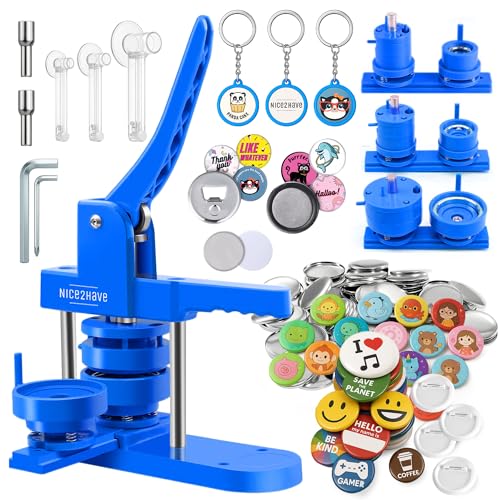
nice2have Button Maker Machine 1+1.25+2.5 Inch Pin Maker Kit

Craft Culture EtchMate Engraving Pen

Resiners AirFast Resin Curing Machine with Large Tray

Zodzi Manual Embossed Label Maker Machine

Caydo Automatic i Cord Knitting Machine Pro

Silhouette America Cameo 5 Alpha (α) Smart Cutting Machine

Cricut Joy Xtra Smart Cutting Machine Bundle

Resiners Resin Curing Machine G3 for Epoxy and UV Resin

VENNQD Rolling Storage Cart Compatible with Cricut (Greige)

VENNQD Rolling Storage Cart Compatible with Cricut (Pink)
A Closer Look At Each Pick
If you run a booth at a craft fair or want to churn out matching buttons for a school event, this kit from nice2have gives you three die sizes in one box. The package lands with paper cutters, blank shells, and several backing styles, so the learning curve is mostly figuring out the press rhythm. Compared with the engraving pen and die-cutter later in this list, this is a much more physical tool, all hand pressure and a satisfying click.
You start with printed artwork, run it through a circular cutter, and press the components together. The result is a sturdy pin, magnet, or bottle opener that feels store-bought. The trade-off is that cutting and pressing each design takes a couple of minutes, so mass production goes slower than it would on an automated machine. You also need a flat, hard surface to get clean cuts every time.
The Value In It
- Three pin sizes in one kit, useful for layering or matching different shirt sizes at events
- Backings span pins, magnets, bottle openers, and keychains, so leftovers become small gifts
- Hand-powered press needs no outlet, which means you can run a booth anywhere
- Replacement parts stay affordable because the shells are a common size
Things To Consider
- Pressing is a workout for larger runs, and your wrist may feel it after an hour
- Cutter blades dull over time and tend to tear thin paper if not replaced
Who It Suits Best
Small-batch creators, classroom volunteers, and parents who want a low-cost first crafting machine for group projects will get plenty of use from this kit.
Consider Something Else When
Anyone who already owns a Silhouette Cameo 5 Alpha will find that the printer-cutter workflow covers flat designs faster, leaving the button press for the final assembly step.
Engraving used to mean a noisy rotary tool and a hefty price tag, but the EtchMate reframes it as a cordless pen that fits in a drawer. The Craft Culture kit ships with 31 different bit profiles, which sounds like a lot until you realize each one targets a specific material. A flat-bottomed bit for wood, a diamond point for glass, a fine liner for jewelry tags, and so on.
You hold the pen like a thick marker and let the small motor do the work. Speeds reach up to 20,000 RPM, and an integrated LED work light helps on dark surfaces. For most home crafters, that range covers everything from wedding favors to monogrammed cutting boards. The honest read is that you should expect to swap bits often while you learn which one suits each surface, since the wrong profile simply scuffs rather than cuts.
Features That Help
- Variable speed control up to 20,000 RPM for switching between soft wood and hard glass
- 31-bit starter set covers most common materials, so the learning curve is mostly trial and error
- Built-in LED work light improves visibility on dark ceramics and stained wood
- Compact pen shape fits standard tool drawers, unlike bulky rotary tools
Trade Offs
- Glass and ceramic engraving requires steady hands, and the thin profile can feel top-heavy
- Bits wear down on stone surfaces and need replacing sooner than the manual suggests
Feature Snapshot
Made For
Personalization hobbyists and small-business owners who engrave names, dates, and logos onto gifts or product samples will find this pen surprisingly capable.
Look Elsewhere When
Creators focused on die-cut vinyl and stickers should skip this and head straight to the Cricut Joy Xtra, which handles flat materials in a single pass.
Resin cures on its own timeline, and that timeline is usually a full day on the shelf. The Resiners AirFast aims to cut that wait down to roughly two hours by circulating warm air across a wide internal tray. The big tray is the headline feature: you can slide in several coaster molds or a single large serving board at once, which matters when you run a small resin side hustle.
Setting it up is simple. Place the molds, dial in the temperature, and let the chamber handle the rest. In cold workshops, the preheat function warms the resin bottle itself, which reduces bubbles later. You should know the chamber is heat-only, so it cannot drop the temperature below the room, meaning summer projects can take slightly longer than winter ones.
Standout Benefits
- Cures standard epoxy in about two hours instead of a full day
- Wide internal tray holds multiple molds at once
- Winter preheat mode reduces microbubbles in cold conditions
- Closed chamber keeps dust off sticky surfaces mid-cure
Honest Caveats
- Heat-only design means ambient room temperature sets the floor, not the machine
- Larger molds may need rotation halfway through for even results
- Power draw climbs during long sessions, so plan outlet placement
Right Fit For
Resin artists who produce coasters, trays, and small furniture pieces in batches will appreciate the speed and tray size of this dedicated curing machine.
Swap It Out When
Anyone working with both epoxy and UV resin should consider the Resiners G3 instead, since it handles both cure types in one unit.
The Zodzi label maker is the simplest tool on this list, and that is exactly its appeal. There is no ink, no battery, no app, and no Bluetooth pairing. You turn a dial to a letter, squeeze the handle, and the machine presses a raised, 3D impression into a strip of plastic tape. The result looks like the old-school embossed labels on vintage stationery, but it functions as a modern labeling system.
This is the kind of tool that lives in a junk drawer for years and still works the first time you pull it out. The trade-off is that you are limited to the character set on the dial, and longer labels take a few minutes of cranking. For most home organizers, that is a fair trade for a tool that never needs charging.
What Makes Sense
- Inkless design means no smudges, no refills, and no dry-out issues
- Embossed 3D letters remain readable on textured surfaces like canvas bins
- Compact body fits in a drawer or craft tote without taking up space
- No power source required, so it works in a classroom or outdoor market
Some Limits To Know
- Dial restricts you to a fixed character set, so non-English text is limited
- Each letter requires a separate squeeze, which is slow for long phrases
Best Suited To
Home organizers, journal keepers, and scrapbookers who want a tactile, ink-free label will get plenty of use from this manual embossing tool.
Not Your Match When
Anyone printing dozens of identical labels in a session will find the Silhouette Cameo 5 Alpha a better fit, since it prints and cuts vinyl labels in a single workflow.
If you have ever tried to knit i-cord by hand, you know the boredom sets in fast. The Caydo Automatic i Cord Knitting Machine Pro exists for the opposite reason. Set it up with a cone of yarn, choose your cord thickness, and walk away while it produces a tidy, tangle-free tube of knitted cord.
This is a specialized tool, but the cord it produces is used in a surprisingly wide range of projects. Think bag handles, drawstring tops, doll trims, shoelace replacements, and rustic gift wrap. Compared with the engraving pen, this is a quieter, more meditative machine. The honest read is that the learning curve is mostly in the first setup, threading the tension disk correctly and finding the right yarn weight, but the payoff is hours of free time on a long craft session.
Why It Works Well
- Fully automatic operation removes the hand fatigue of long cord runs
- Consistent cord thickness, useful for matching bag straps and trims across a set
- Accepts a wide range of yarn weights, from fine cotton to chunky wool
Points To Keep In Mind
- Yarn tensioning takes practice, and the wrong setup creates thin spots
- Specialty yarn like boucle tends to jam the feed mechanism
- Cord is wound onto a spool, so you need a separate reel or swift for storage
Perfect Match For
Crocheters, bag makers, and small-batch accessory creators who need yards of matching cord for handles or trims will benefit most from this automated knitter.
Another Choice May Suit
Knitters who prefer a wider range of stitch patterns should look at the Cricut Joy Xtra bundle, which cuts fabric strips that can be hand-stitched into custom cords.
The Cameo line has long been the workhorse of home vinyl cutters, and the Alpha refresh keeps that reputation intact. The headline addition is a four-point registration system that lines up printed designs with cut lines far more accurately than a manual eye can. For print-and-cut projects like stickers, heat transfers, and custom cards, that upgrade alone can save an afternoon of failed test cuts.
The machine cuts vinyl, paper, and fabric on the same platform, with an AutoBlade that adjusts depth without a manual swap. The Studio software handles the layout, and the new Fast Sketch Mode accelerates drawn designs for sketch-style art prints. It runs quieter than earlier models, which is a small detail until you start projects at midnight. The trade-off is that the full software suite has a learning curve, so first-day users will spend time in tutorials before getting clean cuts.
Key Advantages
- Four-point registration system delivers consistent print-and-cut alignment on stickers and transfers
- AutoBlade adjusts depth on the fly, so material changes do not require manual swap-out
- Quiet motor operation makes it apartment-friendly for late sessions
- Compatible with vinyl, paper, and fabric on a single mat
Potential Drawbacks
- Studio software takes time to learn, especially for first-time cutter owners
- Replacement cutting mats wear out with heavy use and add to the cost of ownership
Spec Overview
Who Should Grab It
Sticker sellers, planner decorators, and apparel crafters who need reliable print-and-cut precision will find the Cameo 5 Alpha a strong step up from earlier models.
A Better Fit Elsewhere
Crafters working in very small spaces should look at the Cricut Joy Xtra, which fits on a narrow shelf where the Cameo would feel cramped.
The Cricut Joy Xtra takes the everyday capabilities of a smart cutter and shrinks the footprint. It cuts, writes, draws, and foils, which is more than the original Joy could manage. For apartment crafters or anyone with a small desk, that combination matters more than raw cutting width, since the machine can sit on a bookshelf and still turn out stickers, cards, and small decals.
The bundle ships with 30 digital images in the Design Space app, ready to use once you register the machine. That gives beginners a head start without forcing a paid subscription on day one. The honest read is that the cutting width is shorter than the Cameo 5 Alpha, so large-format projects like wall decals or full-shirt heat transfers are out of reach. For most personal projects, the trade-off feels fair.
Good Reasons To Consider
- Compact body fits on a shelf, side table, or small studio corner
- Cuts, writes, draws, and foils in one machine, useful for cards and gift tags
- Includes 30 starter digital designs in the Design Space app
- Works with the same material ecosystem as larger Cricut cutters
Where It May Fall Short
- Shorter cutting width limits full-shirt heat transfer projects
- Material costs add up over time, and the machine is picky about non-branded mats
Whose Shelf It Belongs On
Apartment crafters, gift tag makers, and small-project hobbyists who do not need wide-format cuts will find this compact smart cutter genuinely useful.
Reach For A Different Pick When
Anyone producing large vinyl decals or apparel heat transfers should reach for the Silhouette Cameo 5 Alpha, which handles wider materials in a single pass.
The Resiners G3 sits one tier above the AirFast and the difference is real. It handles two distinct resin workflows in a single machine: heat-cured epoxy in roughly two hours and UV resin in roughly one minute. That matters if you have ever run a UV piece and waited all day for a separate epoxy pour to finish.
Inside, hot air circulates to speed epoxy cure while built-in UV lamps handle jewelry, charms, and small details. The chamber is smaller than the AirFast tray, so the G3 leans toward finer, mixed-project work rather than wide molds. You should know the unit is heating only, so the cooling phase follows ambient room temperature. The honest read is that this is the right tool for crafters who work with both resin types and want a single dedicated station.
Well-Handled Touches
- Combined hot air and UV curing supports both epoxy and UV resin projects
- One-minute UV cure time is fast enough for high-volume charm work
- Closed chamber keeps dust and pet hair off sticky resin mid-cure
- Consistent temperature control reduces uneven cure marks on tall molds
Smaller Caveats
- Heating-only design, so post-cure cooling tracks the room temperature
- Smaller chamber suits fine detail work better than large serving boards
Feature Card
Built With In Mind
Mixed resin artists who split time between UV jewelry and epoxy decor will appreciate having one machine that handles both cure types without swapping setups.
Skip It When
Anyone running large-format epoxy trays should skip the G3 and pick the Resiners AirFast, which has a wider tray designed for bigger molds.
Once you own a smart cutter, you quickly run out of places to put the rolls. The VENNQD cart solves that problem with 24 dedicated vinyl roll holders, two fabric drawers for tools and mats, and side hooks for frequently used items. The greige finish blends with most craft room color schemes, so it disappears into the background visually.
You set the cutter on the top shelf, slide a heat press into the lower compartment, and use the middle drawer for scissors, weeding tools, and smaller materials. Compared with the Cricut Joy Xtra on its own, this cart turns a single machine into a small production station. The honest read is that the wheels are helpful for re-positioning but not built for daily rolling across thick carpet, so it works best on hard floors.
Where It Helps
- 24 vinyl roll holders keep an entire color collection visible and accessible
- Two fabric drawers organize tools, mats, and small supplies in one place
- Side tool hooks hold scissors, weeding picks, and rulers at arm’s reach
- Rolling design lets you re-position the station for different projects
Some Limits To Know
- Wheels roll smoothly on hard floors but struggle on plush carpet
- Top shelf is sized for a Cricut machine, so larger cutters may not fit
Perfect Match For
Crafters with growing vinyl collections and multiple Cricut-compatible machines will benefit most from this dedicated rolling storage solution.
Where A Sibling Pick Shines
Anyone who prefers a pink-themed studio can pick the VENNQD Pink version, which offers the same storage layout in a brighter finish.
The pink version of the VENNQD cart is identical in structure to the greige model, with the same 24 vinyl roll holders, two fabric drawers, and side tool hooks. What changes is the color story, which matters in craft rooms where the storage doubles as decor. The pink finish tends to read as part of a creative space rather than as office furniture, which can be a plus for shared rooms or a child’s craft area.
The cart pairs well with the Cricut Joy Xtra from earlier in this list, since the top shelf fits a compact cutter and leaves room for a small heat press below. The honest read is that choosing between this and the greige version is mostly about color preference, since the storage capacity is the same.
Strong Points
- Same 24-roll vinyl capacity as the greige model, just in a pink finish
- Two fabric drawers handle tools, mats, and small supplies
- Rolling base lets you move the station between craft tables
- Side hooks keep frequently used tools within arm’s reach
Points To Note
- Pink finish may not blend with neutral craft room palettes
- Wheels perform best on hard flooring rather than plush carpet
Best Suited To
Crafters building a dedicated creative corner in a shared space, a child’s room, or a pink-themed studio will appreciate the color-forward design of this cart.
Consider Something Else When
Anyone who prefers neutral storage that disappears into a multi-use room should consider the VENNQD Greige version, which offers the same layout in a softer finish.
What To Weigh Before Buying Crafting Machines
Match the Machine to the Material
Different crafting machines handle different surfaces, and that single decision shapes most of your experience. Die-cutters like the Silhouette Cameo 5 Alpha and the Cricut Joy Xtra work best on flat stock, while resin machines like the Resiners AirFast and G3 deal with chemical curing rather than cutting. Engravers and label makers handle solid objects and paper respectively. Think about what you reach for most often, and start there.
Plan for Workspace, Noise, and Power
Some machines are quieter than others, and that matters in an apartment. The Silhouette Cameo 5 Alpha runs quietly enough for late sessions, while resin curing units generate low hum and steady heat for hours. Big carts like the VENNQD models also need floor space and a clear path for rolling. Measure your available space before you fall for a wider tray or taller tower.
Software and Skill Curve
Cutter machines ship with companion software that takes time to learn, while manual tools like the Zodzi label maker need no setup at all. Your tolerance for tutorials will narrow the field quickly. If you want a same-day start, the engraving pen, the manual label maker, and the button press kit are friendly entry points. If you want long-term creative range and you can invest an afternoon in setup, the smart cutters reward the effort.
Accessories and Ongoing Costs
Vinyl rolls, replacement blades, cutting mats, resin molds, and engraving bits all add up over time. Factor in those recurring costs when comparing machines, since a lower sticker price can hide expensive consumables. Storage solutions like the VENNQD carts help reduce waste by keeping materials visible and organized, which means fewer forgotten half-used rolls in the back of a closet.
Key Considerations Across These Picks
Common Buying Traps
The most common slip-up is buying a wider machine than your space allows, then letting it collect dust because setup is annoying. Another is overlooking consumable costs. A smart cutter looks affordable until you start buying branded mats and blades, while a resin machine looks pricey until you realize how much time it saves. Match the tool to your actual project size and budget for the materials that go with it.
Where The Extra Money Goes
Higher-tier machines typically deliver better registration, faster cut times, quieter operation, or dual functionality. The Silhouette Cameo 5 Alpha earns its position through the four-point registration system, which saves a lot of failed prints. The Resiners G3 adds UV curing to a heat-cure platform, which means one machine instead of two. Paying up makes sense when the upgrade removes a recurring frustration, not just because a feature sounds nice on a spec sheet.
Frequently Asked Questions
What is a crafting machine?
A crafting machine is a powered or manual tool that automates part of a creative process, like cutting vinyl, curing resin, engraving metal, or producing knitted cord. Each machine targets a specific craft, so the right pick depends on the material and project type you work with most.
Do I need a computer or app to use a smart cutting machine?
Most smart cutters like the Cricut Joy Xtra and the Silhouette Cameo 5 Alpha rely on companion software or an app to send designs to the blade. You can use a phone, tablet, or computer depending on the brand. Manual tools like the Zodzi label maker need no software at all.
Can one crafting machine handle multiple materials?
Some machines, like the Silhouette Cameo 5 Alpha, cut vinyl, paper, and fabric on the same platform. Others, like the Resiners G3, handle multiple resin types. Most specialized tools work best on a narrow range of materials, so a workshop with several crafts often benefits from two or three focused machines.
How loud are resin curing machines?
Resin curing machines run quietly compared with rotary tools, mostly a low hum from the internal fan. They generate steady heat for hours, so ventilation matters more than soundproofing. Placing one in a corner of a craft room rather than a bedroom keeps the warmth comfortable.
How do I maintain a crafting machine?
Wipe blades and mats after each session, store vinyl rolls upright to prevent flat spots, and replace consumable parts like cutter blades and resin filters on a regular schedule. Rolling carts like the VENNQD models make routine maintenance easier by keeping parts visible and accessible.
Bottom Line
The right crafting machine depends less on brand reputation and more on the projects you actually finish. Start with the material you reach for most, whether that is vinyl, resin, yarn, or paper, and build from there. A small, well-chosen tool used often will serve you better than a feature-heavy machine that sits in a corner.
