
Screen printing at home used to mean taping a frame to the kitchen table and hoping the ink landed where you wanted. A proper press changes that: registration stays locked, garments sit flat, and multi-color designs stop being a guessing game. Whether you’re printing band tees in a garage or testing a side business from a spare room, this shortlist covers everything from starter kits to a full four-station rotary press.
The Shortlist At A Glance
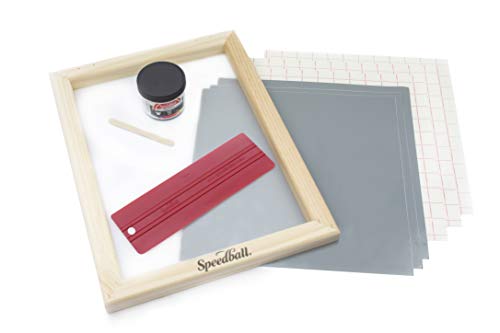
Speedball Beginner Screen Printing Craft Vinyl Kit

VEVOR 1 Color 1 Station Silk Screen Printing Press

INTBUYING 1 Color 1 Station Manual Screen Printing Press

VEVOR 4 Color 1 Station 360° Rotable Screen Printing Press

Caydo 54 Pieces Screen Printing Kit with 50W LED UV Light

Caydo 51PCS All-in-One Screen Printing Kit
Caydo Screen Printer, 1 Color 1 Station Press

VEVOR 4 Color 4 Station 360° Rotable Screen Printing Press

VEVOR 4 Color 2 Station 360° Rotable Screen Printing Press

VEVOR 4 Color 2 Station Silk Screen Printing Press
More Details On Our Top Picks
Most people who own a cutting machine never realize they’re one step away from screen printing. This Speedball kit bridges that gap by letting you cut a stencil from vinyl, apply it to the included 10×14 wood-frame screen, and pull fabric ink through with the Red Baron squeegee.
The appeal is what’s missing: no photo emulsion, no exposure light, no chemicals to store or dispose of. In an apartment or shared craft room, that’s a genuine advantage over traditional setups.
Strong Points
- Skip the darkroom entirely, since cut vinyl replaces light-sensitive emulsion
- Works with the cutting machine you likely already own
- Fabric screen printing ink included, so shirts are printable out of the box
- Speedball’s squeegee has a long-standing reputation among hobby printmakers
Things To Consider
- Vinyl stencils limit you to simpler shapes compared with photographic screens
- You’ll need your own cutter and design software, which aren’t part of the kit
Who Will Love This
Crafters already comfortable with a vinyl cutter who want crisp, repeatable prints without learning emulsion chemistry.
A Better Fit Elsewhere
Anyone wanting detailed photographic artwork will get more mileage from the Caydo 54 Pieces Screen Printing Kit with its exposure light and transparency film.
A single-color, single-station press is the honest starting point for most first-timers, and this VEVOR keeps the commitment small. The cold-rolled steel body carries an electrostatic spray finish, which resists the ink smudges and scuffs a busy craft table tends to accumulate.
At roughly 24 pounds, it’s light enough to move between a garage bench and a spare-room desk, though bolting it down improves stability during heavier squeegee passes. Assembly is required, and the included wrenches and screwdriver cover the basics.
What We Like
- Steel construction with a coated finish that wipes clean after ink sessions
- Compact footprint suits apartments and shared workspaces
- Basic tools ship in the box, easing first-time assembly
Minor Gripes
- One color means layered designs require careful re-registration by hand
- Owners commonly report the unit benefits from being screwed to a sturdy surface
Quick Facts
Made For
Beginners printing one-color logos or text designs who want a real press without a large investment or a dedicated studio corner.
Where A Sibling Pick Shines
Shoppers planning multi-color work from day one should step up to the VEVOR 4 Color 1 Station 360° Rotable Screen Printing Press instead.
Where the VEVOR above leans on heft, this INTBUYING goes the other way: about 16.5 pounds of steel plate in a machine measuring just 35 x 18 x 13 inches. That makes it one of the easiest presses here to tuck onto an existing workbench.
The removable pallet bracket is the detail worth noticing. Swapping platen boards between jobs, say from adult tees to tote bags, becomes a quick unclip rather than a rebuild. Like most presses in this class, it must be fixed to the table with screws for stable operation.
Upsides
- Removable pallet bracket speeds up garment and substrate changes
- Electrostatic-sprayed steel surface shrugs off routine wear
- Generous 22 x 18 inch print area handles larger front graphics
Small Caveats
- Table mounting is mandatory, so plan your bench space before ordering
- Single station means every color change involves swapping screens manually
Right Fit For
Hobbyists with limited bench depth who still want a metal press and frequently switch between garment types.
Swap It Out When
If portability matters more than the swappable pallet, the lighter-feeling VEVOR 1 Color 1 Station press may suit apartment dwellers better.
This is the sweet spot for anyone who wants real multi-color capability without surrendering a whole room. Four screen arms rotate around a single station on independent metal bearings, so you can lay down a base layer, spin to the next color, and keep registration locked throughout.
The double-layer positioning pallet helps layers land consistently, which matters enormously once you’re stacking three or four colors. Compared with the single-color VEVOR earlier in this list, you gain the rotary head while keeping a similar compact footprint bolted to one bench.
Highlights
- Four rotating arms let you run full-color designs in one sitting
- Independent bearings keep rotation smooth and positioning accurate
- Double-layer pallet reduces layer-to-layer drift on detailed art
- Small footprint fits garages, basements, and spare corners
Points To Note
- One station means only one shirt prints at a time, capping batch speed
- Screwing the body to the workbench is expected for stable operation
At A Glance
Who Should Grab It
Home printers ready to move beyond one-color work but working within a single-bench footprint.
Consider Something Else When
Anyone printing larger batches for orders will find the two-station VEVOR 4 Color 2 Station model later in this list far more efficient.
Photo emulsion printing intimidates newcomers mostly because of the gear list: frames, coater, transparencies, exposure source, ink knives. This 54-piece Caydo bundle checks every box, including three frames, six fabric ink colors, a scoop coater, gloves, and A4 transparency film for printing your artwork.
The 50W LED exposure light is the centerpiece. Paired with the photo emulsion kit, it lets you burn detailed images into screens at a kitchen table rather than hunting for sunlight. It’s a lot of components, so expect a small learning curve and some counter space.
Bright Spots
- Everything needed for emulsion printing arrives in one purchase
- Six ink colors support colorful designs from the very first session
- Three frames allow one in use, one drying, one in reserve
- Transparency film works with standard inkjet printers
Softer Spots
- Emulsion requires a dim workspace during coating and drying
- No press included, so squeegee technique is entirely hand-held
Feature Snapshot
Who It Suits Best
Artists wanting photographic detail in their prints and the patience to learn the emulsion process properly.
Not Your Match When
Shoppers who want a rigid press for consistent pressure should pair their skills with the Caydo Screen Printer instead of relying on hand pulls alone.
Think of this as the leaner sibling of the 54-piece kit reviewed above. You still get the 50W exposure light, photo emulsion, two frames, a squeegee, and five sheets of A4 transparency film, but the bundle trims down to four ink colors and a slightly smaller parts count.
The standout tweak is the PVC bracket on the exposure lamp. Holding a light steady over a screen for several minutes gets old fast, and this bracket frees both hands while keeping exposure distance consistent. For casual weekend printers, that small comfort adds up.
Plus Points
- Hands-free light bracket removes arm strain during exposures
- Emulsion removal powder simplifies reclaiming screens for reuse
- Four fabric ink colors cover most casual design palettes
Worth Noting
- Two frames versus three means tighter turnaround between projects
- Hand-printing only, so pressure consistency depends on your technique
Whose Shelf It Belongs On
Occasional home printers who want emulsion capability without committing to the fuller 54-piece inventory.
Reach For A Different Pick When
Frequent printers juggling multiple designs will appreciate the extra frame and inks in the Caydo 54 Pieces Screen Printing Kit.
Two design choices set this Caydo apart from the VEVOR and INTBUYING single-station presses. First, a hinge lets the wood frame lift and hover in place, so you can check registration mid-print without losing your position. Second, the base includes a groove with a centerline for squaring up garments quickly.
Together those details address the two biggest beginner frustrations: misaligned screens and crooked shirts. The honest trade-off is capacity, since this remains a one-color machine suited to simpler designs.
Reasons To Buy
- Hovering hinge preserves screen position during inspection
- Centerline groove squares garments for accurately placed prints
- Approachable for complete beginners learning press technique
Areas To Watch
- Wood frame construction needs gentler handling than all-metal heads
- Single color limits layered or gradient-style artwork
The Right Fit
Detail-oriented beginners who value placement accuracy over production volume, especially for chest logos and pocket prints.
Another Choice May Suit
Printers chasing multi-color designs should look at the VEVOR 4 Color 1 Station 360° Rotable press, whose rotating arms handle layered work natively.
At around 77.6 pounds, this is the serious machine on the list. Four stations mean four shirts in progress simultaneously: while one person pulls a print, the next garment waits loaded at the following head. Small studios taking actual orders tend to settle on this configuration once volume justifies the floor space.
Each arm carries a dedicated positioning stop underneath, and the double-layer design cuts down on deviation between colors. Cold-rolled steel with electrostatic spraying matches the finish quality seen across the VEVOR range here.
Standout Traits
- Four stations enable true batch production workflows
- Per-arm positioning stops keep multi-color registration tight
- Substantial steel build stays planted during aggressive squeegee strokes
- Double-layer pallet design supports consistent results across runs
Honest Caveats
- Assembly is required and takes real time given the component count
- Needs a dedicated floor area; this won’t live on a folding table
Core Details
Built With In Mind
Sellers fulfilling regular orders who’ve outgrown single-station machines and have room for a permanent press footprint.
Look Elsewhere When
Weekend hobbyists printing for fun will find the two-station VEVOR models more practical and less demanding on space.
Two stations split the difference beautifully. One head holds the shirt being printed while the other gets prepped with the next garment, effectively halving dead time compared with the single-station VEVOR reviewed earlier. Full four-color capability stays intact thanks to the same 360-degree rotary body on independent metal bearings.
The materials spec reads well for the class: carbon steel springs, a 304 stainless steel rod, and that familiar electrostatic-sprayed cold-rolled steel body. Bench mounting is still required, so measure your workbench before committing.
Positives
- Two stations keep a second shirt loading while you print
- Carbon steel springs and stainless rod hold up to repeated cycling
- Rotary head maintains accurate positioning across all four colors
Trade Offs
- Heavier than single-station units, so relocation takes effort
- Workbench mounting hardware and assembly time come with the territory
Details At A Glance
Best Suited To
Serious hobbyists and micro-businesses running weekend batches who want speed gains without the four-station footprint.
Skip It When
Tight budgets favor the simpler VEVOR 1 Color 1 Station press for learning fundamentals before scaling up.
This variant covers the same four-color, two-station ground as the previous pick, with a slightly different emphasis. Its stated print area runs about 21.3 x 17.7 inches, and like its siblings it relies on a 360-degree rotary body riding independent metal bearings for smooth, repeatable movement.
Positioning stops sit under each arm to curb deviation, the detail that separates usable multi-color presses from frustrating ones. Owners commonly note that bolting the frame to a solid workbench transforms stability, so treat that step as part of the purchase rather than an option.
Best Bits
- Arm-level stops reduce drift between color layers
- Bearing-mounted rotation feels smooth through long sessions
- Two stations suit growing order volumes without huge floorspace
Room For Improvement
- Installation required, and instructions are reported as sparse by some owners
- Very similar to pick nine, so compare current availability before deciding
Who Should Grab It
Garage-based printers setting up a permanent bench who want proven four-color capability at a two-station scale.
Where Another Pick Suits Better
Those needing maximum throughput should commit to the VEVOR 4 Color 4 Station press, which doubles active garments per cycle.
What Matters Most Before Choosing
Match the Machine to Your Output
Count how many shirts you realistically print per month. Under twenty, a single-station press or even a hand-kit keeps things simple. Regular orders justify a second station, and true production volume points squarely at four stations.
Registration Is Everything
Registration refers to how precisely each color layer lands relative to the last. Rotary heads with metal bearings and per-arm positioning stops do this work for you; cheaper setups shift the burden onto your eyes and patience. Multi-color designs live or die here.
Space and Mounting Reality
Nearly every press in this category bolts to a workbench, and the four-station units need dedicated floor area. Measure first, including clearance for rotating arms, then decide between bench-mounted and freestanding layouts.
Kits Versus Presses
Exposure kits teach you emulsion, burning, and reclaiming; presses teach you pressure and registration. Many home printers eventually own both, starting with a kit to learn artwork prep and adding a press once designs get ambitious.
Key Considerations Across These Picks
Traps First Timers Fall Into
The classic error is buying a four-station press before mastering a single color. Registration skill transfers, but wasted money doesn’t. Another common slip: skipping the bench-mounting step, then blaming the machine for wobble that a few screws would have solved.
What Separates Premium From Basic
Higher-tier presses spend their extra cost on bearings, spring quality, and steel thickness. Those parts determine whether layer five lands as cleanly as layer one. Paying up makes sense once you’re selling prints; for pure hobby use, the budget tier serves fine.
Frequently Asked Questions
Can a beginner use a 4 color press right away?
Yes, though expect a learning curve on registration. Starting with one or two colors builds the skills the other arms demand.
Do these presses include screens and ink?
Presses generally don’t; they’re the machine only. Pair one with a kit like the Caydo bundles for consumables.
Is bench mounting really necessary?
For consistent results, treat it as required. Unmounted presses flex during squeegee pulls and degrade registration.
How much space does a 4 station press need?
Plan for a dedicated floor area plus arm-swing clearance. These units typically weigh well over seventy pounds.
Vinyl stencils versus photo emulsion: which should I start with?
Vinyl suits bold shapes and skips chemicals entirely. Emulsion rewards patience with finer photographic detail.
Closing Remarks
The right choice comes down to honest self-assessment: how often you’ll print, how many colors your designs need, and how much bench or floor space you can give up. Start smaller than your ambition suggests, master registration, and upgrade when real demand shows up. Any of these ten will put your first clean print on a shirt this year.