
A worn hotend announces itself quietly: stringing you can’t tune away, under-extrusion mid-print, a heat block that never quite holds temperature. Replacing it is one of the cheapest ways to bring an aging printer back to life or push a fast machine even faster. This shortlist covers Bambu Lab, Creality, and Anycubic owners, from budget drop-in swaps to ceramic high-flow upgrades.
The Shortlist At A Glance

HzdaDeve A1 Mini Hotend Kit Hardened Steel (2 Pack)

5Aplusreprap Ender 3 Hotend Upgrade M3 Stud Thermistor
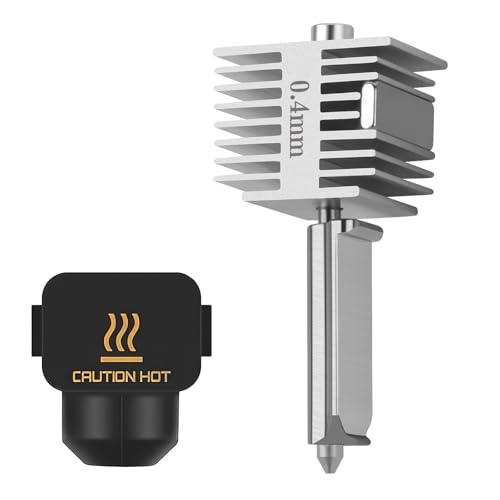
UniTak3D A1/A1 Mini Quick-Swap Hotend 0.4mm

Creality K2 Ceramic Heating Block Hotend Kit
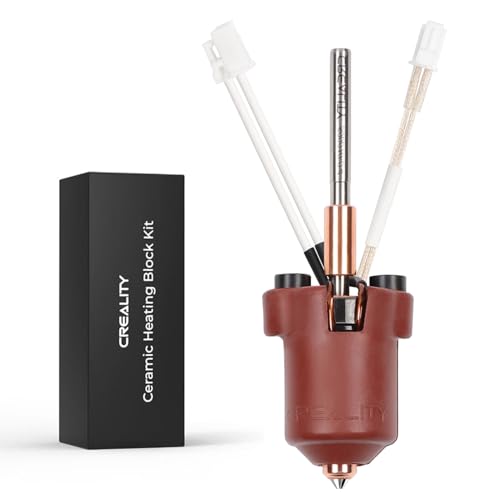
Creality Ender 3 V3 Plus Ceramic Heating Block Kit
Creativity Full Assembled Ender 3 Hotend Kit

Creality Ender 3 V3 SE/KE Hotend Upgrades Kit

REDREX Kobra 3 Combo Hotend Replacement (2 Pack)

Comgrow Ender 3 V3 SE Hotend Kit 250mm/s

Creality Ender 3 V3 SE Assembled Print Head Kit
More Details On Our Top Picks
Anyone running glow-in-the-dark, carbon fiber, or glitter PLA knows the pain of brass nozzles wearing out within weeks. This two-pack answers that with hardened steel nozzles sized at 0.4mm for the Bambu Lab A1 Mini, A1, and A2L platforms.
The steel construction trades a little thermal conductivity for serious abrasion resistance, which matters far more once abrasive additives enter the picture. Keeping a spare on hand means a clogged Friday night print doesn’t end your weekend.
Strong Points
- Hardened steel resists wear from abrasive filaments that chew through brass quickly
- Two units per pack means a ready backup when a nozzle clogs mid-project
- Precision-machined tips support smooth extrusion and cleaner layer lines
- Fits several Bambu machines, handy for multi-printer households
Things To Consider
- Steel heats slightly slower than brass, so expect minor tuning when switching materials
- Owners commonly report needing a fresh bed-level check after any hotend swap
Made For
Hobbyists who print abrasive or specialty filaments regularly on Bambu’s A-series machines and want spares ready.
A Better Fit Elsewhere
Standard PLA-only users may prefer the UniTak3D stainless quick-swap unit lower down this list for its easier maintenance routine.
A thermistor is the small sensor that tells your printer how hot the heat block actually is, and a loose one causes temperature swings that ruin prints. This upgrade uses an NTC 100K sensor mounted on an M3 stud so it clamps firmly to the block instead of drifting during fast printhead movement.
Compatibility is the headline here: it covers a long list of Creality machines including the CR-10 family, CR-20 Pro, Ender 2, Ender 3, Ender 3 V2, Ender 3 Pro, and Ender 5. That breadth makes it a sensible spare-parts drawer item if you maintain several older Creality printers.
What We Like
- M3 stud mounting keeps the sensor seated firmly against the heat block
- Works across many Creality models, from CR-10 variants to the Ender 5
- Insulated wiring helps prevent shorts around the heater area
Minor Gripes
- You’ll need basic crimping or connector work to wire it in cleanly
- Older Bowden setups still demand careful tube seating to avoid leaks
Who Should Grab It
Tinkerers maintaining legacy Creality hardware who want stable temperature readings without replacing the whole assembly.
Where A Sibling Pick Shines
Complete beginners will find the fully assembled Creativity Ender 3 kit later in this roundup far less intimidating.
Where the HzdaDeve pack focuses on nozzle toughness, this UniTak3D unit leans on integration quality. The heatbreak and heating block come tightly joined as one piece, which closes off the gap where molten filament usually leaks and hardens into a clog.
The 0.4mm stainless nozzle carries a diameter tolerance under 0.02mm, tight enough that extrusion stays consistent across long jobs. An all-metal thermal insulation path sheds heat efficiently too, keeping the cold side genuinely cold during multi-hour sessions on the A1, A1 Mini, or A2L.
Highlights
- Integrated heatbreak-and-block design minimizes filament leakage and detachment
- Nozzle tolerance below 0.02mm supports accurate, repeatable extrusion
- All-metal insulation manages heat well during extended print runs
- Burr-free tip finish reduces snagging on fine detail work
Small Caveats
- Stainless won’t survive abrasive filaments as long as hardened steel options
- Single-unit packaging means ordering again once this one wears out
Right Fit For
Bambu A-series owners printing mostly standard PLA and PETG who value clean, leak-free operation over exotic-material durability.
Skip It When
Abrasive filament fans should reach for the HzdaDeve hardened steel two-pack instead.
This is the spec sheet that makes other hotends look modest. A 70W ceramic heater surrounds the block in 360 degrees, pushing flow rates to 40mm³/s, roughly two-thirds higher than Creality’s previous generation, while supporting travel speeds up to 600mm/s.
In practice that means big structural prints finish dramatically sooner, and materials that need real heat get it: the kit handles temperatures up to 300°C. The quick-swap nozzle system also means a clog costs you seconds rather than an afternoon with wrenches.
Reasons To Buy
- 70W ceramic heater delivers 40mm³/s flow for genuinely fast printing
- Handles up to 300°C, opening the door to higher-temp materials
- Quick-swap nozzle design turns maintenance into a seconds-long job
- All-metal integrated build resists leaks between heatbreak and block
Points To Note
- Fitment is specific to the K2 platform, so verify your printer model first
- High-flow settings reward users who keep firmware current
Feature Snapshot
Who Will Love This
K2 and K2 Combo owners chasing production-speed output on large models.
Another Choice May Suit
Ender 3 V3 Plus owners should look at the dedicated Creality ceramic kit next on this list rather than adapting parts across platforms.
Think of this as the K2 kit’s sibling tuned for the Ender 3 V3 and V3 Plus. The 60W ceramic block brings much of the same high-temperature capability, rated to 300°C, along with support for 600mm/s printing speeds.
Because it’s an official Creality part designed specifically for these two machines, installation is a plug-and-play affair with no adapter guesswork. For anyone whose V3 Plus has started under-extruding after months of heavy use, this restores factory performance without modification.
Plus Points
- Purpose-built for the Ender 3 V3 and V3 Plus, so fitment is exact
- 300°C ceiling covers most engineering-grade filaments hobbyists use
- Integrated nozzle design cuts down on leak-related clogs
- Official sourcing means predictable behavior with stock firmware
Softer Spots
- Limited to two printer models, unlike broader third-party kits
- No spare nozzle included, so plan ahead for replacements
Whose Shelf It Belongs On
V3 Plus owners running large-format prints daily who want factory-spec reliability restored cheaply.
Consider Something Else When
V3 SE and KE users should pick the Creality SE/KE kit further down, since the geometry differs between these generations.
First replacement ever? This one removes nearly every opportunity for error because it arrives fully assembled: heater cartridge, thermistor, fan, and nozzle all pre-mounted. You disconnect the old unit, connect this one, and you’re printing again inside ten minutes.
The MK8-style extruder set targets the classic Ender 3, Ender 3s, and Ender 3 Pro. A 24V high-speed fan pulls heat away quickly, and the seamless nozzle-to-tube junction is the detail that prevents the slow leaks that plague hand-assembled stock units.
Bright Spots
- Fully assembled out of the box, ideal for a nervous first swap
- 24V fan cools the heatsink efficiently during long sessions
- Seamless nozzle and tube connection limits leaking and jamming
- Stainless construction stands up to regular high-temperature cycles
Trade Offs
- Stock-class performance, not a speed upgrade over the original part
- Fitment centers on older Ender 3 generations, not V3 models
At A Glance
Who It Suits Best
Newcomers replacing their first failed hotend on an original Ender 3 series machine.
Swap It Out When
Speed-focused users with a V3 SE should choose the Comgrow assembled kit instead for its higher throughput rating.
Dual compatibility is what separates this official kit from the single-model ceramic units above it. One purchase covers both the Ender 3 V3 SE and the V3 KE, thanks to included PTFE tubing cut to each machine’s required length: 0.028 meters for the KE and 0.022 meters for the SE.
The ceramic heating block brings the same high-temperature, high-speed character Creality built into its newer platforms, letting either printer sustain brisk print speeds without thermal sag. Just double-check which tube length matches your machine before installation.
Standout Traits
- Serves both V3 SE and V3 KE printers with model-specific tubing included
- Ceramic block supports high-speed printing reliably
- Official Creality parts avoid firmware and fitment surprises
Worth Noting
- Tube length mismatch between models trips up rushed installs, so read the guide first
- Single hotend per kit makes a second purchase wise for heavy users
Best Suited To
Households or small workshops running both a V3 SE and a KE from one parts bin.
Not Your Match When
Anycubic Kobra 3 owners obviously need the REDREX replacement pack instead, since nothing here fits that platform.
Anycubic Kobra 3 and Kobra 3 V2 Combo owners finally get proper aftermarket attention here. Each unit pairs a 0.4mm brass nozzle with a bi-metal heatbreak, meaning copper and titanium bonded together: copper moves heat where it should go, titanium blocks it from creeping into the cooling zone.
The nozzle bore holds a tolerance under 0.02mm with a smooth inner wall, which is the combination that keeps clogs rare. Two complete assemblies per order, silicone socks included, make this the most self-sufficient package on the list alongside the HzdaDeve pair.
Upsides
- Bi-metal heatbreak sharply limits heat creep into the cold zone
- Two full assemblies with silicone socks cover you for years of swapping
- Tight 0.02mm nozzle tolerance keeps extrusion consistent
- Smooth 1.75mm input path discourages filament jams
Honest Caveats
- Brass nozzles wear faster than steel under abrasive filaments
- Silicone socks need occasional cleaning to keep temperature readings honest
Core Details
The Right Fit
Kobra 3 ecosystem users who print often and want genuine spares rather than a single replacement.
Reach For A Different Pick When
Bambu A1 owners belong with the UniTak3D quick-swap unit, purpose-built for that toolhead.
Comgrow packages the original Creality V3 SE hotend with the small parts that always go missing at the worst moment: an insulation silicone sleeve and a fresh white Bowden tube. Everything arrives pre-assembled, so wiring is literally plug-in.
Rated for speeds up to 250mm/s, this unit keeps the V3 SE’s quick-print personality intact after a swap. Compared with the bare Creativity kit aimed at older Enders, this bundle suits anyone who wants the job done in one order with zero follow-up shopping.
Positives
- Bundle includes silicone sleeve and replacement Bowden tube
- Pre-assembled head means only wire connections on install day
- Original Creality componentry preserves rated 250mm/s performance
Areas To Watch
- Single hotend only, so frequent swappers will want a second kit
- Restricted to the V3 SE platform specifically
Who Should Grab It
V3 SE owners who value a complete, one-box fix over hunting separate accessories.
Where Another Pick Suits Better
Users wanting a higher temperature ceiling on the same printer should compare the Creality V3 SE print head kit closing this list.
Closing the list is Creality’s own V3 SE print head, distinguished by a precision thermistor rated for temperature detection up to 260°C. That headroom gives you confidence with PETG and other materials that run hotter than basic PLA.
Creality also enlarged the heat dissipation blocks on this revision, improving cooling so sustained high temperatures don’t degrade surrounding components. Like its Comgrow-packaged cousin above, it ships pre-assembled with wires ready to plug in, though without the extra tube and sleeve.
Best Bits
- Thermistor reads accurately up to 260°C for hotter-running materials
- Enlarged dissipation blocks improve long-session thermal stability
- Genuine Creality part integrates cleanly with stock firmware
- Pre-assembled with direct-plug wiring for fast replacement
Room For Improvement
- No bundled accessories, unlike the Comgrow kit earlier in the lineup
- Only relevant to V3 SE owners, limiting its audience by design
Details At A Glance
Perfect Match For
V3 SE users stepping up to PETG and similar materials who want factory-grade thermal accuracy.
Look Elsewhere When
Shoppers wanting bundled extras should grab the Comgrow version, which adds the sleeve and Bowden tube.
What Matters Most Before Choosing 3d Printer Hotends
Match The Platform First
Hotends are not universal parts. A Bambu A1 Mini unit physically cannot mount on an Ender 3 V3 SE, and even within Creality’s own lineup, the V3 SE, V3, and K2 each use different geometries. Confirm your exact printer model before anything else, then filter by official versus third-party sourcing depending on how risk-averse you are.
Nozzle Material Decides Your Filament Diet
Brass conducts heat beautifully and prints standard PLA and PETG well, but abrasive additives grind it out of tolerance within weeks. Hardened steel costs you a little thermal response yet survives carbon fiber and glow pigments. Stainless sits between them. Choose based on the spools actually sitting on your shelf.
Assembly Level Shapes Install Day
Pre-assembled heads reduce a replacement to unplugging and plugging in, which suits first-timers and anyone repairing under time pressure. Component-level kits like stud-mount thermistors suit tinkerers comfortable with wiring and crimping. Neither approach is wrong; they simply serve different skill levels.
Temperature And Flow Ratings Set Your Ceiling
Ceramic-heated designs reaching 300°C open the door to engineering filaments, while 40mm³/s flow ratings matter mostly to speed-focused users printing large models. Casual hobbyists rarely need either ceiling, so don’t pay for headroom you won’t touch.
Key Considerations Across These Picks
Traps First Timers Fall Into
The most common mistake is ordering a hotend for the wrong printer generation, especially within the confusingly named Ender 3 family. The second is skipping the post-install calibration: re-level the bed and re-run any Z-offset routine before trusting a big print.
What Separates Premium From Basic
Higher-tier kits buy ceramic heaters, tighter machining tolerances, and bi-metal heatbreaks, which translate into faster prints and fewer mid-job failures. Paying up makes sense for daily printing; occasional hobbyists lose little sticking with budget assembled units.
Frequently Asked Questions
How often should a hotend be replaced?
There’s no fixed schedule; replace it when you see persistent under-extrusion, stringing, or temperature instability that cleaning doesn’t fix. Brass nozzles on abrasive filament may need swapping within weeks, while steel lasts far longer.
Can I use a third-party hotend safely?
Yes, provided it matches your printer’s mounting, voltage, and thermistor type. Official parts minimize surprises, while reputable third-party brands often add useful features like bi-metal heatbreaks.
Why does my new hotend print differently?
Small differences in nozzle tolerance and thermal mass shift optimal temperatures slightly. Run a temperature tower and re-calibrate flow before judging the part.
Do ceramic heating blocks really help?
They distribute heat evenly around the block and recover temperature quickly, which sustains high flow rates. For speed printing, the difference is noticeable; for slow decorative prints, it’s marginal.
Is a 0.4mm nozzle the right default?
For most hobby printing, yes, balancing detail and speed nicely. Drop to 0.2mm for miniatures or jump to 0.6mm for chunky functional parts.
Bottom Line
The right hotend comes down to three questions: which printer you own, which filaments you feed it, and how often you print. Match those answers to the picks above and any of them will serve you well. Whichever route you take, keep a spare on the shelf, because hotends always seem to fail mid-project.