
Acrylic shows up everywhere in a maker’s life: signage, jewelry, custom tumblers, model parts. The trouble is that cutting it cleanly by hand is slow, and the edges rarely come out smooth. That’s where the right machine changes everything.
This roundup covers ten options across three families: handheld electric cutters, laser engravers, and CNC routers. Some suit weekend crafters working at a kitchen table; others belong in a dedicated workshop. Each pick below is matched to a specific skill level, budget tier, and workspace so you can skip the guesswork and get straight to cutting.
The Shortlist At A Glance
R RUCKERCO Cordless Electric Scissors Box Cutter 4V

Brother SDX125EGY ScanNCut Cutting Machine Grey
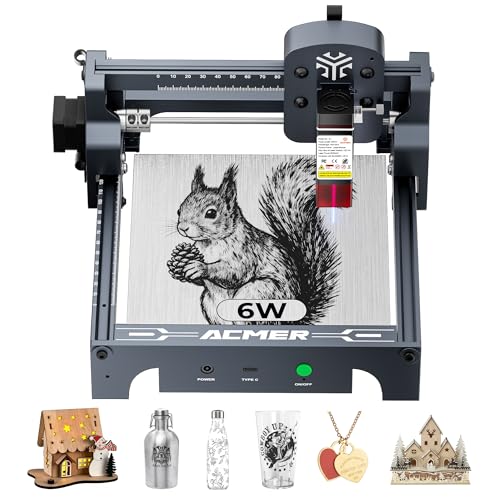
ACMER S1 Laser Engraver 6000mW

Twotrees TTS-55 Pro Laser Engraver 5500mW

LUNYEE 3018 PRO MAX CNC Router 500W

xTool S1 40W Laser Cutter Rotary Bundle

LONGER Ray5 Laser Engraver 40W 385×385mm

ACMER S1 Laser Engraver 2500mW
ACMER S1 Laser Engraver 2500mW

FoxAlien Masuter 3S CNC Router 400W
More Details On Our Top Picks
This is the tool you reach for when a project calls for quick trims rather than precision machining. Its 4V rechargeable motor drives two rotary blades through cardboard, fabric, thin carpet, leather, and plastic sheet up to about a quarter inch thick. Anyone who unboxes shipments daily or preps craft materials in batches will feel the difference in their hands within an afternoon.
The safety lock matters more than it sounds. In a busy home studio or a dim garage corner, accidental starts are a real annoyance, and the built-in LED light helps you see your cut line after hours.
Strong Points
- Cuts roughly ten times faster than manual scissors on thin stock, which adds up fast during bulk prep sessions
- USB recharging means no disposable batteries piling up in a drawer
- Ergonomic grip reduces hand fatigue during longer trimming runs
- Handles a wide material range from vinyl to leather scraps
Things To Consider
- Rotary blades need occasional cleaning of adhesive and fiber buildup to keep cuts clean
- Quarter-inch thickness ceiling rules out dense acrylic sheet work
Who It Suits Best
Casual crafters, resellers breaking down boxes, and anyone who wants a low-effort cutter for soft and thin materials.
Where A Sibling Pick Shines
For actual acrylic sheet cutting, the ACMER S1 Laser Engraver 6000mW is the better match since lasers handle rigid plastic far more cleanly than rotary blades.
Where the R RUCKERCO scissors brute-force their way through material, the Brother ScanNCut takes a measured, almost surgical approach. A built-in scanner reads your material, and the Auto Blade sensor detects thickness automatically, adjusting pressure without manual dialing. Felt and foam up to 3mm come out with clean edges and no fraying, which scrapbookers and quilters will appreciate immediately.
The onboard design library gives you hundreds of patterns to start from, so you can cut something useful before learning any design software. That lowers the barrier for people who find computer-based crafting intimidating.
What We Like
- Automatic blade-thickness sensing removes trial-and-error setup for mixed-material projects
- Extensive built-in pattern library keeps beginners productive on day one
- Scan-to-cut workflow lets you turn hand drawings into repeatable cuts
Minor Gripes
- Blade mats are consumables and need periodic replacement, a running cost some owners underestimate
- Not designed for rigid acrylic sheet; it excels with softer craft media instead
Made For
Paper crafters, quilters, and teachers who want dependable die-cutting without climbing a software learning curve.
Consider Something Else When
Rigid plastic and acrylic sign work calls for the LONGER Ray5 Laser Engraver 40W, which burns through sheet stock this machine cannot touch.
This is where real acrylic capability begins on this list. The 6000mW diode laser pairs with a 24W machine output and an ultra-fine 0.04mm laser spot, which is what lets it etch crisp lettering and cut thin acrylic sheet without the melted, fuzzy edges cheaper modules leave behind. Desk-sized and beginner-friendly, it fits a spare corner rather than demanding a workshop bench.
Software is often the hidden hurdle with budget lasers, and ACMER sidesteps it by including its own AcmerStudio program at no extra cost, ready out of the box. Support for other popular engraving platforms is there too, so you aren’t locked in.
Highlights
- 0.04mm spot size produces sharp detail on small tags, coasters, and jewelry blanks
- Included free software removes the usual first-week setup frustration
- Compact footprint suits apartments and shared craft rooms
- Handles wood alongside acrylic, doubling its usefulness
Small Caveats
- Diode lasers cut clear acrylic poorly; dark or tinted sheet works best, a limitation worth knowing upfront
- Ventilation is essential since engraving produces fumes in enclosed rooms
Quick Facts
Right Fit For
Hobbyists making personalized gifts and small-batch products who want laser precision at an entry price.
Swap It Out When
Production-scale work on large sheets points toward the xTool S1 40W Laser Cutter Rotary Bundle instead.
Compared with the ACMER S1 6000mW just above, the Twotrees trades a little raw wattage for upgrade headroom. Its 5500mW Class II laser ships with a metal air-assist nozzle already fitted, and air assist, which blows a stream of air at the cut point to clear smoke and debris, is the single biggest factor in getting cleaner, deeper cuts from a diode machine. That nozzle makes adding a proper air pump straightforward later.
An aluminum and plastic frame keeps weight down while staying rigid enough for consistent engraving passes. The included red laser shield helps you align jobs safely before committing to a run.
Plus Points
- Air-assist-ready nozzle future-proofs the machine for better cut quality
- Red laser shield simplifies safe positioning before each job
- Lightweight build is easy to move between desk and storage shelf
Points To Note
- You may find the 5500mW module slower on thicker stock than the 6W alternatives here
- Assembly and belt tensioning take patience on first setup, per common owner reports
Who Will Love This
Tinkerers who enjoy upgrading their gear over time and want a platform that grows with their skills.
Another Choice May Suit
Anyone wanting plug-and-play simplicity with no add-ons should look at the ACMER S1 Laser Engraver 2500mW, which prioritizes ease over expandability.
A CNC router works differently from every laser here: a spinning bit physically mills the material, which means it can carve deep profiles and pockets in acrylic, not just cut through it. The LUNYEE’s 500W spindle has enough torque for dense materials, and the all-metal frame plus limit switches and an emergency-stop button give it a workshop-grade feel that plastic-framed rivals lack.
The 300 x 180 x 80mm working area handles sign blanks and small panels comfortably. GRBL offline control means you can run jobs from a connected controller without keeping a laptop tethered nearby, handy in a dusty garage.
Bright Spots
- 500W spindle maintains consistent cutting through tough stock
- Emergency stop and limit switches add a layer of operational control
- Offline GRBL operation frees your computer during long runs
- 80mm Z clearance accommodates thicker acrylic blocks
Softer Spots
- Expect noise and chips; this is a garage or basement tool, not a living-room one
- Learning CAM software takes longer than laser workflows, based on widely reported user experience
Details At A Glance
Whose Shelf It Belongs On
Garage workshop owners comfortable with milling basics who want to carve, not just slice, acrylic and wood.
Reach For A Different Pick When
Desk-bound users wanting quiet, fume-free detail work will prefer the Brother SDX125EGY ScanNCut Cutting Machine Grey.
Step up from the LONGER Ray5 and the difference is scale. The xTool S1 carries a 40W laser on a generous 23.93 x 15.16 inch bed, big enough for door signs or batch runs like a hundred-plus dog tags in one session. Engraving speeds reach 600mm/s, which turns production days into production hours.
The bundled rotary attachment is the headline for tumbler makers: it rotates cylindrical drinkware under the beam so you can engrave curved surfaces, something flat-bed-only machines simply can’t do. Sellers building a product line around customized cups will find this bundle covers their core workflow.
Reasons To Buy
- Large bed fits oversized projects and high-volume batch work
- 600mm/s speed shortens job times dramatically on production runs
- Rotary bundle enables curved-surface engraving on tumblers and bottles
- 40W output slices thick wood in single passes
Worth Noting
- Footprint and power draw demand a dedicated space, not a shared desk
- Higher-tier pricing puts it beyond casual hobby budgets
Who Should Grab It
Side-hustle sellers and small studios producing engraved goods at volume who’ve outgrown desktop diode machines.
Look Elsewhere When
Beginners testing the waters should start with the Twotrees TTS-55 Pro Laser Engraver 5500mW before committing to this tier.
The Ray5 sits between the entry diodes and the xTool S1 in both price and ambition. Its 40W module uses dual-beam technology, combining laser sources to cut up to 30mm black acrylic, 20mm wood, and even thin stainless steel in a single pass. For anyone whose projects live in thick dark acrylic, that depth rating is the whole story.
A 32-bit mainboard keeps motion smooth at speed, and the 385 x 385mm bed offers meaningful room without claiming an entire table. In our view, this is the sweet spot for makers who’ve confirmed they love laser work and want serious capability without the flagship price.
Standout Traits
- Cuts 30mm black acrylic in one pass, well past typical diode limits
- Dual-beam design boosts effective cutting power efficiently
- 32-bit mainboard delivers steady, precise movement
- Steel-sheet capability widens your material options
Honest Caveats
- Clear acrylic still reflects most diode light, so material choice stays important
- High-power modules demand strict eye protection and ventilation habits
Core Details
Who It Suits Best
Intermediate makers cutting thick dark acrylic regularly who want flagship-class depth at a mid-tier cost.
Not Your Match When
Light-duty users doing occasional thin-sheet engraving save money with the ACMER S1 Laser Engraver 6000mW.
Think of this as the gentlest possible introduction to laser cutting. The 2500mW diode won’t slice thick sheet, but it engraves wood, coated metals, and dark acrylic surfaces with surprising neatness, backed by the same 24W machine output and free AcmerStudio software as its pricier sibling above. Nothing about the workflow intimidates a first-timer.
The honest read is that this is a stepping-stone purchase. You’ll learn alignment, focus, file prep, and ventilation habits on forgiving projects, then decide whether to invest in more power later.
Positives
- Lowest-commitment way to learn laser workflows without a big spend
- Same friendly software ecosystem as the higher-power ACMER models
- Compact enough to store in a closet between sessions
Trade Offs
- Engraving only on most materials; through-cutting acrylic is largely off the menu
- Slower job times than the 6W version on equivalent designs
Who Will Love This
Complete beginners and gift-makers experimenting with personalization who want minimal risk.
Where Another Pick Suits Better
Once you know you’re committed, the ACMER S1 Laser Engraver 6000mW delivers four times the module power for genuinely useful cutting.
This listing shares its DNA with the previous ACMER S1 2500mW, same 24W machine output, same free AcmerStudio software, same beginner-friendly footprint. The distinction worth noting is the ultra-fine 0.04mm laser spot carried over from the 6W variant, which sharpens fine-line engraving noticeably on small items like keychains and name plates.
Between the two 2.5W listings, your choice comes down to availability and current listing terms rather than hardware. Either serves the same learner profile well, and both benefit from the same care routine: keep the lens clean and the rails dusted.
Upsides
- 0.04mm spot renders tiny text and logos crisply
- Ready-to-use software keeps the first session frustration-light
- Quiet operation suits apartment crafting
Areas To Watch
- Limited cutting depth means most acrylic work stays surface-level
- Diode modules gradually lose output over years of heavy use, a commonly reported trait
Whose Shelf It Belongs On
Detail-oriented hobbyists focused on engraving quality over cutting depth, especially in small spaces.
Skip It When
Through-cutting thick sheet is the goal; the LONGER Ray5 Laser Engraver 40W 385×385mm handles that job properly.
Next to the LUNYEE 3018 PRO MAX, the Masuter 3S plays the refinement card. Its NEMA 23 closed-loop stepper motors, motors that verify position feedback to eliminate step-loss, deliver 2.2 Nm of torque and rapid moves up to 10,000mm/min. Translation: fewer ruined parts from missed steps, faster cycle times, and confidence pushing feed rates on aluminum as well as acrylic.
Built-in support for a fourth-axis rotary attachment opens 360-degree cylindrical carving, a capability most machines at this price ignore entirely. Ambitious makers will see where this leads.
Best Bits
- Closed-loop motors prevent lost steps on long, aggressive cuts
- 10,000mm/min rapids trim meaningful time off every job
- Fourth-axis readiness enables full cylindrical carving
- Handles wood, acrylic, and aluminum in one chassis
Small Caveats
- Setup and tramming reward prior CNC familiarity; total novices face a curve
- Chip extraction and lubrication become part of your routine ownership chores
Feature Snapshot
The Right Fit
Experienced CNC users and ambitious intermediates who want pro-level accuracy and expansion paths in a benchtop package.
Swap It Out When
First-time router buyers seeking a simpler, gentler start will be happier with the LUNYEE 3018 PRO MAX CNC Router 500W.
What Matters Most Before Choosing Acrylic Cutting Machines
Match The Tool To Your Material Thickness
Thin acrylic sheets under 3mm respond well to diode lasers and even sharp rotary tools. Thicker stock, anything approaching half an inch, really needs a 40W-class laser or a CNC router with adequate spindle power. Buying underpowered for your material is the most common regret in this category.
Count Your Workspace Honestly
Lasers need ventilation and eye protection; routers need noise tolerance and chip cleanup. Measure your available surface before falling for a large-bed machine, because a cramped setup undermines even great hardware.
Factor In The Learning Curve
Handheld cutters work within minutes. Lasers require software, focus calibration, and material testing. CNC routers add CAM toolpaths and bit selection. Choose the complexity level matching the time you’ll actually invest.
Budget For Consumables
Blades, mats, lenses, bits, and air-assist pumps all wear out. A machine’s true cost includes what it consumes monthly, not just its sticker figure.
Key Considerations Across These Picks
Traps First Timers Fall Into
The biggest mistake is buying for the project you dream about rather than the one on your desk this month. A second trap: ignoring that clear acrylic reflects diode laser light, leaving many new owners puzzled by shallow engraving. Dark or tinted sheet solves it cheaply.
What Separates Premium From Basic
Higher-tier machines buy closed-loop accuracy, larger beds, faster speeds, and bundled accessories like rotary attachments. Paying up makes sense once volume or material thickness demands it; until then, entry models teach the same fundamentals.
Frequently Asked Questions
Can a diode laser cut clear acrylic?
Generally no, because clear acrylic transmits the laser wavelength instead of absorbing it. Dark or tinted acrylic engraves and cuts reliably.
Are laser engravers safe indoors?
Yes, with ventilation and proper eyewear rated for your laser wavelength. Never run one unattended.
Do CNC routers cut acrylic cleanly?
They do, especially with single-flute bits and correct feed rates, leaving polished edges ready for flame finishing.
How thick can electric scissors cut?
The R RUCKERCO model handles material up to roughly a quarter inch, best suited to soft and flexible stock.
Is a rotary attachment necessary?
Only for cylindrical items like tumblers and bottles. Flat-work users can skip it entirely.
Closing Remarks
There’s no single right answer here, only the right fit for your materials, space, and ambitions. Start honest about what you’ll actually make, and the list above sorts itself quickly. Whichever machine you choose, give yourself a few practice projects before judging it, and let your skills grow into the tool rather than the other way around.